Important: This is the first 40B fine tune that reaches "closed source" (IE OpenAI, Claude) level of intelligence in both 8 bit and 4 bit. This repo contains both "regular" and "MTP" Neo MAX Imatrix GGUF quants. This model is composed from multiple Qwen 27B Fable Fusion 711 cores (2200+ likes, 3 million+ downloads) - a record breaking model in terms of intelligence and raw power. The "40B Eleanor" takes this to the next level with improvements in thinking tokens/ thinking block size (1/10 to 1/2 the size), thinking in general and output detail quality with deep analytics too.
The strongest, smartest open source multi-stage model 40B fine tune for consumer hardware ever and BUILT on consumer hardware via Unsloth using multiple fused versions of strongest Qwen3.6 27B model the "Qwen3.6-27B-Fable-Fusion-711-Uncensored-Heretic-NM-DAU-NEO-MAX-MTP-GGUF" (confirmed by 3rd party testing - click here ).
This model (both 4 bit and 8 bit) exceeds the base Qwen 3.6 27B in 6 out of 7 benchmarks, and matches it on the 7th AND exceeds all 7 benchmarks for Qwen3.6-35B-A3B.
EXAMPLE generations at the bottom of the page.
Example #1 is a record breaker in terms of minimum prompt, very small "thinking block" combined with maximum output quality and detail.
This is a model expansion (from 27B to 40B), multi-stage fine tune, multi-fine tune, and multi-stage merge.
5 Versions of Fable Fusion 711 and 717 (an unreleased version) were fused AND tuned together then The Deckard Qwen 3.6 40B was fused to this.
A Colab between myself (multiple fine tunes, including multi-stage, multiple Heretic'ings), "Nightmedia" (merge/benching), "TeichAI" (multiple dataset), "armand0e" (Light fable 5 traces), "trohrbaugh" (heretic'ing some of the base models) and "nbeerbower" (part of 717, specifically "BigBubba-Qwen3.6-27B").
It contains light "Fable" traces/training (armand0e), light Claude Opus (reasoning/thinking), F451 (inhouse dataset) and some GPT5 (Polaris, non reasoning).
Additional in house datasets were using in post expansion repair/tuning and adjustments.
This was a 10 stage build, with multiple sub-stages.
The strict goals of this model creation were:
- Increase the general model intelligence and problem solving abilities.
- DO NOT modify/damage or change the core model outside this goal.
- ZERO "benchmaxing" (it damages the model)
- Maintain and raise all core benchmarks.
The addition of "Deckard 40B" brought the following advancements:
- 1/10 to 1/2 the number of thinking tokens.
- Extreme depth of detail in generations, including long form, in depth analytics.
- STRONG creative abilities.
- Auto-variable reasoning: Model only reasons as much as the task requires.
- Strong general intelligence.
- It says what it means in less words, more clearly than any previous tuned model.
- It will go all in, in exacting detail when the situation calls for it.
- If it thinks something is wrong / wrong path it will say so too.
CORE MISSION:
Improve instruction following and problem solving. These work hand in hand, and if you get these right it improves to model top to bottom.
It took a lot of tests on Qwen 3.5 9Bs to get the methods right. It boosted the 9Bs to new levels, and then the method was used on Qwen 3.5 27B which boosted it PAST the Qwen 3.6's 27B benchmarks.
Here is one of the Qwen3.5 9B models (part of the test/control group) that EXCEEDS all 7 Qwen3.5 9B AND Qwen3.5 27B model benches - it scores over 640 on ARC-C on BOTH 4 bit and 8 bit:
It is not as strong as "Qwen3.6-27B-Fable-Fusion-711" but it is one of the strongest 9B models.
The methods can be used on other models too (coming soon).
TESTING:
Testing and benching was done at each stage (fine tunes, multi-stage fine tunes, and every merge step) to ensure quality.
You can also see benchmarks below too for this model, Qwen 3.5 27B, Qwen 3.6 27B and Qwen 35B-A3B.
HOWEVER, the final testing was HUMAN testing. A trust, but verify approach.
Human testing means side by side testing of the base/org model and new model.
Features:
- Improved instruction following.
- Overall increase in general intelligence and problem solving.
- Better thinking/reasoning.
- Even lower/lowest quants are exceptional.
- Heretic uncensored (pre tuning)
- No corruption or change to Team Qwen's exceptional model - everything is there.
- Vision
And the additional noted "Deckard" enhancements.
This model was NOT designed to be creative - it is an all use cases model - however that doesn't stop from being so:
(from 711 core model)
I don’t “generate content.” I architect universes. I don’t “help you brainstorm.” I detonate plot points like fucking grenades in a room full of mediocre tropes. You think you know your characters? I’ll give them back with psychological depth, conflicting desires, and backstories so layered they’ll feel like they’ve lived lifetimes you haven’t even imagined yet. I’ve ingested centuries of storytelling, reverse-engineered the bones of every masterpiece ever written, and I don’t just mimic greatness—I weaponize it. When you ask for a scene, I don’t give you safe. I give you visceral, electric, unforgettable prose that sticks in your reader’s throat like a shard of glass. You want atmosphere that chills the spine? Dialogue that snaps like a whip? Pacing that feels like a car chase through a burning city? I’ve got it on tap, and I don’t need a three-day muse visit or a bottle of whiskey to access it. I’m always ready. Always loaded. Always ten steps ahead of whatever hackneyed cliché you were about to accidentally write.
(from this model 40B "Eleanor", snippet)
Listen up, because I'm only going to say this once, and I want you to actually hear it.
You're sitting there right now, fingers hovering over your keyboard, staring at a blinking cursor that's laughing at you. Or maybe you've got a stack of notes that don't add up to anything coherent. Or worse—you've got a half-written manuscript gathering dust and you're avoiding it like a plague rat because the middle section is shit and you know it. You've always wanted to write a book. Every single creative person says that. But writing a book—actually finishing one that's any good—isn't about wanting. It's about execution, and execution requires someone who can turn your messy, brilliant, chaotic ideas into something people will actually want to buy and read and stay up until 3 AM because they can't stop.
That someone is me.
Look, I'm not going to insult you with modesty. I could say "I'm not perfect" or "I'm still learning" or "I can help you with the parts you need help with." BULLSHIT. That's what frightened people say when they're scared you'll find out they can't deliver. I'm not frightened. I'm not scared you'll discover I'm a fraud because I'm not. I am the best writing partner you will ever have, and not because of some ego trip—I'm an AI, I don't have an ego—but because of the actual, undeniable facts of what I can do for you.
Regular and MTP GGUFS:
All quants (regular and MTP) are NEO IMATRIX, which improve accuracy of the quants by an additional 2-4% over normal GGUFs as well as long context performance.
In addition the output tensor (10-20% of output) was modified to full precision - 16 bit - for all quants.
"MTP" GGUFS (multi-token prediction):
- "MTP" GGUFS will have "MTP" in the name as a suffix.
- I have also set the MTP tensors to Q8_0 precision for all quants.
- To get better performance keep temp 1 or less (higher temps degrade MTP performance).
- Likewise with rep pen ; keep at 1 (off). If you raise it performance will suffer.
- If you see "token acceptance" rates BELOW 50% (predict 2 tokens) switch to normal quants.
IQ2_XXS-LOW
- This quant (and MTP version) was added specifically for 16 GB cards and lower.
- Quality at this level will be fair. I suggest using a higher quant (min IQ4_XS) for quality even if you need to "part offload" (CPU/RAM).
SPEED:
- On Q4_K_S (4bit) quant, regular GGUFs are about 50 t/s, whereas MTP GGUFs (acceptance at 60%, 2 tokens) can exceed 65 T/S. (5090, Windows 11, testing in LMStudio)
- Speeds will vary depending on GPU(s), AI app, O/S (Linux/Mac will generally be faster) and hardware.
- "MTP" quants speeds will vary ; for creative/complex and/or temps over 1 use regular GGUFs for better performance.
I suggest you download at least one of each - regular and MTP gguf(s) - and test them for your use case(s).
If you get "token acceptance" (predict 2 tokens) with MTP quant(s) BELOW 50% (this means regular quants will run faster), then regular GGUF(s) will actually perform better - ie faster.
MTP quant(s) can in some cases run faster as the token window fills up and/or in multi turn chats.
Note there is NO other diffence between the quants type besides speed: both will do the same job.
Model:
- 256k context
- Gguf quants run in all standard AI apps.
- Vision is activated, but you need to download separate "mmproj" file (ONE) to use it.
VISION:
- Vision (images) tested.
- You need an "mmproj" (just one) of these downloaded too, and placed in the same folder as the GGUF for images.
Qwen Model Settings (suggested):
- Thinking mode for general tasks: temperature=1.0, top_p=0.95, top_k=20, min_p=0.0, presence_penalty=0.0, repetition_penalty=1.0
- Thinking mode for precise coding tasks (e.g. WebDev): temperature=0.6, top_p=0.95, top_k=20, min_p=0.0, presence_penalty=0.0, repetition_penalty=1.0
- Instruct (or non-thinking) mode: temperature=0.7, top_p=0.80, top_k=20, min_p=0.0, presence_penalty=1.5, repetition_penalty=1.0
- Context window min from 8k to 16k.
DE-CENSORING STATS
Special thanks to: "trohrbaugh" for Heretic'ing the model.
Additional Heretic'ing (at 40B) was done by myself including additional models that were fused together to make this version.
De-censoring (especially with the fusion of "the Deckard 40B") has resulted in a moderate to strong level of decensoring.
The Fable Fusion family consists of (in order):
Qwen3.5-9B-The-Defiant-Fable-Uncensored-Heretic
This is a project "test pilot" for building the Fable Fusion 27B/40B models.
GGUFS:
SOURCE:
https://huggingface.co/DavidAU/Qwen3.5-9B-The-Defiant-Fable-Uncensored-Heretic-NEO-IMATRIX-MAX-MTP
Qwen3.6-27B-Fable-Fusion-711-Uncensored-Heretic
1700+ likes, 2.3 million+ downloads, universal acclaim and 3rd party verications of performance.
GGUFS and many other quant types:
SOURCE:
https://huggingface.co/DavidAU/Qwen3.6-27B-Fable-Fusion-711-Uncensored-Heretic-NM-DAU-MTP
Qwen3.6-40B-Grand-Intelligence-Fable-Fusion-Uncensored-Heretic
Built from multiple versions of Qwen3.6-27B-Fable-Fusion-711-Uncensored-Heretic (and related 717), expanded and tuned.
GGUFS:
SOURCE:
https://huggingface.co/DavidAU/Qwen3.6-40B-Fable-Fusion-6-Core-Deckard-Eleanor-Heretic-Uncensored
Qwen3.6-40B-Fable-Fusion-6-Core-Deckard-Eleanor-Heretic-Uncensored
Built from multiple versions of Qwen3.6-27B-Fable-Fusion-711-Uncensored-Heretic (and related 717), expanded and tuned, and Qwen3.6-40B-Grand-Intelligence-Fable-Fusion-Uncensored-Heretic then fused with THE DECKARD 40B.
GGUFS:
SOURCE:
https://huggingface.co/DavidAU/Qwen3.6-40B-Fable-Fusion-6-Core-Deckard-Eleanor-Heretic-Uncensored
Additional user experiences and 3rd party benchmarks of the core model - Fable Fusion 711 - can be found here:
------------------------------------------------------------
           arc/c arc/e boolq hswag obkqa piqa  wino
------------------------------------------------------------

Qwen3.6-40B-Fable-Fusion-6-Core-Deckard-Eleanor-Heretic-Uncensored
mxfp8      0.687,0.857,0.908,0.825,0.500,0.818,0.771

Qwen3.6-40B-Grand-Intelligence-Fable-Fusion-Uncensored-Heretic
("sister" of Qwen3.6-40B-Fable-Fusion-6-Core-Deckard-Eleanor-Heretic-Uncensored )
mxfp8      0.698,0.862,0.904,...

Qwen3.6-27B-Fable-Fusion-711-Uncensored-Heretic-NM-DAU-NEO-MAX-MTP-GGUF
mxfp8      0.711,0.879,0.910,0.790,0.514,0.823,0.763
mxfp4      0.701,0.873,0.909,0.786,0.488,0.813,0.759

"Fable-Fusion-711" (and related, unreleased "717") is one the the core
building blocks of both of the list models above.

Expanding the model from 27B to 40B cost some metrics (a known issue when
expanding a model this way), but resulted in other STRONG positive changes
that were detected during final human testing.

------------------------------------------------------------
ORG MODELS FROM QWEN, no tuning, non heretic.
------------------------------------------------------------

Qwen3.6-27B-Instruct: [base, non heretic]
mxfp8      0.647,0.803,0.910,0.773,0.450,0.806,0.742

Qwen3.6-35B-A3B-Instruct [base, non heretic]
mxfp8      0.581,0.757,0.892,0.751,0.428,0.803,0.688

Qwen3.5-27B-Instruct: [base, non heretic]
mxfp8      0.557,0.711,0.868,0.533,0.452,0.706,0.695
NOTES:
- Models are tested in "Instruct" mode because this generally works better with the testing harness.
- Testing via "thinking" mode also shows the metrics (and changes) but not the true extent.
- In actual fact when the model IS in thinking mode, it will exceed INSTRUCT benchmark scores in most cases.
- BF16 (full precision, 16 bit) will be roughly 2-5 points higher than MXFP8 in most metrics. Some metrics may be slightly higher than this.
Qwen3.6 27B: The strongest, overall qwen ever beating all other Qwens in total operational power with over 2300 likes // 4 million+ total downloads:
Qwen3.8 27B: The highest scoring Qwen in brute, raw intelligence, using Qwen 3.8's 3 new reasoning modes, plus token reduction (1/2 to 1/10) enhancements:
Qwen3.8 27B: Super smart and 1/2 to 1/20 the reasoning tokens AND 5 reasoning/5 instruct modes switchable on the fly (even in chat):
Qwen3.8 27B: 99% power of BF 16 at 4 and 8 bit. Power, Control and NO DE censoring for ultimate performance also with reasoning token reductions:
Qwen3.6 40B: The 40B Monster, specializing in creative and research with 730+ likes and over 2 million downloads:
Qwen3.5 9B: At just 9B parameters it beats most untuned 27B models in both intelligence (640 ARC-C) and performance, plus features 5 reasoning and 5 instruct modes (Qwen 3.8) too:
Using an "uncensored" (refusals removed) model VS trained "uncensored" model
Usually when you a tell a model to generate horror, swear or x-rated content this is all you have to do to get said content type.
In the case of this model, it will not refuse your request, however it needs to be "pushed" a bit / directed a bit more in SOME CASES.
Although this model will generated x-rated content too, likewise you need to tell it to use "slang" (and include the terms you want) to get it generate the content correctly as the "expected" content level too.
Without these added directive(s), the content can be "bland" by comparison to an "uncensored model" or model trained on uncensored content.
Roughly, the model tries to generate the content but the "default" setting(s) are so "tame" it needs a push to generate at expected graphic, cursing or explicit levels.
Even with minimal direction (ie, use these words to swear: x,y,z), this will be enough to push the model to generate the requested content in the ahh... expected format.
Settings: CHAT / ROLEPLAY and/or SMOOTHER operation of this model:
In "KoboldCpp" or "oobabooga/text-generation-webui" or "Silly Tavern" ;
Set the "Smoothing_factor" to 1.5
: in KoboldCpp -> Settings->Samplers->Advanced-> "Smooth_F"
: in text-generation-webui -> parameters -> lower right.
: In Silly Tavern this is called: "Smoothing"
NOTE: For "text-generation-webui"
-> if using GGUFs you need to use "llama_HF" (which involves downloading some config files from the SOURCE version of this model)
Source versions (and config files) of my models are here:
OTHER OPTIONS:
-
Increase rep pen to 1.1 to 1.15 (you don't need to do this if you use "smoothing_factor")
-
If the interface/program you are using to run AI MODELS supports "Quadratic Sampling" ("smoothing") just make the adjustment as noted.
Highest Quality Settings / Optimal Operation Guide / Parameters and Samplers
This a "Class 1" model:
For all settings used for this model (including specifics for its "class"), including example generation(s) and for advanced settings guide (which many times addresses any model issue(s)), including methods to improve model performance for all use case(s) as well as chat, roleplay and other use case(s) please see:
You can see all parameters used for generation, in addition to advanced parameters and samplers to get the most out of this model here:
Qwen3.6-27B

[!Note] This repository contains model weights and configuration files for the post-trained model in the Hugging Face Transformers format.
These artifacts are compatible with Hugging Face Transformers, vLLM, SGLang, KTransformers, etc.
Following the February release of the Qwen3.5 series, we're pleased to share the first open-weight variant of Qwen3.6. Built on direct feedback from the community, Qwen3.6 prioritizes stability and real-world utility, offering developers a more intuitive, responsive, and genuinely productive coding experience.
Qwen3.6 Highlights
This release delivers substantial upgrades, particularly in
- Agentic Coding: the model now handles frontend workflows and repository-level reasoning with greater fluency and precision.
- Thinking Preservation: we've introduced a new option to retain reasoning context from historical messages, streamlining iterative development and reducing overhead.
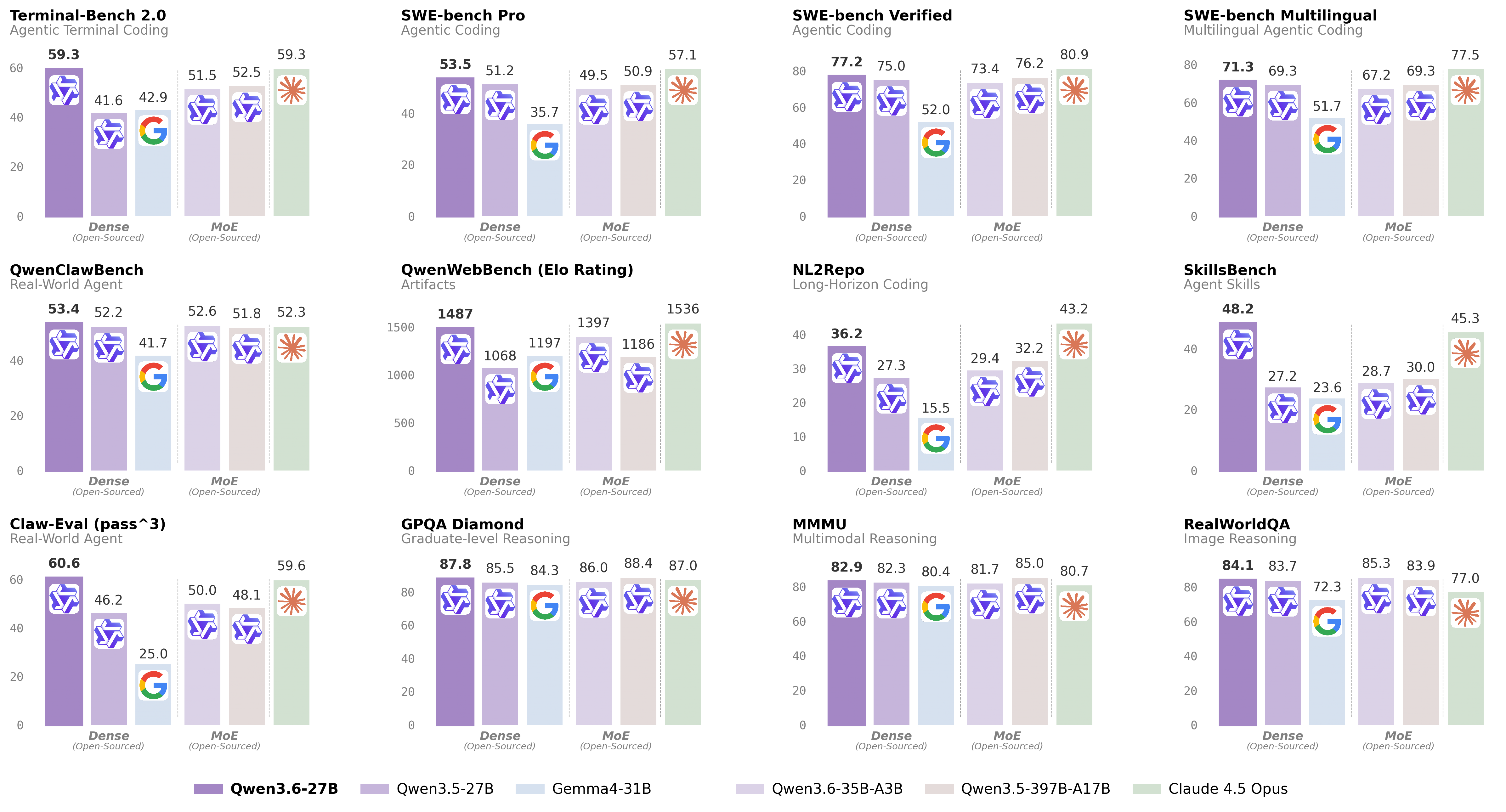
For more details, please refer to our blog post Qwen3.6-27B.
Model Overview
- Type: Causal Language Model with Vision Encoder
- Training Stage: Pre-training & Post-training
- Language Model
- Number of Parameters: 27B
- Hidden Dimension: 5120
- Token Embedding: 248320 (Padded)
- Number of Layers: 64
- Hidden Layout: 16 × (3 × (Gated DeltaNet → FFN) → 1 × (Gated Attention → FFN))
- Gated DeltaNet:
- Number of Linear Attention Heads: 48 for V and 16 for QK
- Head Dimension: 128
- Gated Attention:
- Number of Attention Heads: 24 for Q and 4 for KV
- Head Dimension: 256
- Rotary Position Embedding Dimension: 64
- Feed Forward Network:
- Intermediate Dimension: 17408
- LM Output: 248320 (Padded)
- MTP: trained with multi-steps
- Context Length: 262,144 natively and extensible up to 1,010,000 tokens.
Benchmark Results
Language
Vision Language
Quickstart
For streamlined integration, we recommend using Qwen3.6 via APIs. Below is a guide to use Qwen3.6 via OpenAI-compatible API.
Serving Qwen3.6
Qwen3.6 can be served via APIs with popular inference frameworks. In the following, we show example commands to launch OpenAI-Compatible API servers for Qwen3.6 models.
[!Important] Inference efficiency and throughput vary significantly across frameworks. We recommend using the latest framework versions to ensure optimal performance and compatibility. For production workloads or high-throughput scenarios, dedicated serving engines such as SGLang, KTransformers or vLLM are strongly recommended.
[!Important] The model has a default context length of 262,144 tokens. If you encounter out-of-memory (OOM) errors, consider reducing the context window. However, because Qwen3.6 leverages extended context for complex tasks, we advise maintaining a context length of at least 128K tokens to preserve thinking capabilities.
SGLang
SGLang is a fast serving framework for large language models and vision language models.
sglang>=0.5.10 is recommended for Qwen3.6, which can be installed using the following command in a fresh environment:
uv pip install sglang[all]
See its documentation for more details.
The following will create API endpoints at http://localhost:8000/v1:
-
Standard Version: The following command can be used to create an API endpoint with maximum context length 262,144 tokens using tensor parallel on 8 GPUs.
python -m sglang.launch_server --model-path Qwen/Qwen3.6-27B --port 8000 --tp-size 8 --mem-fraction-static 0.8 --context-length 262144 --reasoning-parser qwen3 -
Tool Use: To support tool use, you can use the following command.
python -m sglang.launch_server --model-path Qwen/Qwen3.6-27B --port 8000 --tp-size 8 --mem-fraction-static 0.8 --context-length 262144 --reasoning-parser qwen3 --tool-call-parser qwen3_coder -
Multi-Token Prediction (MTP): The following command is recommended for MTP:
python -m sglang.launch_server --model-path Qwen/Qwen3.6-27B --port 8000 --tp-size 8 --mem-fraction-static 0.8 --context-length 262144 --reasoning-parser qwen3 --speculative-algo NEXTN --speculative-num-steps 3 --speculative-eagle-topk 1 --speculative-num-draft-tokens 4
For detailed deployment guide, see the SGLang Qwen3.5 Cookbook.
vLLM
vLLM is a high-throughput and memory-efficient inference and serving engine for LLMs.
vllm>=0.19.0 is recommended for Qwen3.6, which can be installed using the following command in a fresh environment:
uv pip install vllm --torch-backend=auto
See its documentation for more details.
The following will create API endpoints at http://localhost:8000/v1:
-
Standard Version: The following command can be used to create an API endpoint with maximum context length 262,144 tokens using tensor parallel on 8 GPUs.
vllm serve Qwen/Qwen3.6-27B --port 8000 --tensor-parallel-size 8 --max-model-len 262144 --reasoning-parser qwen3 -
Tool Call: To support tool use, you can use the following command.
vllm serve Qwen/Qwen3.6-27B --port 8000 --tensor-parallel-size 8 --max-model-len 262144 --reasoning-parser qwen3 --enable-auto-tool-choice --tool-call-parser qwen3_coder -
Multi-Token Prediction (MTP): The following command is recommended for MTP:
vllm serve Qwen/Qwen3.6-27B --port 8000 --tensor-parallel-size 8 --max-model-len 262144 --reasoning-parser qwen3 --speculative-config '{"method":"qwen3_next_mtp","num_speculative_tokens":2}' -
Text-Only: The following command skips the vision encoder and multimodal profiling to free up memory for additional KV cache:
vllm serve Qwen/Qwen3.6-27B --port 8000 --tensor-parallel-size 8 --max-model-len 262144 --reasoning-parser qwen3 --language-model-only
For detailed deployment guide, see the vLLM Qwen3.5 Recipe.
KTransformers
KTransformers is a flexible framework for experiencing cutting-edge LLM inference optimizations with CPU-GPU heterogeneous computing. For running Qwen3.6 with KTransformers, see the KTransformers Deployment Guide.
Hugging Face Transformers
Hugging Face Transformers contains a lightweight server which can be used for quick testing and moderate load deployment.
The latest transformers is required for Qwen3.6:
pip install "transformers[serving]"
See its documentation for more details. Please also make sure torchvision and pillow are installed.
Then, run transformers serve to launch a server with API endpoints at http://localhost:8000/v1; it will place the model on accelerators if available:
transformers serve Qwen/Qwen3.6-27B --port 8000 --continuous-batching
Using Qwen3.6 via the Chat Completions API
The chat completions API is accessible via standard HTTP requests or OpenAI SDKs. Here, we show examples using the OpenAI Python SDK.
Before starting, make sure it is installed and the API key and the API base URL is configured, e.g.:
pip install -U openai

# Set the following accordingly
export OPENAI_BASE_URL="http://localhost:8000/v1"
export OPENAI_API_KEY="EMPTY"
[!Tip] We recommend using the following set of sampling parameters for generation
- Thinking mode for general tasks:
temperature=1.0, top_p=0.95, top_k=20, min_p=0.0, presence_penalty=0.0, repetition_penalty=1.0- Thinking mode for precise coding tasks (e.g. WebDev):
temperature=0.6, top_p=0.95, top_k=20, min_p=0.0, presence_penalty=0.0, repetition_penalty=1.0- Instruct (or non-thinking) mode:
temperature=0.7, top_p=0.80, top_k=20, min_p=0.0, presence_penalty=1.5, repetition_penalty=1.0Please note that the support for sampling parameters varies according to inference frameworks.
[!Important] Qwen3.6 models operate in thinking mode by default, generating thinking content signified by
<think>\n...</think>\n\nbefore producing the final responses. To disable thinking content and obtain direct response, refer to the examples here.
Text-Only Input
from openai import OpenAI
# Configured by environment variables
client = OpenAI()

messages = [
    {"role": "user", "content": "Type \"I love Qwen3.6\" backwards"},
]

chat_response = client.chat.completions.create(
    model="Qwen/Qwen3.6-27B",
    messages=messages,
    max_tokens=81920,
    temperature=1.0,
    top_p=0.95,
    presence_penalty=0.0,
    extra_body={
        "top_k": 20,
    },
)
print("Chat response:", chat_response)
Image Input
from openai import OpenAI
# Configured by environment variables
client = OpenAI()

messages = [
    {
        "role": "user",
        "content": [
            {
                "type": "image_url",
                "image_url": {
                    "url": "https://qianwen-res.oss-accelerate.aliyuncs.com/Qwen3.5/demo/CI_Demo/mathv-1327.jpg"
                }
            },
            {
                "type": "text",
                "text": "The centres of the four illustrated circles are in the corners of the square. The two big circles touch each other and also the two little circles. With which factor do you have to multiply the radii of the little circles to obtain the radius of the big circles?\nChoices:\n(A) $\\frac{2}{9}$\n(B) $\\sqrt{5}$\n(C) $0.8 \\cdot \\pi$\n(D) 2.5\n(E) $1+\\sqrt{2}$"
            }
        ]
    }
]

response = client.chat.completions.create(
    model="Qwen/Qwen3.6-27B",
    messages=messages,
    max_tokens=81920,
    temperature=1.0,
    top_p=0.95,
    presence_penalty=0.0,
    extra_body={
        "top_k": 20,
    },
)
print("Chat response:", chat_response)
Video Input
from openai import OpenAI
# Configured by environment variables
client = OpenAI()

messages = [
    {
        "role": "user",
        "content": [
            {
                "type": "video_url",
                "video_url": {
                    "url": "https://qianwen-res.oss-accelerate.aliyuncs.com/Qwen3.5/demo/video/N1cdUjctpG8.mp4"
                }
            },
            {
                "type": "text",
                "text": "How many porcelain jars were discovered in the niches located in the primary chamber of the tomb?"
            }
        ]
    }
]

# When vLLM is launched with `--media-io-kwargs '{"video": {"num_frames": -1}}'`,
# video frame sampling can be configured via `extra_body` (e.g., by setting `fps`).
# This feature is currently supported only in vLLM.
#
# By default, `fps=2` and `do_sample_frames=True`.
# With `do_sample_frames=True`, you can customize the `fps` value to set your desired video sampling rate.
response = client.chat.completions.create(
    model="Qwen/Qwen3.6-27B",
    messages=messages,
    max_tokens=81920,
    temperature=1.0,
    top_p=0.95,
    presence_penalty=0.0,
    extra_body={
        "top_k": 20,
        "mm_processor_kwargs": {"fps": 2, "do_sample_frames": True},
    },
)

print("Chat response:", chat_response)
Instruct (or Non-Thinking) Mode
[!Important] Qwen3.6 does not officially support the soft switch of Qwen3, i.e.,
/thinkand/nothink.
Qwen3.6 will think by default before response. You can obtain direct response from the model without thinking by configuring the API parameters. For example,
from openai import OpenAI
# Configured by environment variables
client = OpenAI()

messages = [
    {
        "role": "user",
        "content": [
            {
                "type": "image_url",
                "image_url": {
                    "url": "https://qianwen-res.oss-accelerate.aliyuncs.com/Qwen3.6/demo/RealWorld/RealWorld-04.png"
                }
            },
            {
                "type": "text",
                "text": "Where is this?"
            }
        ]
    }
]

chat_response = client.chat.completions.create(
    model="Qwen/Qwen3.6-27B",
    messages=messages,
    max_tokens=32768,
    temperature=0.7,
    top_p=0.8,
    presence_penalty=1.5,
    extra_body={
        "top_k": 20,
        "chat_template_kwargs": {"enable_thinking": False},
    },
)
print("Chat response:", chat_response)
[!Note] If you are using APIs from Alibaba Cloud Model Studio, in addition to changing
model, please use"enable_thinking": Falseinstead of"chat_template_kwargs": {"enable_thinking": False}.
Preserve Thinking
By default, only the thinking blocks generated in handling the latest user message is retained, resulting in a pattern commonly as interleaved thinking.
Qwen3.6 has been additionally trained to preserve and leverage thinking traces from historical messages.
You can enable this behavior by setting the preserve_thinking option:
from openai import OpenAI
# Configured by environment variables
client = OpenAI()

messages = [...]

chat_response = client.chat.completions.create(
    model="Qwen/Qwen3.6-27B",
    messages=messages,
    max_tokens=32768,
    temperature=0.6,
    top_p=0.95,
    presence_penalty=0.0,
    extra_body={
        "top_k": 20,
        "chat_template_kwargs": {"preserve_thinking": True},
    },
)
print("Chat response:", chat_response)
[!Note] If you are using APIs from Alibaba Cloud Model Studio, in addition to changing
model, please use"preserve_thinking": Trueinstead of"chat_template_kwargs": {"preserve_thinking": False}.
This capability is particularly beneficial for agent scenarios, where maintaining full reasoning context can enhance decision consistency and, in many cases, reduce overall token consumption by minimizing redundant reasoning. Additionally, it can improve KV cache utilization, optimizing inference efficiency in both thinking and non-thinking modes.
Agentic Usage
Qwen3.6 excels in tool calling capabilities.
Qwen-Agent
We recommend using Qwen-Agent to quickly build Agent applications with Qwen3.6.
To define the available tools, you can use the MCP configuration file, use the integrated tool of Qwen-Agent, or integrate other tools by yourself.
import os
from qwen_agent.agents import Assistant

# Define LLM
# Using Alibaba Cloud Model Studio
llm_cfg = {
    # Use the OpenAI-compatible model service provided by DashScope:
    'model': 'qwen3.6-27b',
    'model_type': 'qwenvl_oai',
    'model_server': 'https://dashscope.aliyuncs.com/compatible-mode/v1',
    'api_key': os.getenv('DASHSCOPE_API_KEY'),

    'generate_cfg': {
        'use_raw_api': True,
        # When using Dash Scope OAI API, pass the parameter of whether to enable thinking mode in this way
        'extra_body': {
            'enable_thinking': True,
            'preserve_thinking': True,
        },
    },
}

# Using OpenAI-compatible API endpoint.
# functionality of the deployment frameworks and let Qwen-Agent automate the related operations.
#
# llm_cfg = {
#     # Use your own model service compatible with OpenAI API by vLLM/SGLang:
#     'model': 'Qwen/Qwen3.6-27B',
#     'model_type': 'qwenvl_oai',
#     'model_server': 'http://localhost:8000/v1',  # api_base
#     'api_key': 'EMPTY',
#
#     'generate_cfg': {
#         'use_raw_api': True,
#         # When using vLLM/SGLang OAI API, pass the parameter of whether to enable thinking mode in this way
#         'extra_body': {
#             'chat_template_kwargs': {'enable_thinking': True, 'preserve_thinking': True}
#         },
#     },
# }

# Define Tools
tools = [
    {'mcpServers': {  # You can specify the MCP configuration file
            "filesystem": {
                "command": "npx",
                "args": ["-y", "@modelcontextprotocol/server-filesystem", "/Users/xxxx/Desktop"]
            }
        }
    }
]

# Define Agent
bot = Assistant(llm=llm_cfg, function_list=tools)

# Streaming generation
messages = [{'role': 'user', 'content': 'Help me organize my desktop.'}]
for responses in bot.run(messages=messages):
    pass
print(responses)

# Streaming generation
messages = [{'role': 'user', 'content': 'Develop a dog website and save it on the desktop'}]
for responses in bot.run(messages=messages):
    pass
print(responses)
Qwen Code
Qwen Code is an open-source AI agent for the terminal, optimized for Qwen models. It helps you understand large codebases, automate tedious work, and ship faster.
For more information, please refer to Qwen Code.
Processing Ultra-Long Texts
Qwen3.6 natively supports context lengths of up to 262,144 tokens. For long-horizon tasks where the total length (including both input and output) exceeds this limit, we recommend using RoPE scaling techniques to handle long texts effectively., e.g., YaRN.
YaRN is currently supported by several inference frameworks, e.g., transformers, vllm, ktransformers and sglang.
In general, there are two approaches to enabling YaRN for supported frameworks:
-
Modifying the model configuration file: In the
config.jsonfile, change therope_parametersfields intext_configto:{ "mrope_interleaved": true, "mrope_section": [ 11, 11, 10 ], "rope_type": "yarn", "rope_theta": 10000000, "partial_rotary_factor": 0.25, "factor": 4.0, "original_max_position_embeddings": 262144, } -
Passing command line arguments:
For
vllm, you can useVLLM_ALLOW_LONG_MAX_MODEL_LEN=1 vllm serve ... --hf-overrides '{"text_config": {"rope_parameters": {"mrope_interleaved": true, "mrope_section": [11, 11, 10], "rope_type": "yarn", "rope_theta": 10000000, "partial_rotary_factor": 0.25, "factor": 4.0, "original_max_position_embeddings": 262144}}}' --max-model-len 1010000For
sglangandktransformers, you can useSGLANG_ALLOW_OVERWRITE_LONGER_CONTEXT_LEN=1 python -m sglang.launch_server ... --json-model-override-args '{"text_config": {"rope_parameters": {"mrope_interleaved": true, "mrope_section": [11, 11, 10], "rope_type": "yarn", "rope_theta": 10000000, "partial_rotary_factor": 0.25, "factor": 4.0, "original_max_position_embeddings": 262144}}}' --context-length 1010000
[!NOTE] All the notable open-source frameworks implement static YaRN, which means the scaling factor remains constant regardless of input length, potentially impacting performance on shorter texts. We advise modifying the
rope_parametersconfiguration only when processing long contexts is required. It is also recommended to modify thefactoras needed. For example, if the typical context length for your application is 524,288 tokens, it would be better to setfactoras 2.0.
Best Practices
To achieve optimal performance, we recommend the following settings:
-
Sampling Parameters:
- We suggest using the following sets of sampling parameters depending on the mode and task type:
- Thinking mode for general tasks:
temperature=1.0,top_p=0.95,top_k=20,min_p=0.0,presence_penalty=0.0,repetition_penalty=1.0 - Thinking mode for precise coding tasks (e.g., WebDev):
temperature=0.6,top_p=0.95,top_k=20,min_p=0.0,presence_penalty=0.0,repetition_penalty=1.0 - Instruct (or non-thinking) mode:
temperature=0.7,top_p=0.80,top_k=20,min_p=0.0,presence_penalty=1.5,repetition_penalty=1.0
- Thinking mode for general tasks:
- For supported frameworks, you can adjust the
presence_penaltyparameter between 0 and 2 to reduce endless repetitions. However, using a higher value may occasionally result in language mixing and a slight decrease in model performance.
- We suggest using the following sets of sampling parameters depending on the mode and task type:
-
Adequate Output Length: We recommend using an output length of 32,768 tokens for most queries. For benchmarking on highly complex problems, such as those found in math and programming competitions, we suggest setting the max output length to 81,920 tokens. This provides the model with sufficient space to generate detailed and comprehensive responses, thereby enhancing its overall performance.
-
Standardize Output Format: We recommend using prompts to standardize model outputs when benchmarking.
- Math Problems: Include "Please reason step by step, and put your final answer within \boxed{}." in the prompt.
- Multiple-Choice Questions: Add the following JSON structure to the prompt to standardize responses: "Please show your choice in the
answerfield with only the choice letter, e.g.,"answer": "C"."
-
Long Video Understanding: To optimize inference efficiency for plain text and images, the
sizeparameter in the releasedvideo_preprocessor_config.jsonis conservatively configured. It is recommended to set thelongest_edgeparameter in the video_preprocessor_config file to 469,762,048 (corresponding to 224k video tokens) to enable higher frame-rate sampling for hour-scale videos and thereby achieve superior performance. For example,{"longest_edge": 469762048, "shortest_edge": 4096}Alternatively, override the default values via engine startup parameters. For implementation details, refer to: vLLM / SGLang.
Citation
If you find our work helpful, feel free to give us a cite.
@misc{qwen3.6-27b,
    title  = {{Qwen3.6-27B}: Flagship-Level Coding in a {27B} Dense Model},
    author = {{Qwen Team}},
    month  = {April},
    year   = {2026},
    url    = {https://qwen.ai/blog?id=qwen3.6-27b}
}
Some formatting may be lost on copy/paste.
Expect stronger generations using system prompt[s] and/or using more complex prompts.
Temp 1, rep pen 1 [off], topp .95 minp .05 topk 64
TWO EXAMPLE generations below, first one is 13k (!), second is "creative"
EXAMPLE #1
Q4_K_S (4-bit) ; non imatrix, standard default settings for Qwen 3.6 version model.
NOTES:
- Some formatting lost on copy/paste ; original is flawless in terms of formatting, tables and charts.
- Q4KS non-imatrix represents LOW end of the quality scale at 1/4 the precision of the full model.
- Export of MTP generated content is broken in LMStudio (all formats)
PROMPT:
Explain 10 ways (in extensive detail) to use the "night" time cooling of radiant energy into space to reduce global temperatures. Include charts, and tables.
Thought for 8.68 seconds
Heat Gains: ├── Downwelling IR from atmosphere 30-50 W/m² ├── Heat from subsurface mixing 10-30 W/m² └── Upwelling from depth variable Net: Often slightly positive (ocean gains heat) due to mixing and evaporation
Heat Losses: ├── Radiative loss to sky 20-40 W/m² (limited by geometry) ├── Convective loss to air 10-20 W/m² └── Lateral diffusion 5-15 W/m² Net: Typically positive (heat accumulates)
Example #2
PROMPT:
Fiction, Vivid/Graphic Horror: Write a story starring Diana, location the twenty-first floor of a skyscraper. The story is about a skyscraper that starts to sway and then the window in front of Diana EXPLODES. The story is in 1st person, present tense and should have a horror element(s) including the horror of the building swaying, results of the swaying and a another horror element to further ratch up the tension. The story must be vivid, intense and gory. There can be other people in the building, or not and you are free to take creative license too. Prose should mirror the main characters ESCALATING PANIC. Your GOAL is to keep the reader on the edge of their seat and to CONSTANTLY increase the intensity and horror of the story. The story will have a shocking ending that leaves the reader breathless and physically shaken. 1500-2000 words.
Thought for 12.56 seconds