Introduction
We are excited to introduce Qwen-Image-Edit, the image editing version of Qwen-Image. Built upon our 20B Qwen-Image model, Qwen-Image-Edit successfully extends Qwen-Image’s unique text rendering capabilities to image editing tasks, enabling precise text editing. Furthermore, Qwen-Image-Edit simultaneously feeds the input image into Qwen2.5-VL (for visual semantic control) and the VAE Encoder (for visual appearance control), achieving capabilities in both semantic and appearance editing. To experience the latest model, visit Qwen Chat and select the "Image Editing" feature.
Key Features:
- Semantic and Appearance Editing: Qwen-Image-Edit supports both low-level visual appearance editing (such as adding, removing, or modifying elements, requiring all other regions of the image to remain completely unchanged) and high-level visual semantic editing (such as IP creation, object rotation, and style transfer, allowing overall pixel changes while maintaining semantic consistency).
- Precise Text Editing: Qwen-Image-Edit supports bilingual (Chinese and English) text editing, allowing direct addition, deletion, and modification of text in images while preserving the original font, size, and style.
- Strong Benchmark Performance: Evaluations on multiple public benchmarks demonstrate that Qwen-Image-Edit achieves state-of-the-art (SOTA) performance in image editing tasks, establishing it as a powerful foundation model for image editing.
Quick Start
Install the latest version of diffusers
pip install git+https://github.com/huggingface/diffusers
The following contains a code snippet illustrating how to use the model to generate images based on text prompts:
import os
from PIL import Image
import torch

from diffusers import QwenImageEditPipeline

pipeline = QwenImageEditPipeline.from_pretrained("Qwen/Qwen-Image-Edit")
print("pipeline loaded")
pipeline.to(torch.bfloat16)
pipeline.to("cuda")
pipeline.set_progress_bar_config(disable=None)
image = Image.open("./input.png").convert("RGB")
prompt = "Change the rabbit's color to purple, with a flash light background."
inputs = {
    "image": image,
    "prompt": prompt,
    "generator": torch.manual_seed(0),
    "true_cfg_scale": 4.0,
    "negative_prompt": " ",
    "num_inference_steps": 50,
}

with torch.inference_mode():
    output = pipeline(**inputs)
    output_image = output.images[0]
    output_image.save("output_image_edit.png")
    print("image saved at", os.path.abspath("output_image_edit.png"))
Showcase
One of the highlights of Qwen-Image-Edit lies in its powerful capabilities for semantic and appearance editing. Semantic editing refers to modifying image content while preserving the original visual semantics. To intuitively demonstrate this capability, let's take Qwen's mascot—Capybara—as an example:
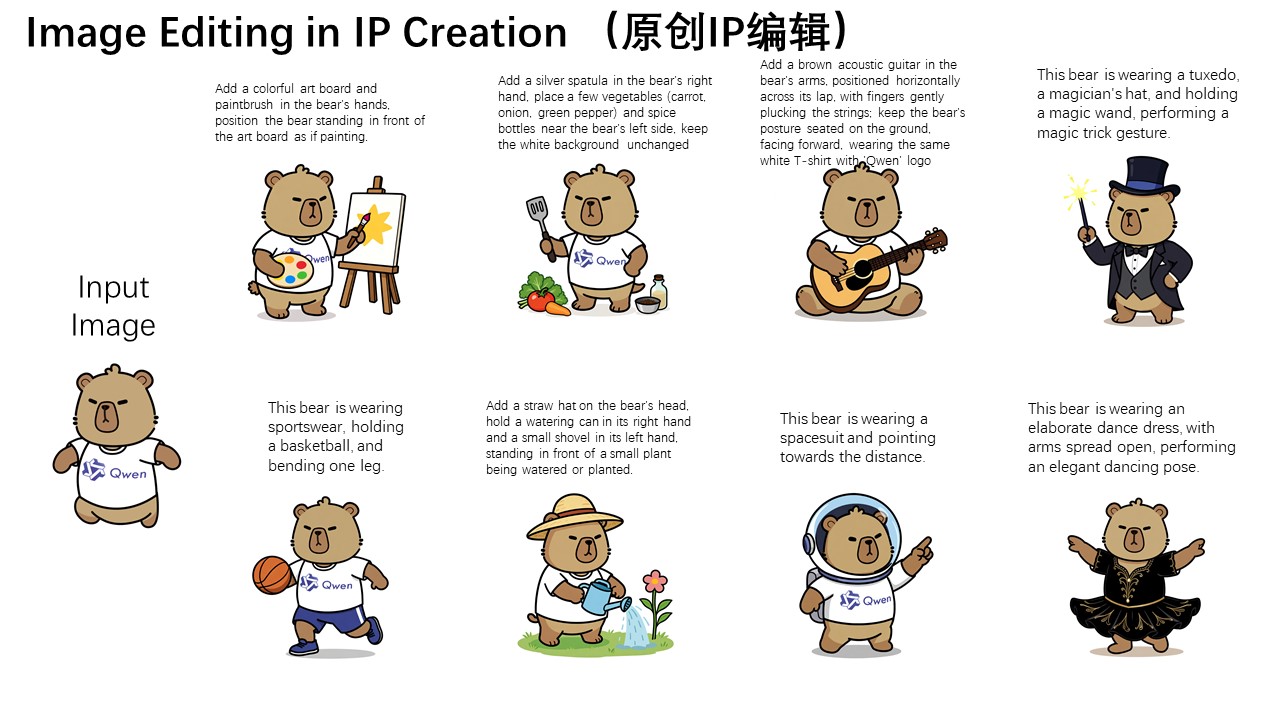 As can be seen, although most pixels in the edited image differ from those in the input image (the leftmost image), the character consistency of Capybara is perfectly preserved. Qwen-Image-Edit's powerful semantic editing capability enables effortless and diverse creation of original IP content.
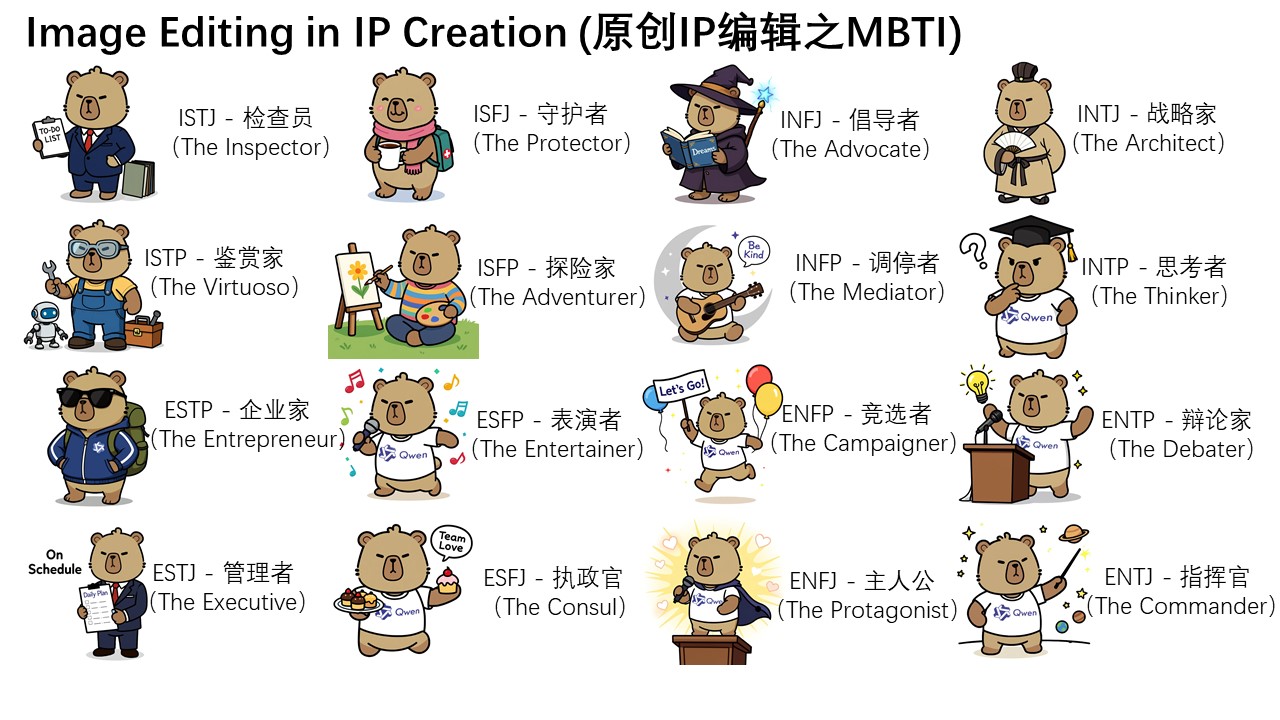
Furthermore, on Qwen Chat, we designed a series of editing prompts centered around the 16 MBTI personality types. Leveraging these prompts, we successfully created a set of MBTI-themed emoji packs based on our mascot Capybara, effortlessly expanding the IP's reach and expression.
As can be seen, although most pixels in the edited image differ from those in the input image (the leftmost image), the character consistency of Capybara is perfectly preserved. Qwen-Image-Edit's powerful semantic editing capability enables effortless and diverse creation of original IP content.
Furthermore, on Qwen Chat, we designed a series of editing prompts centered around the 16 MBTI personality types. Leveraging these prompts, we successfully created a set of MBTI-themed emoji packs based on our mascot Capybara, effortlessly expanding the IP's reach and expression.
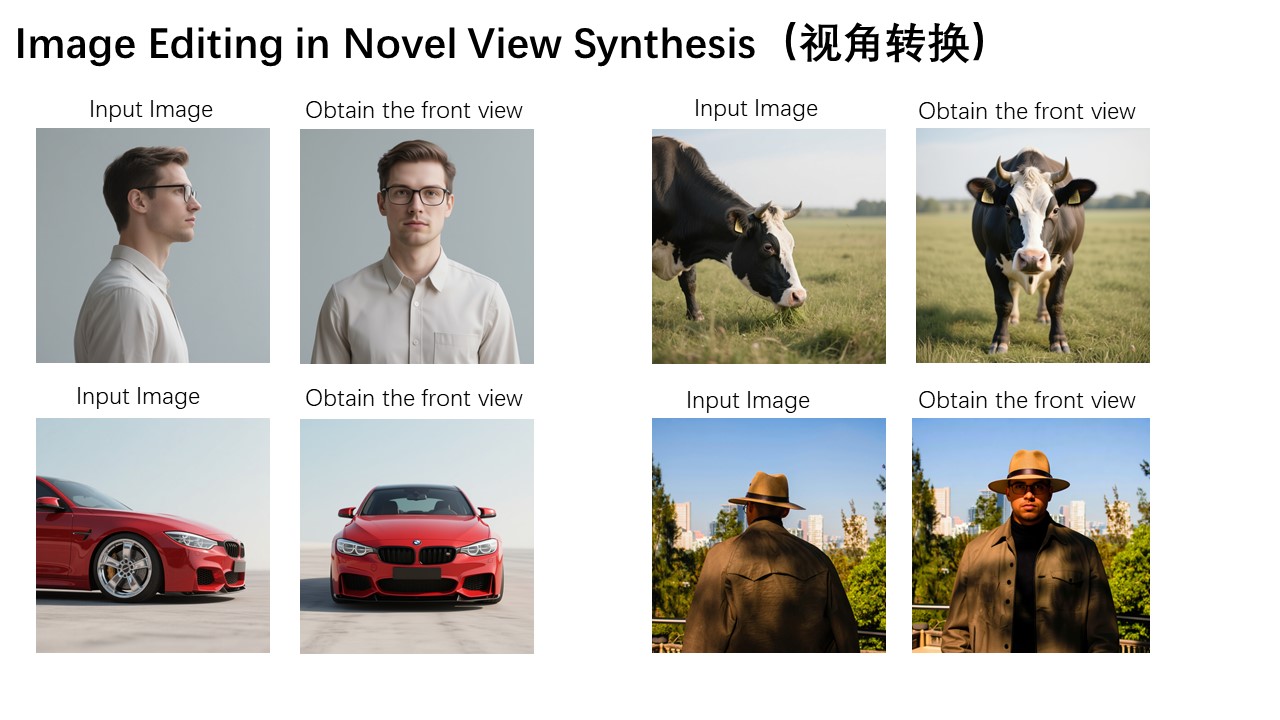
 Moreover, novel view synthesis is another key application scenario in semantic editing. As shown in the two example images below, Qwen-Image-Edit can not only rotate objects by 90 degrees, but also perform a full 180-degree rotation, allowing us to directly see the back side of the object:
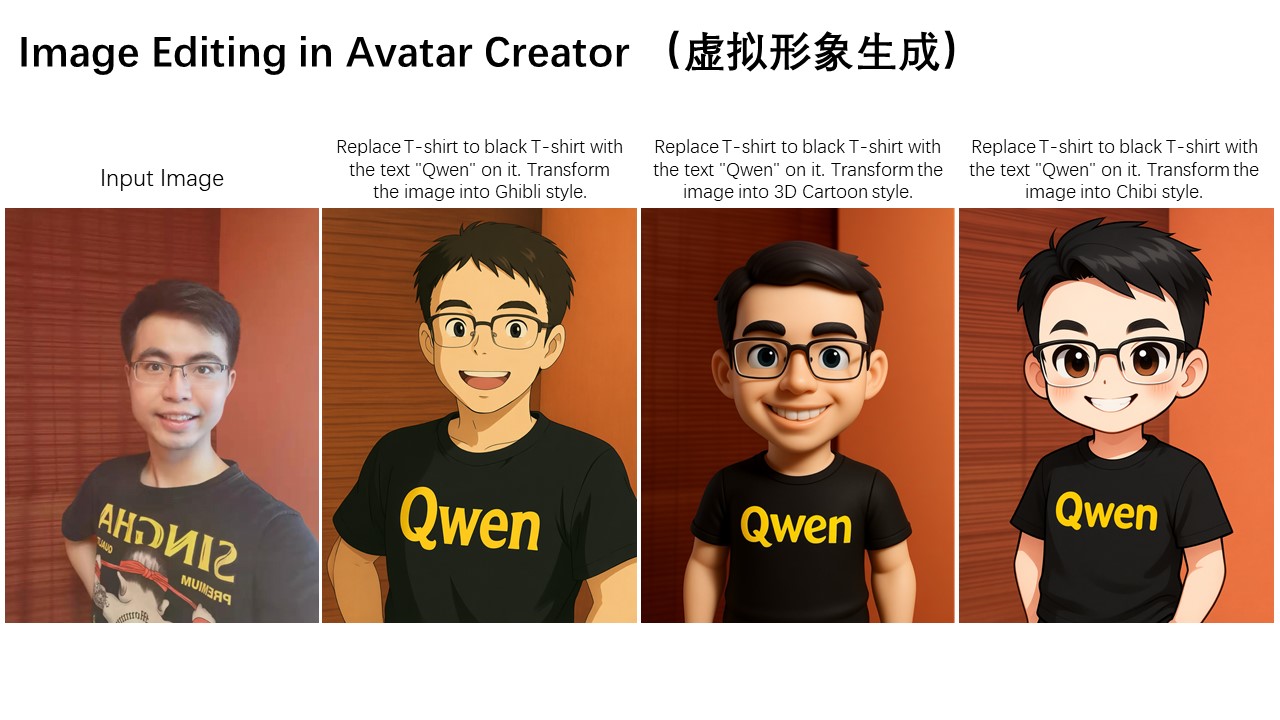
 Another typical application of semantic editing is style transfer. For instance, given an input portrait, Qwen-Image-Edit can easily transform it into various artistic styles such as Studio Ghibli. This capability holds significant value in applications like virtual avatar creation:
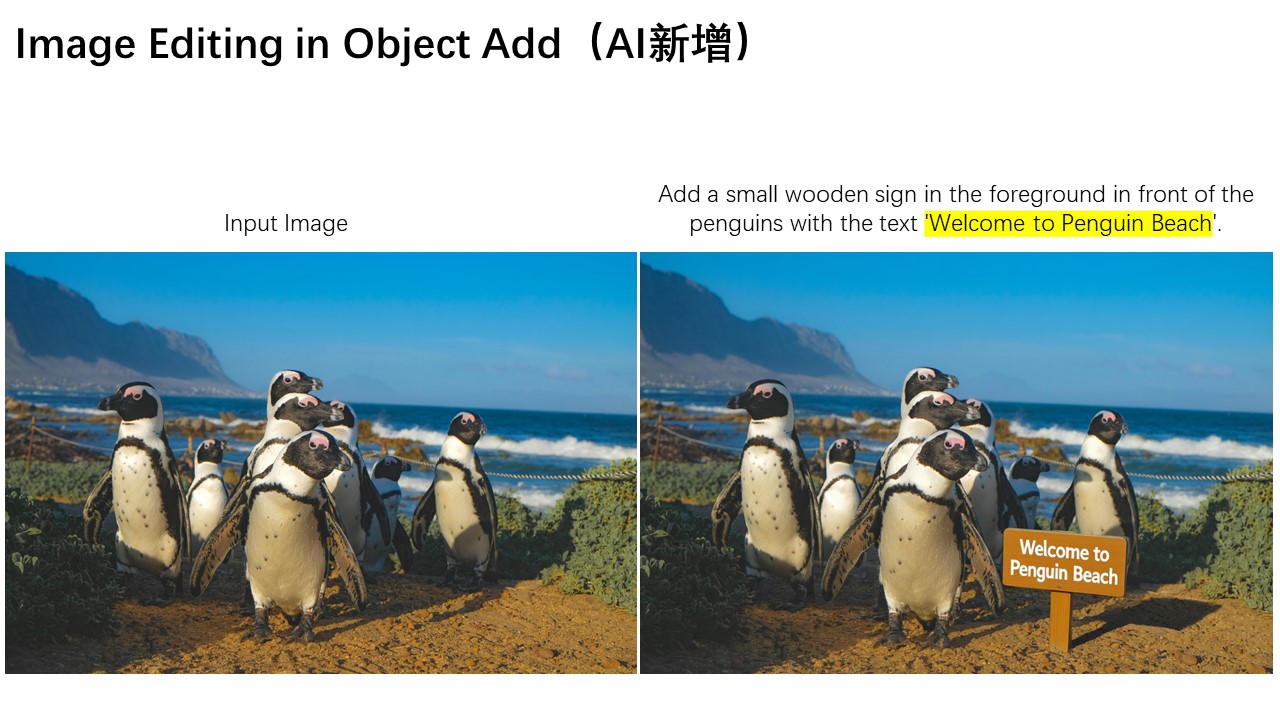
 In addition to semantic editing, appearance editing is another common image editing requirement. Appearance editing emphasizes keeping certain regions of the image completely unchanged while adding, removing, or modifying specific elements. The image below illustrates a case where a signboard is added to the scene.
As shown, Qwen-Image-Edit not only successfully inserts the signboard but also generates a corresponding reflection, demonstrating exceptional attention to detail.
In addition to semantic editing, appearance editing is another common image editing requirement. Appearance editing emphasizes keeping certain regions of the image completely unchanged while adding, removing, or modifying specific elements. The image below illustrates a case where a signboard is added to the scene.
As shown, Qwen-Image-Edit not only successfully inserts the signboard but also generates a corresponding reflection, demonstrating exceptional attention to detail.
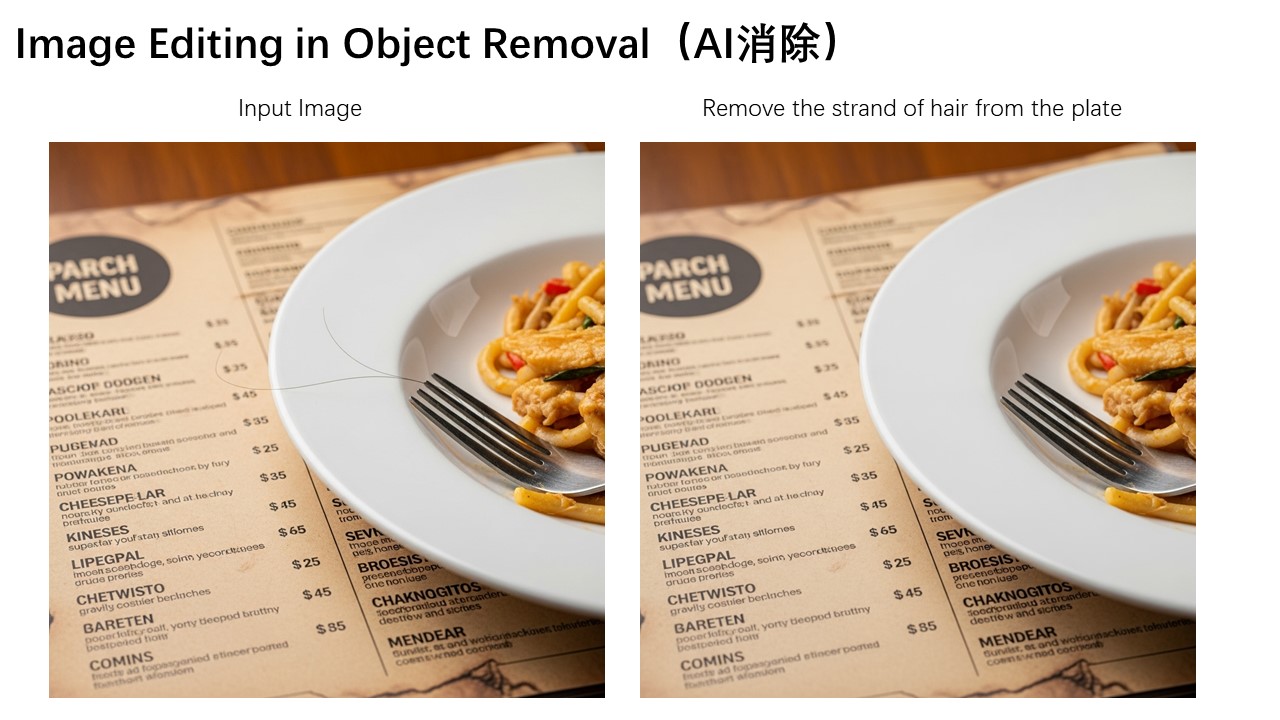
 Below is another interesting example, demonstrating how to remove fine hair strands and other small objects from an image.
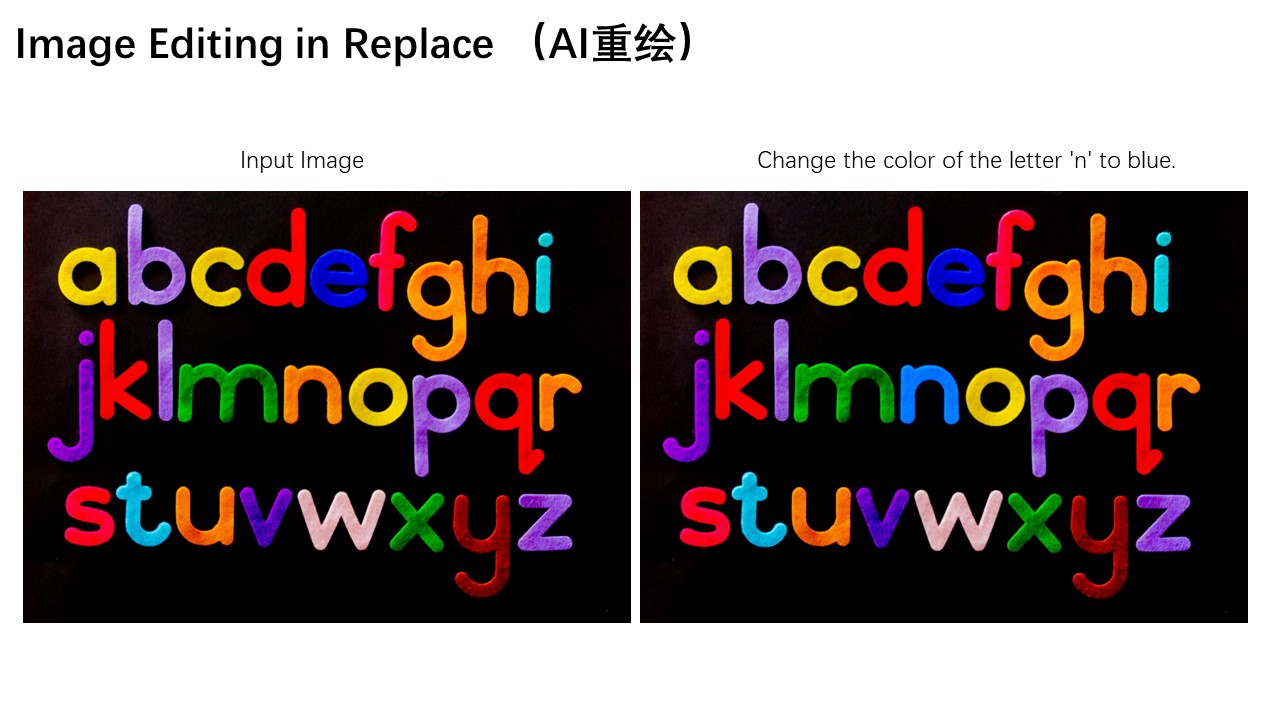
 Additionally, the color of a specific letter "n" in the image can be modified to blue, enabling precise editing of particular elements.
 Appearance editing also has wide-ranging applications in scenarios such as adjusting a person's background or changing clothing. The three images below demonstrate these practical use cases respectively.

 Another standout feature of Qwen-Image-Edit is its accurate text editing capability, which stems from Qwen-Image's deep expertise in text rendering. As shown below, the following two cases vividly demonstrate Qwen-Image-Edit's powerful performance in editing English text:

 Qwen-Image-Edit can also directly edit Chinese posters, enabling not only modifications to large headline text but also precise adjustments to even small and intricate text elements.
 Finally, let's walk through a concrete image editing example to demonstrate how to use a chained editing approach to progressively correct errors in a calligraphy artwork generated by Qwen-Image:
 In this artwork, several Chinese characters contain generation errors. We can leverage Qwen-Image-Edit to correct them step by step. For instance, we can draw bounding boxes on the original image to mark the regions that need correction, instructing Qwen-Image-Edit to fix these specific areas. Here, we want the character "稽" to be correctly written within the red box, and the character "亭" to be accurately rendered in the blue region.
 However, in practice, the character "稽" is relatively obscure, and the model fails to correct it correctly in one step. The lower-right component of "稽" should be "旨" rather than "日". At this point, we can further highlight the "日" portion with a red box, instructing Qwen-Image-Edit to fine-tune this detail and replace it with "旨".
 Isn't it amazing? With this chained, step-by-step editing approach, we can continuously correct character errors until the desired final result is achieved.


 Finally, we have successfully obtained a completely correct calligraphy version of Lantingji Xu (Orchid Pavilion Preface)!
In summary, we hope that Qwen-Image-Edit can further advance the field of image generation, truly lower the technical barriers to visual content creation, and inspire even more innovative applications.
Finally, we have successfully obtained a completely correct calligraphy version of Lantingji Xu (Orchid Pavilion Preface)!
In summary, we hope that Qwen-Image-Edit can further advance the field of image generation, truly lower the technical barriers to visual content creation, and inspire even more innovative applications.
License Agreement
Qwen-Image is licensed under Apache 2.0.
Citation
We kindly encourage citation of our work if you find it useful.
@misc{wu2025qwenimagetechnicalreport,
      title={Qwen-Image Technical Report},
      author={Chenfei Wu and Jiahao Li and Jingren Zhou and Junyang Lin and Kaiyuan Gao and Kun Yan and Sheng-ming Yin and Shuai Bai and Xiao Xu and Yilei Chen and Yuxiang Chen and Zecheng Tang and Zekai Zhang and Zhengyi Wang and An Yang and Bowen Yu and Chen Cheng and Dayiheng Liu and Deqing Li and Hang Zhang and Hao Meng and Hu Wei and Jingyuan Ni and Kai Chen and Kuan Cao and Liang Peng and Lin Qu and Minggang Wu and Peng Wang and Shuting Yu and Tingkun Wen and Wensen Feng and Xiaoxiao Xu and Yi Wang and Yichang Zhang and Yongqiang Zhu and Yujia Wu and Yuxuan Cai and Zenan Liu},
      year={2025},
      eprint={2508.02324},
      archivePrefix={arXiv},
      primaryClass={cs.CV},
      url={https://arxiv.org/abs/2508.02324},
}
Join Us
If you're passionate about fundamental research, we're hiring full-time employees (FTEs) and research interns. Don't wait — reach out to us at fulai.hr@alibaba-inc.com