HandsOnWorld: Unconstrained Egocentric Video Generation with Camera-Disentangled Hand Control
Yushuo Chen1,2, Xiaoyu Shi2, Xiaoshi Wu3, Xintao Wang2, Pengfei Wan2, Yebin Liu1
1Tsinghua University 2Kling Team, Kuaishou Technology 3Chinese University of Hong Kong
Project Page · Paper · arXiv · Code · Models
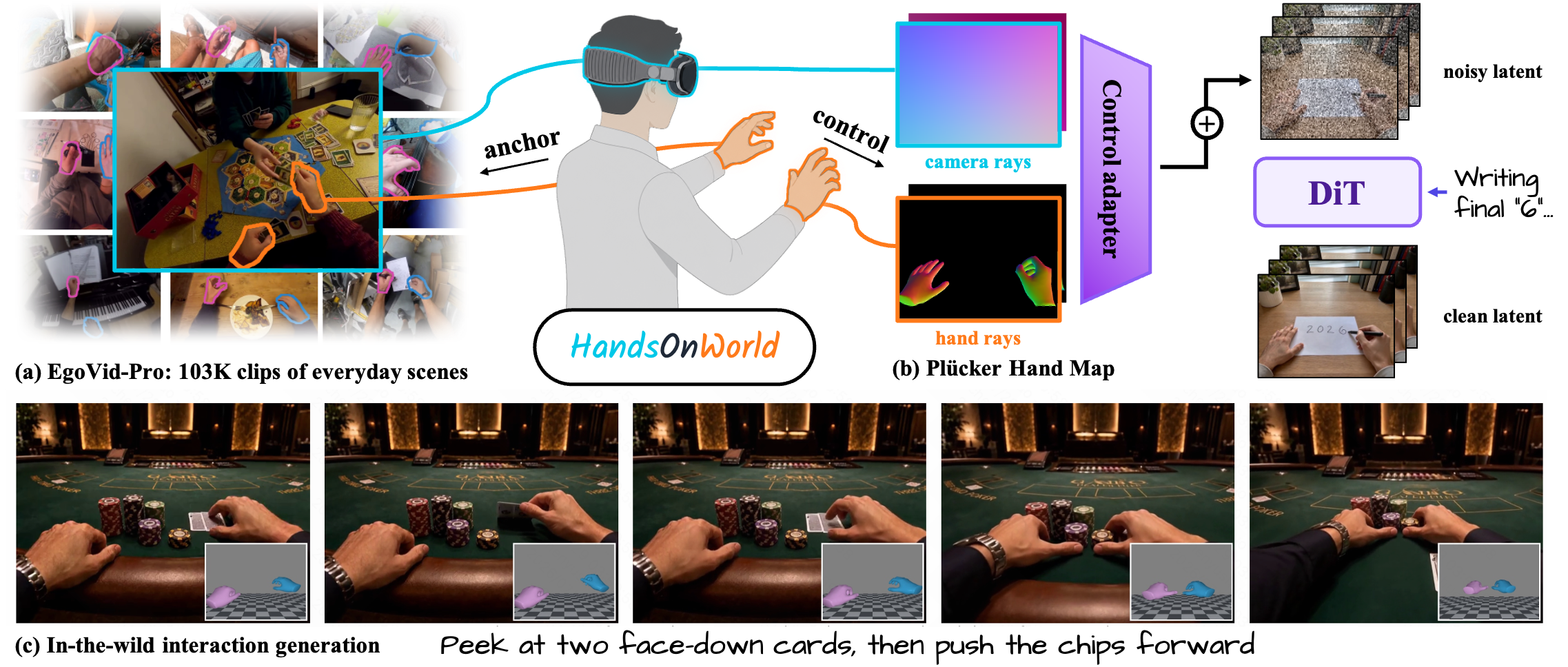
Installation
1. Environment Setup
conda create -n handsonworld python=3.10 -y
conda activate handsonworld
conda install -c conda-forge ffmpeg -y

python -m pip install --upgrade pip setuptools wheel
python -m pip install torch==2.6.0 torchvision==0.21.0 \
  --index-url https://download.pytorch.org/whl/cu124
python -m pip install ninja cmake
python -m pip install -c requirements.txt \
  -e '.[train,distill,fitting]' \
  smplx==0.1.28 human-body-prior==0.8.5.0 configer==1.3.1 \
  'huggingface_hub>=0.34,<1.0'
Install the two geometry dependencies separately:
# Differentiable rendering of hand control maps
python -m pip install --no-build-isolation \
  'git+https://github.com/NVlabs/nvdiffrast.git@v0.4.0'

# Rotation conversions used by our local VPoser snapshot
python -m pip install --no-build-isolation \
  'git+https://github.com/facebookresearch/pytorch3d.git@75ebeeaea0908c5527e7b1e305fbc7681382db47'

# Install the bundled, a modified DiffSynth backend
python scripts/setup_backend.py --verify-only
python scripts/setup_backend.py
2. Download Required Files
a. Wan Base Models
We provide training using the following models:
| Backbone | Official weights | Local directory |
|---|---|---|
| Wan2.2 I2V A14B | Wan-AI/Wan2.2-I2V-A14B | models/Wan2.2-I2V-A14B/ |
| Wan2.1 I2V 14B 480P | Wan-AI/Wan2.1-I2V-14B-480P | models/Wan2.1-I2V-14B-480P/ |
| Wan2.2 TI2V 5B | Wan-AI/Wan2.2-TI2V-5B | models/Wan2.2-TI2V-5B/ |
You can download with the
Hugging Face CLI (Wan2.2-I2V-A14B as example), and select the matching JSON configuration in configs/ and update
its paths if you use a different directory.
WAN_REPO=Wan-AI/Wan2.2-I2V-A14B # modify it for other models
WAN_DIR=models/${WAN_REPO#*/}

hf download "$WAN_REPO" --local-dir "$WAN_DIR"
hf download google/umt5-xxl \
  --include 'spiece.model' 'tokenizer*.json' 'special_tokens_map.json' \
  --local-dir "$WAN_DIR/google/umt5-xxl"
Then prepare the model with zero-initialized control adapter:
python scripts/prepare_resources.py --model wan22_i2v14b
python scripts/prepare_resources.py --model wan21_i2v14b
python scripts/prepare_resources.py --model wan22_ti2v5b
By default, the processed model are stored as:
models/initialized/
    wan22_i2v14b/{high,low}.safetensors
    wan21_i2v14b/single.safetensors
    wan22_ti2v5b/single.safetensors
b. HandsOnWorld Checkpoints
All released checkpoints are in KlingTeam/HandsOnWorld.
Download the models you need into checkpoints/; the inference configurations
already use this directory layout.
| Model | Weights | Config |
|---|---|---|
| SFT · Wan2.2 I2V A14B | Download | JSON |
| SFT · Wan2.2 I2V A14B (subset training) | Download | JSON |
| SFT · Wan2.1 I2V 14B | Download | JSON |
| SFT · Wan2.2 TI2V 5B | Download | JSON |
| Self-Forcing · Wan2.1 I2V 14B (4 steps) | Download | JSON |
# Download only the SFT backbone you want; change the included directory as needed.
hf download KlingTeam/HandsOnWorld \
  --include 'sft/wan22_i2v14b/normal_plucker/*' --local-dir checkpoints

# Download the Wan2.1 14B distilled student and its frozen control adapter.
hf download KlingTeam/HandsOnWorld \
  --include 'distillation/wan21_i2v14b/normal_plucker/*' --local-dir checkpoints
c. SMPL and VPoser (for Hand Filtering)
Download the neutral SMPL model from the SMPL website and VPoser v1.0 from the SMPL-X downloads page.
Organize the files as follows, preserving the VPoser model code and settings alongside its checkpoint:
models/
    body_models/
        smpl/
            SMPL_NEUTRAL.pkl
    vposer_v1_0/
        vposer_smpl.py
        TR00_004_00_WO_accad.ini
        snapshots/
            TR00_E096.pt
Data Preparation
The default resolution for training is 640×480. We recommend to prepare 4:3 video clips and the corresponding annotations. The camera intrinsics will be automatically scaled to match the training resolution.
Finally, you should prepare a train.csv and set this path to data.metadata in your training configuration.
CSV entries may use absolute paths or paths relative to the CSV directory.
An optional data.base_path overrides that directory for training; no separate
root is needed for CSVs produced by the preparation scripts.
1. ARCTIC
Download and extract the data following the official ARCTIC instructions. The preparation script uses the ego-view images, raw annotations, split files, metadata, and MANO models:
unpack/
    arctic_data/data/
        cropped_images/<subject>/<sequence>/0/*.jpg
        raw_seqs/
        splits_json/
        meta/
    body_models/mano/
        MANO_LEFT.pkl
        MANO_RIGHT.pkl
python scripts/prepare_arctic.py \
  --base-dir /path/to/arctic/unpack \
  --output-dir data/arctic \
  --mano-dir /path/to/mano # when MANO is stored separately
The default uses the official p2 training split, skips the first two available
frames, and samples every second frame. ARCTIC ego images are 840×600 and are cropped into 800x600 to match the 4:3 training configuration. Captions are generated from the annotated object and
action names.
2. Custom dataset with protagonist filtering
Prepare a CSV with two columns, video and prompt. Relative video paths are
resolved from the CSV's directory. Supply the captions you want to train with:
video,prompt
clips/example.mp4,"A person plays a board game at a wooden table."
The built-in hawor adapter calls an external
HaWoR installation. Clone HaWoR and follow
its installation and model-download instructions, then pass its directory below.
python scripts/prepare_videos.py \
  --input-csv /path/to/clips.csv \
  --hawor-root /path/to/HaWoR \
  --output-dir data/custom
This runs hand estimation, protagonist hand filtering, and camera reconstruction, then exports aligned videos and controls while preserving your captions.
By default, the filter checks the first frame of each candidate chunk. To check all frames and keep a chunk only when more than 90% pass, add:
--sampling all_frames --min-pass-ratio 0.9
The threshold is configurable, and body fitting shares shape parameters within
each chunk. Results are written to train.csv; per-video outcomes are recorded
in processing_report.csv.
To use another hand estimator, implement the small HandEstimator interface
shown in custom_estimator.py,
then select that class with the same preparation command:
python scripts/prepare_videos.py \
  --input-csv /path/to/clips.csv \
  --output-dir data/custom \
  --estimator your_package.estimator:YourEstimator \
  --estimator-config /path/to/estimator.json
The custom estimator supplies candidate hand tracks and reconstructs the tracks selected by our protagonist filter.
Here we provide an EgoVid example:
The example includes precomputed annotations in
examples/egovid/train.csv, which is the default
training dataset in the SFT and distillation configurations. It contains one
clip for trying the pipeline; set data.metadata to your own prepared CSV for
full training. To regenerate its annotations:
python scripts/prepare_videos.py \
  --input-csv examples/egovid/input.csv \
  --hawor-root /path/to/HaWoR \
  --output-dir data/example
Training
Supervised Fine-Tuning
Select the backbone through CONFIG; the launch interface is shared:
| Backbone | Example configuration |
|---|---|
| Wan2.2 I2V A14B | wan22_i2v14b_normal_plucker.json |
| Wan2.1 I2V 14B 480P | wan21_i2v14b_normal_plucker.json |
| Wan2.2 TI2V 5B | wan22_ti2v5b_normal_plucker.json |
Set dataset paths, output paths, and training options in the selected config. For example, on two machines with eight GPUs each, run once per machine:
CONFIG=configs/wan22_i2v14b_normal_plucker.json \
GLOBAL_SIZE=2 GLOBAL_ID=0 GPUS_PER_MACHINE=8 \
MASTER_ADDR=10.0.0.1 MASTER_FILE=/shared/handsonworld/master.json \
  bash scripts/train_cluster.sh
Set GLOBAL_ID to 0 or 1 on the respective machine, use the first machine's
reachable IP, and place MASTER_FILE on shared storage. For one machine, use
GLOBAL_SIZE=1 GLOBAL_ID=0. Adjust GPU counts and network settings for your
cluster.
Self-Forcing Distillation
Supported backbones are Wan2.1 I2V 14B and Wan2.2 TI2V 5B. Run the following stages in order on every participating node:
export CONFIG=configs/distillation/wan22_ti2v5b_normal.json
# export CONFIG=configs/distillation/wan21_normal.json # if using Wan2.1 I2V 14B
export GPUS_PER_MACHINE=8

bash scripts/distill.sh prepare
bash scripts/distill.sh causal_sft
bash scripts/distill.sh ode
bash scripts/distill.sh kd
bash scripts/distill.sh dmd
Inference
The released-model configurations use examples/egovid/train.csv for a quick
example. For your own evaluation, prepare a CSV in the same format and set
inference.metadata and inference.output_dir in the configuration.
Inference using the checkpoint from SFT:
CONFIG=configs/wan22_i2v14b_normal_plucker.json \
  bash scripts/infer_sft.sh
Inference using the checkpoint from self-forcing distillation:
CONFIG=configs/distillation/wan21_normal.json \
  bash scripts/distill.sh infer
To use your own distilled checkpoint, set inference.checkpoint to its completed
checkpoint directory.
Acknowledgement
Part of our code is borrowed from the following repos, great thanks to them!
Citation
If you find this work useful for your research, please consider citing:
@misc{chen2026handsonworld,
    title={HandsOnWorld: Unconstrained Egocentric Video Generation with Camera-Disentangled Hand Control},
    author={Yushuo Chen and Xiaoyu Shi and Xiaoshi Wu and Xintao Wang and Pengfei Wan and Yebin Liu},
    year={2026},
    eprint={2607.02075},
    archivePrefix={arXiv},
    primaryClass={cs.CV},
    url={https://arxiv.org/abs/2607.02075}
}