ViRA-9B
This repository holds ViRA-9B, one of the two models of the paper "ViRA: Toward Ultra-High-Resolution Visual Agents via Cross-Input Relative Policy Optimization".








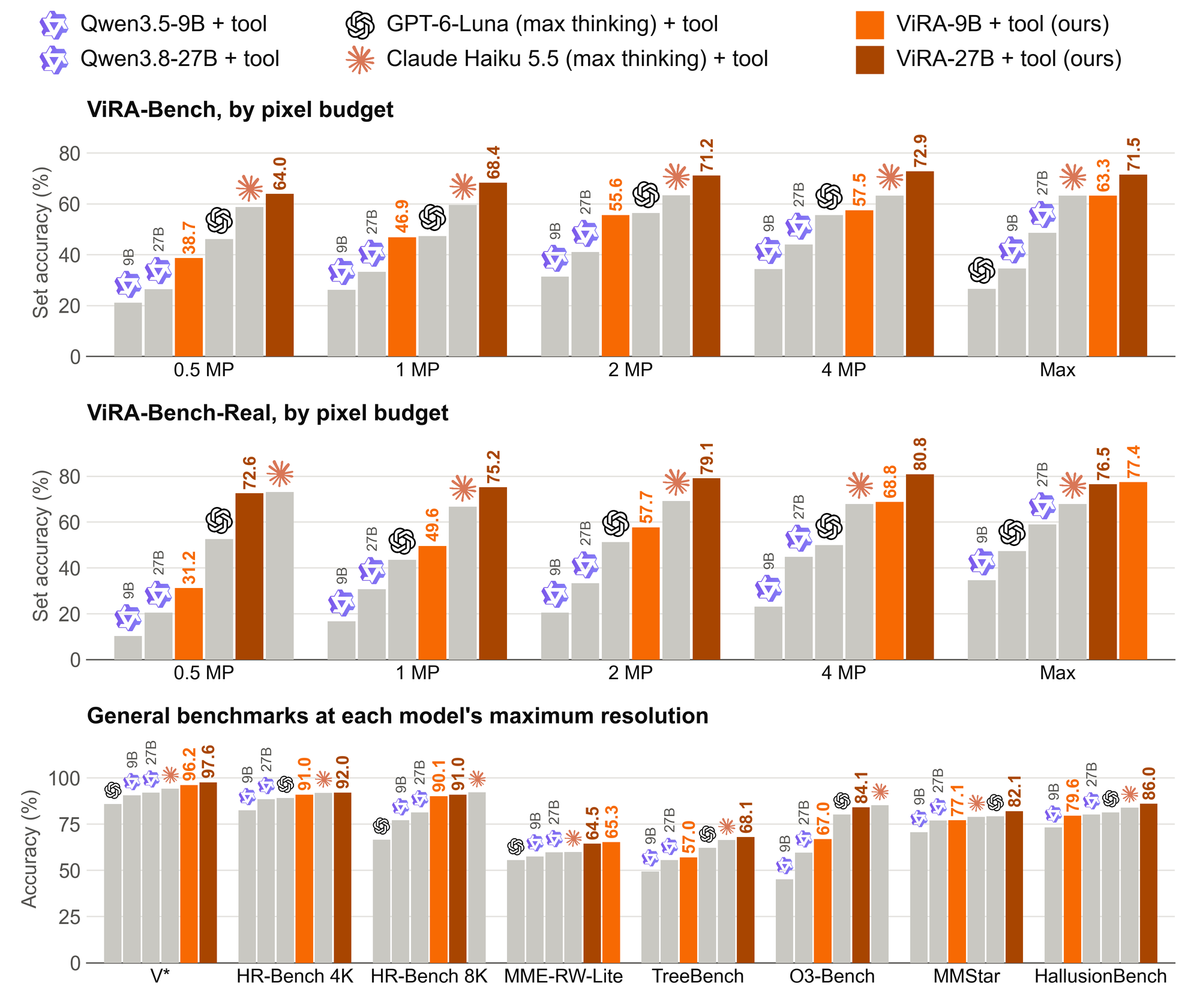
Set accuracy on ViRA-Bench and ViRA-Bench-Real at five pixel budgets, and accuracy on general benchmarks at each model's maximum resolution. The bars of each group are sorted by height. Claude Haiku 5.5 and GPT-6-Luna run at their highest thinking level.
ViRA-9B is a visual agent for questions about small details in high-resolution photos. It first views the whole photo at a pixel budget, zooms into the regions it needs with a zoom tool, and then answers.
ViRA-9B is Qwen3.5-9B trained with reinforcement learning using CrossRPO (cross-input relative policy optimization). CrossRPO trains on contrast sets: K versions of one photo that differ only in one small object, with one question and a different correct answer for each version. An agent that guesses from the rest of the photo gives the same answer on every version, so it cannot solve a set without reading the object.
| Base model | Qwen/Qwen3.5-9B |
| Training method | CrossRPO, λ = 0.5, reward = correctness of the answer |
| Training data | 3,642 items of ViRA-Train (column in_vira9b_train): 1,664 contrast sets and 1,978 single images, one pass |
| Rollouts | 16 items per step, 12 rollouts per item, pixel budget drawn log-uniformly from 0.5 to 16.8 MP |
| Optimizer | AdamW, learning rate 1e-6 |
| Largest input image | 16.8 MP (16,384 visual tokens of 32 x 32 px) |
| Thinking mode | off; the agent writes its reasoning inside <think> tags |
| Benchmark | ViRA-Bench |
| Paper | arXiv:2611.21605 |
| Code | github.com/huawei-lin/ViRA (training, evaluation and inference) |
| License | Apache 2.0 |
Results
Set accuracy (%) on ViRA-Bench (762 contrast sets) and ViRA-Bench-Real (78 sets). A set counts as solved only if the original and both variants are answered correctly. The pixel budget caps the first view and every crop. Max is each model's maximum resolution: 16.8 MP for ViRA and Qwen, 3.8 MP for Claude Haiku 5.5 and 30.7 MP for GPT-6-Luna. Bold: best in each row.
Accuracy (%) on general single-image benchmarks at 1 MP and at each model's maximum resolution. Bold: best in each row.
+ tool is the base model with a zoom tool in the DeepEyes format (a box on the photo, crops not enlarged). Claude Haiku 5.5 and GPT-6-Luna run with the ViRA zoom tool at their highest thinking level. Decoding is greedy. The numbers of ViRA on ViRA-Bench, ViRA-Bench-Real, V* and HR-Bench are means of three runs. The paper reports all models.
Zoom tool
At a budget of x MP, the agent sees the photo resized to at most x MP. It zooms by calling image_zoom_in_tool with
bbox_2d=[x1, y1, x2, y2]on a 0-1000 scale of the image named bysource, andsource=original_image(the first view) orobservation_k(the k-th crop returned so far).
The crop is always cut from the full-resolution photo, so a crop of a crop loses no resolution. A crop larger than the
budget is shrunk to x MP, and a smaller crop is enlarged to fill the budget, by at most 4x per side. The agent may zoom
up to six times, and each reply has at most 4,096 new tokens. The answer is the text of the last <answer> span; for a
multiple-choice question it starts with the option letter.
Usage
Serve the model with vLLM:
vllm serve huaweilin/ViRA-9B --served-model-name ViRA-9B \
    --max-model-len 128000 --limit-mm-per-prompt '{"image": 10}' \
    --generation-config vllm
With the code, python -m vira.infer --image photo.jpg --question "..." --options "..." "..." --budget 1 asks the
served model one question. The script below does the same without the repository: it runs the agent with the system
prompt, the user turns and the zoom tool of training and evaluation. For an open question, pass options=None.
import base64, io, json, math, re
from openai import OpenAI
from PIL import Image

Image.MAX_IMAGE_PIXELS = None
PATCH, MIN_PIXELS, MAX_PIXELS, MAGNIFY, MAX_ZOOMS = 32, 65536, 16384 * 32 * 32, 4.0, 6
BUDGETS = {"0.5MP": 640 * 28 * 28, "1MP": 1280 * 28 * 28, "2MP": 2560 * 28 * 28,
           "4MP": 5120 * 28 * 28, "max": MAX_PIXELS}

ZOOM_DESC = ("Zoom in on a specific region of an image by cropping it based on a bounding box "
             "(bbox) and an optional object label. You can zoom in step by step: zoom in again "
             "on the latest observation with a tighter box, until the detail you need is "
             "clearly visible. If the question needs several parts of the image, zoom in on "
             "each of them in the original image.")
BOX_DESC = ("The bounding box of the region to zoom in, as [x1, y1, x2, y2], where (x1, y1) is "
            "the top-left corner and (x2, y2) is the bottom-right corner. Coordinates are "
            "relative to the image named by source, on a 0-1000 scale.")
SOURCE_DESC = ('The image to zoom in on: "original_image" (the first image, the default) or '
               '"observation_i", the i-th zoom-in image returned so far (observation_1 is the '
               "first). Zooming in on an observation looks closer at part of it; every crop is "
               "cut from the full-resolution original.")
LABEL_DESC = "The name or label of the object in the specified bounding box (optional)."
TOOL = {"type": "function", "function": {
    "name": "image_zoom_in_tool", "description": ZOOM_DESC,
    "parameters": {"type": "object", "properties": {
        "bbox_2d": {"type": "array", "items": {"type": "number"}, "minItems": 4, "maxItems": 4,
                    "description": BOX_DESC},
        "source": {"type": "string", "description": SOURCE_DESC},
        "label": {"type": "string", "description": LABEL_DESC}}, "required": ["bbox"]}}}
SYSTEM = ("You are a helpful assistant.\n\n# Tools\n"
          "You may call one or more functions to assist with the user query.\n"
          "You are provided with function signatures within <tools></tools> XML tags:\n<tools>\n"
          + json.dumps(TOOL, separators=(",", ":")) + "\n</tools>\n\n# How to call a tool\n"
          "Return a json object with function name and arguments within <tool_call></tool_call> "
          "XML tags:\n<tool_call>\n"
          '{"name": <function-name>, "arguments": <args-json-object>}\n</tool_call>\n\n'
          "**Example**:  \n<tool_call>  \n"
          '{"name": "image_zoom_in_tool", "arguments": {"bbox_2d": [10, 20, 100, 200], '
          '"label": "the apple on the desk"}}  \n'
          "</tool_call>")
FORMAT = ("\nThink first, call **image_zoom_in_tool** if needed, then answer. Format strictly "
          "as:  <think>...</think>  <tool_call>...</tool_call> (if tools needed)  "
          "<answer>...</answer> ")
HINT = ("\nThis is observation_{k}, a zoom-in of your last box. If the detail you need is still "
        'small or unclear, zoom in again on it ("source": "observation_{k}") with a tighter '
        "box; repeat until you can see it clearly. If the question also needs another part of "
        'the image, zoom in on that part of the original image ("source": "original_image"). '
        "When you have seen what you need, answer the question.\nQuestion: {question}")


def grid(w, h, budget):
    """Size on the 32-px grid with at most `budget` and at least MIN_PIXELS pixels."""
    W, H = max(PATCH, round(w / PATCH) * PATCH), max(PATCH, round(h / PATCH) * PATCH)
    if W * H > budget:
        s = math.sqrt(w * h / budget)
        W = max(PATCH, math.floor(w / s / PATCH) * PATCH)
        H = max(PATCH, math.floor(h / s / PATCH) * PATCH)
    elif W * H < MIN_PIXELS:
        s = math.sqrt(MIN_PIXELS / (w * h))
        W, H = math.ceil(w * s / PATCH) * PATCH, math.ceil(h * s / PATCH) * PATCH
    return W, H


def zoom(photo, frames, args, budget):
    """Cut the box from the full-resolution photo. frames[k] = (region of the photo, size shown)
    of image k: k = 0 is the first view, k >= 1 is observation_k."""
    box = [float(v) for v in args.get("bbox_2d", args.get("bbox"))]
    src = str(args.get("source") or "original_image").strip().lower()
    k = 0 if src == "original_image" else int(re.fullmatch(r"observation_(\d+)", src).group(1))
    if len(box) != 4 or not 0 <= k < len(frames) or (k == 0 and src != "original_image"):
        raise ValueError(f"bad box or source: {args}")
    (rx0, ry0, rx1, ry1), (fw, fh) = frames[k]
    x0, x1 = sorted((box[0] * fw / 1000, box[2] * fw / 1000))
    y0, y1 = sorted((box[1] * fh / 1000, box[3] * fh / 1000))
    x0, y0, x1, y1 = max(0.0, x0), max(0.0, y0), min(float(fw), x1), min(float(fh), y1)
    if x1 - x0 < PATCH:                              # each side at least one visual token
        x0, x1 = max(0.0, (x0 + x1) / 2 - PATCH / 2), min(float(fw), (x0 + x1) / 2 + PATCH / 2)
    if y1 - y0 < PATCH:
        y0, y1 = max(0.0, (y0 + y1) / 2 - PATCH / 2), min(float(fh), (y0 + y1) / 2 + PATCH / 2)
    if x1 - x0 < 1 or y1 - y0 < 1 or max(x1 - x0, y1 - y0) / min(x1 - x0, y1 - y0) > 100:
        raise ValueError(f"empty box or aspect ratio above 100: {box}")
    rw, rh = rx1 - rx0, ry1 - ry0                    # pixels of image k -> pixels of the photo
    region = (math.floor(rx0 + min(x0 * rw / fw, rw)), math.floor(ry0 + min(y0 * rh / fh, rh)),
              math.ceil(rx0 + min(x1 * rw / fw, rw)), math.ceil(ry0 + min(y1 * rh / fh, rh)))
    w, h = region[2] - region[0], region[3] - region[1]
    m = min(MAGNIFY, math.sqrt(budget / (w * h)))    # a small crop is enlarged, at most 4x per side
    size = grid(round(w * m), round(h * m), budget) if m > 1 else grid(w, h, budget)
    frames.append((region, size))
    return photo.crop(region).resize(size, Image.BICUBIC)


def image_part(im):
    buf = io.BytesIO()
    im.save(buf, "PNG")
    data = base64.b64encode(buf.getvalue()).decode()
    return {"type": "image_url", "image_url": {"url": "data:image/png;base64," + data}}


def answer_question(client, model, photo_path, question, options=None, budget=BUDGETS["max"]):
    """Returns the text of the last <answer> (None if the agent gives no answer) and the replies."""
    photo = Image.open(photo_path).convert("RGB")
    budget = min(budget, MAX_PIXELS)
    if options:
        lines = [f"{'ABCDEFGH'[i]}. {o}" for i, o in enumerate(options)]
        asked = "\n".join([question.strip()] + lines)
    else:
        asked = question.strip() + "\nAnswer the question using a single word or phrase."
    view = grid(*photo.size, budget)
    frames = [((0, 0, *photo.size), view)]
    shown = image_part(photo.resize(view, Image.BICUBIC))
    first = [shown, {"type": "text", "text": asked + FORMAT}]
    messages = [{"role": "system", "content": SYSTEM}, {"role": "user", "content": first}]
    replies = []
    for turn in range(MAX_ZOOMS + 1):
        reply = client.chat.completions.create(
            model=model, messages=messages, max_tokens=4096, temperature=0, stop=["</tool_call>"],
            extra_body={"chat_template_kwargs": {"enable_thinking": False}})
        text = reply.choices[0].message.content or ""
        if "<tool_call>" in text and "</tool_call>" not in text.split("<tool_call>")[-1]:
            text += "</tool_call>"                   # the server does not return the stop string
        replies.append(text)
        if "<answer>" in text and "</answer>" in text.split("<answer>")[-1]:
            return text.split("<answer>")[-1].split("</answer>")[0].strip(), replies
        calls = re.findall(r"<tool_call>(.*?)</tool_call>", text, re.S)
        if not calls or turn == MAX_ZOOMS:           # no tool call, or a seventh call: no answer
            return None, replies
        messages.append({"role": "assistant", "content": text, "reasoning_content": ""})
        try:
            call = json.loads(calls[-1])
            if call.get("name") != "image_zoom_in_tool":
                raise ValueError(f"Unknown tool name: {call.get('name')}")
            crop = zoom(photo, frames, call["arguments"], budget)
        except Exception as e:                       # a failed call: the agent may try again
            error = f"<tool_response>Error: {e}</tool_response>"
            messages.append({"role": "user", "content": [{"type": "text", "text": error}]})
            continue
        k = len(frames) - 1
        hint = HINT.format(k=k, question=asked) + FORMAT + "</tool_response>"
        messages.append({"role": "user", "content": [
            {"type": "text", "text": f"<tool_response>observation_{k}:"}, image_part(crop),
            {"type": "text", "text": hint}]})
    return None, replies


if __name__ == "__main__":
    client = OpenAI(base_url="http://127.0.0.1:8000/v1", api_key="EMPTY")
    question = "What does the small sign above the door on the far left show?"
    options = ["An arrow pointing up", "An arrow pointing left", "An arrow pointing right",
               "A cross"]
    answer, _ = answer_question(client, "ViRA-9B", "photo.jpg", question, options, BUDGETS["1MP"])
    print(answer)        # multiple choice: the answer starts with the option letter
The prompts must be used as they are: the model was trained with this system prompt, this answer format and the question repeated under every crop.
Paper
ViRA: Toward Ultra-High-Resolution Visual Agents via Cross-Input Relative Policy Optimization (arXiv:2611.21605)
Visual agents answer questions about ultra-high-resolution photos by zooming into the relevant regions. However, existing agents often answer from common sense instead of reading the evidence. Reinforcement learning (RL) on the final answer cannot correct this, because a guess earns the same reward as reading. We propose Cross-Input Relative Policy Optimization (CrossRPO), which trains agents on contrast sets. A contrast set asks one question about several versions of an image that differ only in a small region with the evidence and have different answers, so only reading the evidence solves the whole set. CrossRPO rewards solving the whole set, and we prove that it does not reinforce a set answered from common sense. We build contrast sets for training (ViRA-Train) and evaluation (ViRA-Bench) by editing one small object in images of 21 to 120 megapixels, and we photograph further sets with real changes (ViRA-Bench-Real) to exclude editing traces. We train two Visual Reasoning Agents, ViRA-9B and ViRA-27B, with CrossRPO on only about 3,500 items of ViRA-Train each. CrossRPO achieves 63.3% set accuracy on ViRA-Bench at the maximum resolution, against 59.3% for GRPO. ViRA-9B is the most accurate open model of its size on all benchmarks, and ViRA-27B outperforms Claude Haiku 5.5 and GPT-6-Luna, both at their highest thinking level, on most benchmarks.
Citation
If you use ViRA, its models or its datasets, please cite the paper:
@misc{lin2026vira,
  title         = {{ViRA}: Toward Ultra-High-Resolution Visual Agents
                   via Cross-Input Relative Policy Optimization},
  author        = {Huawei Lin and Jinting Liu and Tongyan Wang and
                   Xuyang Chen and Ruihua Shi and Zhichao Xu and
                   Jiaxin Qin and Guoshenghui Zhao and
                   Baijian Yang and Yingjie Victor Chen and
                   Tan Yu and Weijie Zhao},
  year          = {2026},
  eprint        = {2611.21605},
  archivePrefix = {arXiv},
  primaryClass  = {cs.CV},
  url           = {https://arxiv.org/abs/2611.21605}
}