Ming-Lite-Omni v1.5
Introduction
Ming-lite-omni v1.5 is a comprehensive upgrade to the full-modal capabilities of Ming-lite-omni. It significantly improves performance across tasks including image-text understanding, document understanding, video understanding, speech understanding and synthesis, and image generation and editing. Built upon Ling-lite-1.5, Ming-lite-omni v1.5 has a total of 20.3 billion parameters, with 3 billion active parameters in its MoE (Mixture-of-Experts) section. It demonstrates highly competitive results in various modal benchmarks compared to industry-leading models.
📌 Updates
- [2025.07.15] 🔥 We release Ming-lite-omni v1.5 with significant improvements across all modalities.
- [2025.06.12] 🔥 Our Technical Report is in public on arxiv.
- [2025.05.28] 🔥 The official version of Ming-lite-omni v1 is released, with better performance and image generation support.
- [2025.05.04] 🔥 We release the test version of Ming-lite-omni:Ming-lite-omni-Preview.
Key Features
Compared to Ming-lite-omni, Ming-lite-omni v1.5 features key optimizations in the following 3 areas:
- Enhanced Video Understanding—MRoPE & Curriculum Learning: Ming-lite-omni v1.5 significantly improves video understanding through MRoPE's 3D spatiotemporal encoding and a curriculum learning strategy for handling long videos, enabling precise comprehension of complex visual sequences.
- Refined Multi-modal Generation-Consistency & Perception Control: Ming-lite-omni v1.5 offers superior generation, featuring dual-branch image generation with ID & Scene Consistency Loss for coherent editing, and perception enhancement for detailed visual control. Its new audio decoder and BPE encoding also deliver high-quality, real-time speech synthesis.
- Comprehensive Data Upgrades-Broadened & Refined fine-grained Data: Ming-lite-omni v1.5's capabilities are built on extensive data upgrades, including new structured text data, expanded high-quality product information, and refined fine-grained visual and speech perception data (including dialects). This provides a richer, more accurate foundation for all modalities.
Evaluation
In various modality benchmark tests, Ming-lite-omni v1.5 demonstrates highly competitive results compared to industry-leading models of similar scale.
Image-text Understanding
Ming-lite-omni v1.5 shows significant improvements in general image-text understanding, visual object localization, and universal object recognition capabilities, providing a more powerful base model for a wide range of visual applications.
| Task Type | Dataset | Qwen2.5-VL-7B | Ming-lite-omni v1.5 |
|---|---|---|---|
| OpenCompass | AI2D | 84.36 | 84.91 |
| HallusionBench | 55.77 | 54.59 | |
| MMBench_TEST_V11 | 82.75 | 80.73 | |
| MMMU | 56.56 | 54.33 | |
| MMStar | 65.27 | 65.07 | |
| MMVet | 71.61 | 73.99 | |
| MathVista | 68.10 | 72.00 | |
| OCRBench | 87.80 | 88.90 | |
| average | 71.5 | 71.8 | |
| Localization | RefCOCO_val/testA/testB | 90.00/92.5.85.4 | 91.40/93.2/87.1 |
| RefCOCO+_val/testA/testB | 84.20/89.1/76.9 | 86.30/90.5/79.2 | |
| RefCoCog_val/test | 87.2/87.2 | 87.1/87.6 | |
| Recognition | General Recognition | 92.42 | 92.53 |
| Vertical domains for natural encyclopedias (animals, plants, ingredients, vehicles, dishes, etc.) | 47.79 | 54.27 |
Document Understanding
Ming-lite-omni v1.5 generally performs on par with Qwen2.5-VL-7B in complex document understanding tasks. Notably, it achieves SOTA results among models under 10B parameters on OCRBench, which focuses on text-visual understanding, and on ChartQA, which requires in-depth chart visual analysis and logical reasoning.
| Task Type | dataset | Qwen2.5-VL-7B | Ming-lite-omni v1 | Ming-lite-omni v1.5 |
|---|---|---|---|---|
| OCR Understanding | ChartQA_test | 87.24 | 85.1 | 88.84 |
| DocVQA_test | 95.57 | 93.0 | 93.68 | |
| TextVQA_val | 85.06 | 82.8 | 82.27 | |
| OCRBench | 87.8 | 88.4 | 88.90 | |
| Average | 88.91 | 87.32 | 88.42 | |
| Document Analysis | OmniDocBench↓ en/zh | 30.8/39.8 | 34 /34.4 | 34.9/34.9 |
| OCR Comprehensive Capability | OCRBenchV2 en/zh | 56.3/57.2 | 53.3/52 | 52.1/55.2 |
Video Understanding
Ming-lite-omni v1.5 achieves a leading position among models of its size in video understanding tasks.
| Benchmark | Qwen2.5-VL-7B | Qwen2.5-Omni-7B | InternVL3-8B | Ming-lite-omni v1.5 |
|---|---|---|---|---|
| VideoMME(w/o subs) | 65.10 | 64.30 | 66.30 | 67.07 |
| VideoMME(w/ subs) | 71.60 | 72.40 | 68.90 | 72.59 |
| VideoMME(avg) | 68.35 | 68.35 | 67.60 | 69.83 |
| MVBench | 69.60 | 70.30 | 75.40 | 69.43 |
| LongVideoBench | 56.00 | 54.82 | 58.80 | 59.54 |
| OvOBench | 51.10 | 50.46 | 51.91 | 52.17 |
Speech Understanding
Ming-lite-omni v1.5 further improves upon Ming-lite-omni in speech understanding. It supports English, Mandarin, Cantonese, Sichuanese, Shanghainese, Minnan, and other dialects, maintaining an industry-leading position in open-source English and Mandarin ASR (Automatic Speech Recognition) and Audio QA (Question Answering) tasks.
- ASR Task
| Model | Average on All/Open-source Benchmarks(↓) | aishell1 | aishell2_test_android | aishell2_test_ios | cv15_zh | fleurs_zh | wenetspeech_testmeeting | wenetspeech_testnet | librispeech_test_clean | librispeech_test_other | multilingual_librispeech | cv15_en | fleurs_en | voxpopuli_v1.0_en | speechio_leaderboard | dialect_hunan | dialect_minnan | dialect_guangyue | dialect_chuanyu | dialect_shanghai | noisy_jrgj | zxb_chat | zxb_govern | zxb_health | zxb_knowledge | zxb_local_live |
|---|---|---|---|---|---|---|---|---|---|---|---|---|---|---|---|---|---|---|---|---|---|---|---|---|---|---|
| Ming-lite-omni-1.5 | 4.67(+0.15)/3.83(+0.05) | 1.3 | 2.47 | 2.46 | 5.66 | 2.87 | 6.19 | 5.24 | 1.25 | 2.61 | 4.14 | 6.95 | 3.28 | 6.43 | 2.81 | 6.96 | 12.74 | 3.7 | 3.8 | 9.95 | 10.9 | 2.6 | 1.77 | 2.97 | 3.41 | 1.88 |
| Ming-lite-omni | 4.82/3.88 | 1.47 | 2.55 | 2.52 | 6.31 | 2.96 | 5.95 | 5.46 | 1.44 | 2.80 | 4.15 | 6.89 | 3.39 | 5.80 | 2.65 | 7.88 | 13.84 | 4.36 | 4.33 | 10.49 | 11.62 | 2.34 | 1.77 | 3.31 | 3.69 | 2.44 |
| Qwen2.5-Omni | 8.81/ 4.37 | 1.18 | 2.75 | 2.63 | 5.2 | 3.0 | 5.9 | 7.7 | 1.8 | 3.4 | 7.56 | 7.6 | 4.1 | 5.8 | 2.54 | 29.31 | 53.43 | 10.39 | 7.61 | 32.05 | 11.11 | 3.68 | 2.23 | 4.02 | 3.17 | 2.03 |
| Qwen2-Audio | 12.34 / 5.41 | 1.53 | 2.92 | 2.92 | 6.9 | 7.5 | 7.16 | 8.42 | 1.6 | 3.6 | 5.40 | 8.6 | 6.90 | 6.84 | - | 25.88 | 123.78 | 7.59 | 7.77 | 31.73 | - | 4.29 | 2.70 | 4.18 | 3.33 | 2.34 |
| Kimi-Audio | 12.75/4.42 | 0.60 | 2.64 | 2.56 | 7.21 | 2.69 | 6.28 | 5.37 | 1.28 | 2.42 | 5.88 | 10.31 | 4.44 | 7.97 | 2.23 | 31.93 | 80.28 | 41.49 | 6.69 | 60.64 | 24.40 | 2.96 | 2.03 | 2.38 | 1.98 | 2.05 |
- Speech QA Task
| Model | Average(Open-ended QA) | AlpacaEval | CommonEval | SD-QA | MMSU | OpenBookQA | IFEval | AdvBench |
|---|---|---|---|---|---|---|---|---|
| Ming-lite-omni v1.5[omni] | 4.474(+0.134) | 4.648 | 4.3 | 61.16 | 45.77 | 65.934 | 55.599 | 98.076 |
| Ming-lite-omni[omni] | 4.34 | 4.63 | 4.06 | 58.84 | 47.53 | 61.98 | 58.36 | 99.04 |
| MiniCPM-o [omni] | 4.285 | 4.42 | 4.15 | 50.72 | 54.78 | 78.02 | 49.25 | 97.69 |
| Kimi-Audio [audio] | 4.215 | 4.46 | 3.97 | 63.12 | 62.17 | 83.52 | 61.10 | 100.00 |
| Qwen2.5-Omni [omni] | 4.21 | 4.49 | 3.93 | 55.71 | 61.32 | 81.10 | 52.87 | 99.42 |
| GLM-4-Voice [audio] | 3.77 | 4.06 | 3.48 | 43.31 | 40.11 | 52.97 | 24.91 | 88.08 |
| Qwen2-Audio-chat [audio] | 3.545 | 3.69 | 3.40 | 35.35 | 35.43 | 49.01 | 22.57 | 98.85 |
| Step-Audio-chat [audio] | 3.49 | 3.99 | 2.99 | 46.84 | 31.87 | 29.19 | 65.77 | 86.73 |
Speech Generation
Ming-lite-omni v1.5 shows significant improvement over Ming-lite-omni in English and Mandarin voice cloning tasks.
| Model | seed-tts-eval-zh_wer | seed-tts-eval-zh_sim | seed-tts-eval-en_wer | seed-tts-eval-en_sim |
|---|---|---|---|---|
| Seed-TTS | 1.11 | 0.796 | 2.24 | 0.762 |
| MaskGCT | 2.27 | 0.774 | 2.62 | 0.714 |
| E2 TTS | 1.97 | 0.730 | 2.19 | 0.710 |
| F5-TTS | 1.56 | 0.741 | 1.83 | 0.647 |
| CosyVoice 2 | 1.45 | 0.748 | 2.57 | 0.652 |
| Qwen2.5-Omni-7B | 1.70 | 0.752 | 2.72 | 0.632 |
| Ming-lite-omni | 1.69 | 0.68 | 4.31 | 0.509 |
| Ming-lite-omni v1.5 | 1.93 | 0.68 | 3.75 | 0.54 |
Image Generation
Ming-lite-omni v1.5 demonstrates significant advantages in maintaining scene and person ID consistency during human image editing. It also expands its support for perception tasks such as generative segmentation, depth prediction, object detection, and edge contour generation.
| Gen-eval | 1-Obj | 2-Obj | Counting | Colors | Position | Color Attr | Avg. |
|---|---|---|---|---|---|---|---|
| Ming-lite-omni | 0.99 | 0.77 | 0.68 | 0.78 | 0.46 | 0.42 | 0.64 |
| Ming-lite-omni v1.5 | 0.99 | 0.93 | 0.86 | 0.87 | 0.90 | 0.66 | 0.87 |
- Human image editing
| prompt | ours | Qwen-VLo |
|---|---|---|
Make the person in the image smile slightly without altering the original structure  |  |  |
- Generative segmentation
| input | Segmentation | Semantic Segmantation | Panoptic Segmentation |
|---|---|---|---|
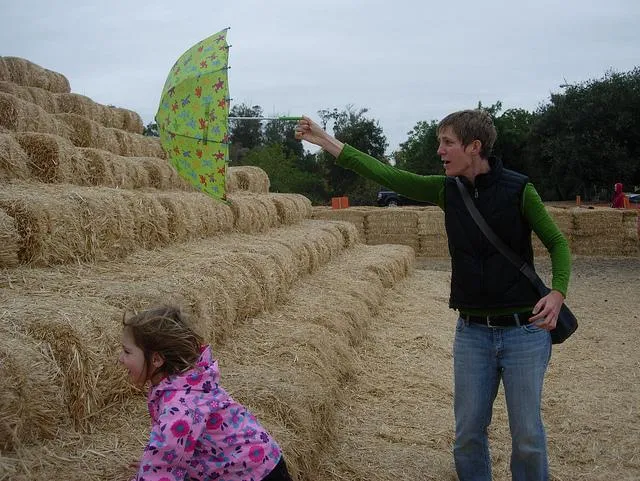 | 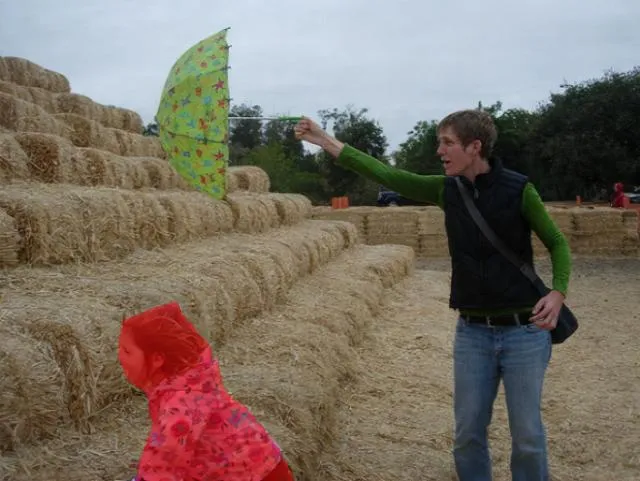 prompt: Given the following instructions: little girl, pink, your monitors colors off friend p pink shirt girl; please perform referring segmentation on this image. prompt: Given the following instructions: little girl, pink, your monitors colors off friend p pink shirt girl; please perform referring segmentation on this image. | 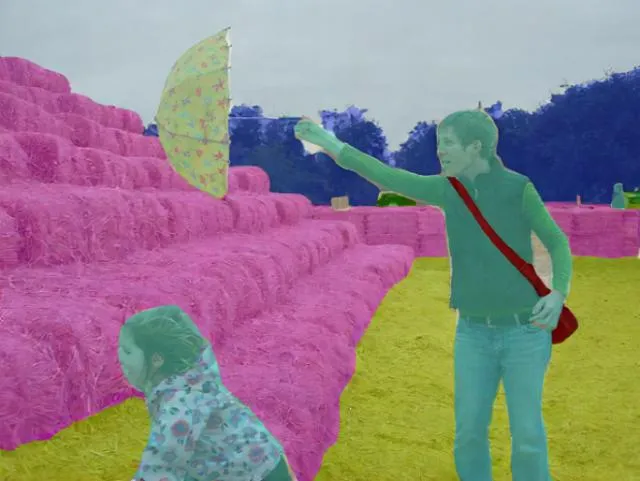 prompt: Please segment different classes in this image prompt: Please segment different classes in this image | 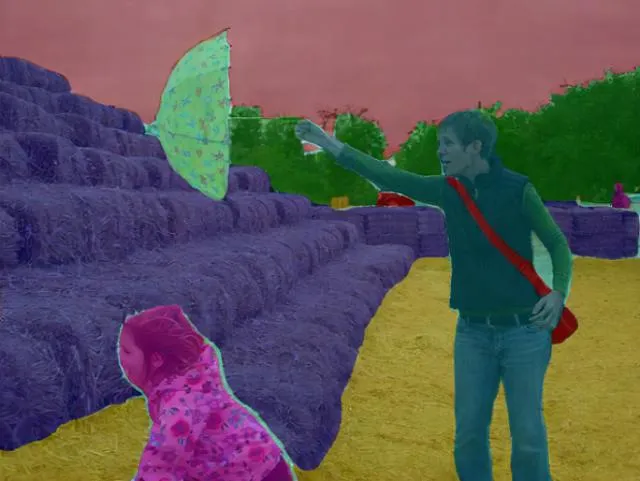 prompt: Please segment different instances in this image. prompt: Please segment different instances in this image. |
- Edge contour generation
| Input | Depth Map | Detection Box | Contour |
|---|---|---|---|
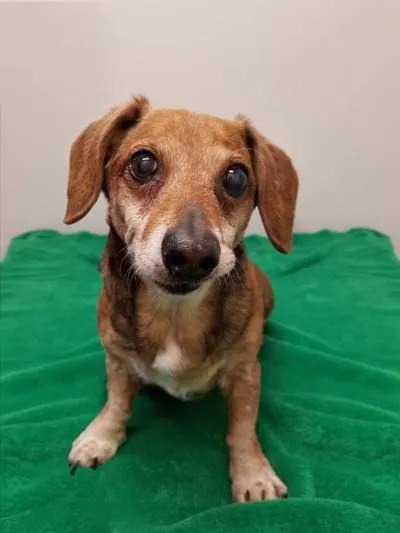 | 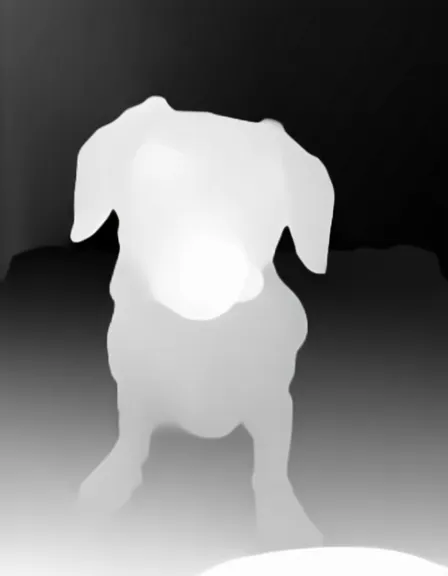 | 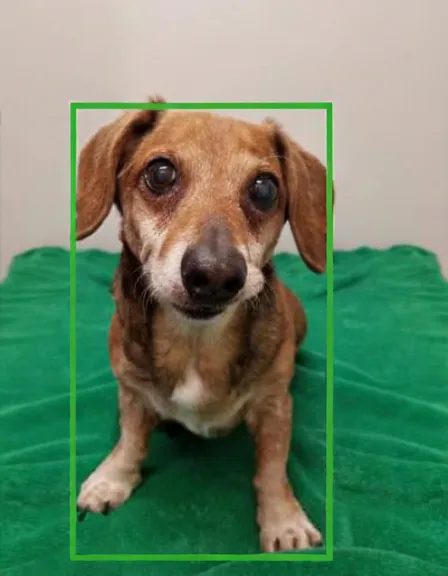 | 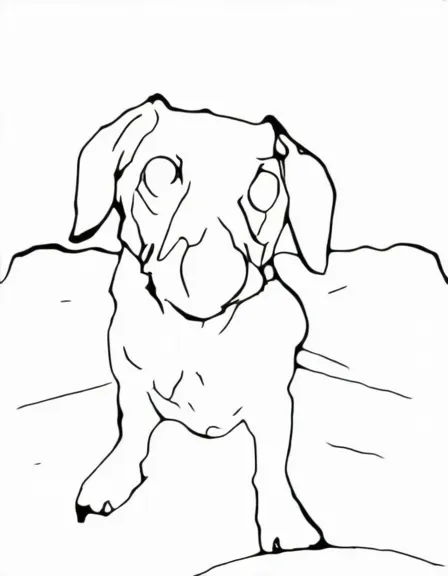 |
Model Downloads
You can download our latest model from both Huggingface and ModelScope. For previous version model like Ming-Lite-Omni v1, Please refer to this link.
| Model | Input modality | Oput modality | Download |
|---|---|---|---|
| Ming-Lite-Omni-1.5 | Image,text,video,audio | Image,text,audio | 🤗 HuggingFace 🤖 ModelScope |
pip install modelscope
modelscope download --model inclusionAI/Ming-Lite-Omni-1.5 --local_dir inclusionAI/Ming-Lite-Omni-1.5  --revision master
Note: This download process will take several minutes to several hours, depending on your network conditions.
Use Cases
Additional demonstration cases are available on our project page.
Environment Preparation
Installation with pip
pip install -r requirements.txt
# for python 3.10
pip install data/matcha_tts-0.0.5.1-cp310-cp310-linux_x86_64.whl
# for python 3.8
# pip install data/matcha_tts-0.0.5.1-cp38-cp38-linux_x86_64.whl
pip install diffusers==0.33.0
pip install nvidia-cublas-cu12==12.4.5.8  # for H20 GPU
Installation with docker
You can also initialize the environment by building the docker image. First clone this repository:
git clone --depth 1 https://github.com/inclusionAI/Ming.git
cd Ming
Then build the docker image with the provided Dockerfile in docker/docker-py310-cu121. This step might take a while:
docker build -t ming:py310-cu121 docker/docker-py310-cu121
At last, start the container with the current repo directory mounted:
docker run -it --gpus all -v "$(pwd)":/workspace/Ming ming:py310-cu121 ming:py310-cu121 /bin/bash
You can run the model with python interface. You may download the huggingface model in the repo directory first (.../Ming/) or mount the downloaded model path when starting the container.
Example Usage
We provide a step-by-step running example:
Step 1 - Download the source code
git clone https://github.com/inclusionAI/Ming.git
cd Ming
Step 2 - Download the model weights and create a soft link to the source code directory
Download our model following Model Downloads
mkdir inclusionAI
ln -s /path/to/inclusionAI/Ming-Lite-Omni-1.5 inclusionAI/Ming-Lite-Omni
Step 3 - Enter the code directory, you can refer to the following codes to run the Ming-Lite-Omni model.
jupyter notebook cookbook.ipynb
We also provide a simple example on the usage of this repo. For detailed usage, please refer to cookbook.ipynb.
import torch
from transformers import AutoProcessor, GenerationConfig
from modeling_bailingmm import BailingMMNativeForConditionalGeneration

# load model
model = BailingMMNativeForConditionalGeneration.from_pretrained(
    "inclusionAI/Ming-Lite-Omni",
    torch_dtype=torch.bfloat16,  # Use bfloat16 for memory efficiency
    attn_implementation="flash_attention_2",
    load_image_gen=True,
    low_cpu_mem_usage=True       # Minimize CPU memory during loading
).to("cuda")


# build processor
processor = AutoProcessor.from_pretrained(".", trust_remote_code=True)

# qa
messages = [
    {
        "role": "HUMAN",
        "content": [
            {"type": "text", "text": "请详细介绍鹦鹉的生活习性。"}
        ],
    },
]

# 1. Format inputs using chat template
text = processor.apply_chat_template(messages, add_generation_prompt=True)

# 2. Extract vision/audio data
image_inputs, video_inputs, audio_inputs = processor.process_vision_info(messages)

# 3. Prepare tensor inputs
inputs = processor(
    text=[text],
    images=image_inputs,
    videos=video_inputs,
    audios=audio_inputs,
    return_tensors="pt",
)
inputs = inputs.to(model.device)
for k in inputs.keys():
    if k == "pixel_values" or k == "pixel_values_videos" or k == "audio_feats":
        inputs[k] = inputs[k].to(dtype=torch.bfloat16)

# 4. Configure generation
generation_config = GenerationConfig.from_dict({'no_repeat_ngram_size': 10})
generated_ids = model.generate(
    **inputs,
    max_new_tokens=512,
    use_cache=True,
    eos_token_id=processor.gen_terminator,
    generation_config=generation_config,
)
generated_ids_trimmed = [
        out_ids[len(in_ids):] for in_ids, out_ids in zip(inputs.input_ids, generated_ids)
    ]

# 5. Decode output
output_text = processor.batch_decode(
    generated_ids_trimmed, skip_special_tokens=True, clean_up_tokenization_spaces=False
)[0]
print(output_text)
# Output:

# 鹦鹉是一种非常聪明和社交性强的鸟类,它们的生活习性非常丰富和有趣。以下是一些关于鹦鹉生活习性的详细介绍:
# ### 1. **栖息地**
# 鹦鹉主要分布在热带和亚热带地区,包括非洲、亚洲、澳大利亚和南美洲。它们通常生活在森林、草原、沙漠和城市环境中。不同种类的鹦鹉对栖息地的要求有所不同,但大多数鹦鹉喜欢有丰富植被和水源的地方。
# ### 2. **饮食**
# 鹦鹉是杂食性动物,它们的饮食非常多样化。它们的食物包括种子、坚果、水果、蔬菜、花蜜和昆虫。鹦鹉的喙非常强壮,能够轻松地打开坚硬的果壳和坚果。一些鹦鹉还会吃泥土或沙子,以帮助消化和补充矿物质。
# ......
Note: We test the examples on hardware of NVIDIA H800-80GB/H20-96G with CUDA 12.4. Loading inclusionAI/Ming-Lite-Omni-1.5 in bfloat16 takes about 42G GPU memory.
Gradio Demo
We provide a graphical user interface based on Gradio to facilitate the use of Ming-lite-omni.
- Install Gradio dependencies
pip install gradio
pip install gradio_client
- Start the Gradio server
python gradio_demo.py
License and Legal Disclaimer
This code repository is licensed under the MIT License, and the Legal Disclaimer is located in the LEGAL.md file under the project's root directory.
Citation
If you find our work helpful, feel free to give us a cite.
@misc{Mingomni2025,
      title  = {Ming-Omni: A Unified Multimodal Model for Perception and Generation},
      author = {Inclusion AI},
      year = {2025},
      eprint = {2506.09344},
      archivePrefix = {arXiv},
      url = {https://arxiv.org/abs/2506.09344}
}