Infinity-Parser2-Pro
News
- [2026-05-11] Released flagship document parsing models: Infinity-Parser2-Pro, Infinity-Parser2-Flash, and the dataset Infinity-Doc2-5M. Infinity-Parser2 achieves SOTA results on olmOCR-bench and ParseBench.
Introduction
We are excited to release Infinity-Parser2, our latest flagship document understanding model. We offer two distinct variants to address diverse deployment constraints: Infinity-Parser2-Pro, optimized for maximum accuracy in precision-critical tasks, achieves state-of-the-art results on olmOCR-Bench (87.6%) and ParseBench (74.3%), surpassing frontier models including DeepSeek-OCR-2, PaddleOCR-VL-1.5, and MinerU2.5. Infinity-Parser2-Flash, engineered for low-latency inference, delivers a 3.68x speedup over our previous Infinity-Parser-7B model. With significant upgrades to both our data engine and multi-task reinforcement learning approach, the model consolidates robust multi-modal parsing capabilities into a unified architecture, unlocking brand-new zero-shot capabilities across a wide range of real-world business scenarios.
Key Features
- Upgraded Data Engine: We have comprehensively enhanced our synthetic data engine to support both fixed-layout and flexible-layout document formats. By curating nearly 5 million diverse document parsing samples across a wide range of layouts, combined with a dynamic adaptive sampling strategy, we ensure highly balanced and robust multi-task learning across various document types.
- Multi-Task Reinforcement Learning: We designed a novel verifiable reward system to support Joint Reinforcement Learning (RL), enabling seamless and simultaneous co-optimization of multiple complex tasks, including document parsing, element parsing, chart parsing, chemical formula parsing, document vqa, and general multimodal understanding.
- Breakthrough Parsing Performance: Infinity-Parser2-Pro substantially outperforms our previous 7B model, achieving 87.6% on olmOCR-Bench and 74.3% on ParseBench, surpassing frontier models such as DeepSeek-OCR-2, PaddleOCR-VL, and MinerU2.5.
- Inference Acceleration: Infinity-Parser2-Flash delivers significantly higher efficiency than Infinity-Parser-7B, with inference throughput increased by 3.68x (from 441 to 1,624 tokens/sec), reducing both deployment latency and costs.
Performance
Note: '*' denotes results evaluated using our internal evaluation tools. '‡' denotes results from the Gemini-3.1-Pro.
Quick Start
1. Minimal "Hello World" (Native Transformers)
If you are looking for a minimal script to parse a single image to Markdown using the native transformers library, here is a simple snippet:
from PIL import Image
import torch
from transformers import AutoModelForImageTextToText, AutoProcessor
from qwen_vl_utils import process_vision_info

# Load the model and processor
model = AutoModelForImageTextToText.from_pretrained(
    "infly/Infinity-Parser2-Pro",
    torch_dtype="float16",
    device_map="auto",
)
processor = AutoProcessor.from_pretrained("infly/Infinity-Parser2-Pro")

# Build the messages for the model
pil_image = Image.open("demo_data/demo.png").convert("RGB")
min_pixels = 2048  # 32 * 64
max_pixels = 16777216  # 4096 * 4096
prompt = """
- Extract layout information from the provided PDF image.
- For each layout element, output its bbox, category, and the text content within the bbox.
- Bbox format: [x1, y1, x2, y2].
- Allowed layout categories: ['header', 'title', 'text', 'figure', 'table', 'formula', 'figure_caption', 'table_caption', 'formula_caption', 'figure_footnote', 'table_footnote', 'page_footnote', 'footer'].
- Text extraction and formatting:
  1) For 'figure', the text field must be an empty string.
  2) For 'formula', format text as LaTeX.
  3) For 'table', format text as HTML.
  4) For all other categories (e.g., text, title), format text as Markdown.
- The output text must be exactly the original text from the image, with no translation or rewriting.
- Sort all layout elements in human reading order.
- Final output must be a single JSON object.
"""

messages = [
    {
        "role": "user",
        "content": [
            {
                "type": "image",
                "image": pil_image,
                "min_pixels": min_pixels,
                "max_pixels": max_pixels,
            },
            {"type": "text", "text": prompt},
        ],
    }
]

chat_template_kwargs = {"enable_thinking": False}

text = processor.apply_chat_template(
    messages, tokenize=False, add_generation_prompt=True, **chat_template_kwargs
)
image_inputs, _ = process_vision_info(messages, image_patch_size=16)

inputs = processor(
    text=text,
    images=image_inputs,
    do_resize=False,
    padding=True,
    return_tensors="pt",
)

# Move all tensors to the same device as the model
inputs = {
    k: v.to(model.device) if isinstance(v, torch.Tensor) else v
    for k, v in inputs.items()
}

# Generate the response
generated_ids = model.generate(
    **inputs,
    max_new_tokens=32768,
    temperature=0.0,
    top_p=1.0,
)

# Strip input tokens, keeping only the newly generated response
generated_ids_trimmed = [
    out_ids[len(in_ids) :]
    for in_ids, out_ids in zip(inputs["input_ids"], generated_ids)
]
output_text = processor.batch_decode(
    generated_ids_trimmed, skip_special_tokens=True, clean_up_tokenization_spaces=False
)
print(output_text)
2. Advanced Pipeline (infinity_parser2)
For bulk processing, advanced features, or an end-to-end PDF parsing pipeline, we recommend using our infinity_parser2 wrapper.
Pre-requisites
# Create a Conda environment (Optional)
conda create -n infinity_parser2 python=3.12
conda activate infinity_parser2

# Install PyTorch (CUDA). Find the proper version at https://pytorch.org/get-started/previous-versions based on your CUDA version.
pip install torch==2.10.0 torchvision==0.25.0 torchaudio==2.10.0 --index-url https://download.pytorch.org/whl/cu128

# Install FlashAttention (FlashAttention-2 is recommended by default)
# Standard install (compiles from source, ~10-30 min):
pip install flash-attn==2.8.3 --no-build-isolation
# Faster install: download wheel from https://github.com/Dao-AILab/flash-attention/releases. Then run: pip install /path/to/<wheel_filename>.whl
# For Hopper GPUs (e.g. H100, H800), we recommend FlashAttention-3 instead. See: https://github.com/Dao-AILab/flash-attention
# NOTE: The code will prioritize detecting FlashAttention-3. If not found, it falls back to FlashAttention-2.

# Install vLLM
# NOTE: you may need to run the command below to resolve triton and numpy conflicts before installing vllm.
# pip uninstall -y pytorch-triton opencv-python opencv-python-headless numpy && rm -rf "$(python -c 'import site; print(site.getsitepackages()[0])')/cv2"
pip install vllm==0.17.1
Install infinity_parser2
Install from PyPI
pip install infinity_parser2
Install from source code
git clone https://github.com/infly-ai/INF-MLLM.git
cd INF-MLLM/Infinity-Parser2
pip install -e .
Usage
Command Line
The parser command is the fastest way to get started.
# NOTE: The Infinity-Parser2 model will be automatically downloaded on the first run.

# Parse a PDF (outputs Markdown by default)
parser demo_data/demo.pdf

# Parse an image
parser demo_data/demo.png

# Batch parse multiple files
parser demo_data/demo.pdf demo_data/demo.png -o ./output

# Parse an entire directory
parser demo_data -o ./output

# Output raw JSON with layout bboxes
parser demo_data/demo.pdf --output-format json

# Convert to Markdown directly
parser demo_data/demo.png --task doc2md
# View all options
parser --help
Python API
# NOTE: The Infinity-Parser2 model will be automatically downloaded on the first run.

from infinity_parser2 import InfinityParser2

parser = InfinityParser2()

# Parse a single file (returns Markdown)
result = parser.parse("demo_data/demo.pdf")
print(result)

# Parse multiple files (returns list)
results = parser.parse(["demo_data/demo.pdf", "demo_data/demo.png"])

# Parse a directory (returns dict)
results = parser.parse("demo_data")
Output formats:
| task_type | Description | Default Output |
|---|---|---|
doc2json | Extract layout elements with bboxes (default) | Markdown |
doc2md | Directly convert to Markdown | Markdown |
custom | Use your own prompt | Raw model output |
# doc2json: get raw JSON with bbox coordinates
result = parser.parse("demo_data/demo.pdf", output_format="json")

# doc2md: direct Markdown conversion
result = parser.parse("demo_data/demo.pdf", task_type="doc2md")

# Custom prompt
result = parser.parse("demo_data/demo.pdf", task_type="custom",
                      custom_prompt="Please transform the document's contents into Markdown format.")

# Batch processing with custom batch size
result = parser.parse("demo_data", batch_size=8)

# Save results to directory
parser.parse("demo_data/demo.pdf", output_dir="./output")
Backends:
Infinity-Parser2 supports three inference backends. By default it uses the vLLM Engine (offline batch inference).
# vLLM Engine (default) — offline batch inference
parser = InfinityParser2(
    model_name="infly/Infinity-Parser2-Pro",
    backend="vllm-engine",        # default
    tensor_parallel_size=2,
)

# Transformers — local single-GPU inference
parser = InfinityParser2(
    model_name="infly/Infinity-Parser2-Pro",
    backend="transformers",
    device="cuda",
    torch_dtype="bfloat16",       # "float16" or "bfloat16"
)

# vLLM Server — online HTTP API (start server first)
parser = InfinityParser2(
    model_name="infly/Infinity-Parser2-Pro",
    backend="vllm-server",
    api_url="http://localhost:8000/v1/chat/completions",
    api_key="EMPTY",
)
To start a vLLM server:
vllm serve infly/Infinity-Parser2-Pro \
    --trust-remote-code \
    --reasoning-parser qwen3 \
    --host 0.0.0.0 \
    --port 8000 \
    --tensor-parallel-size 2 \
    --gpu-memory-utilization 0.85 \
    --max-model-len 65536 \
    --mm-encoder-tp-mode data \
    --mm-processor-cache-type shm \
    --enable-prefix-caching
For more details, please refer to the official guide.
Visual Parsing Examples
| Visualization | Note |
|---|---|
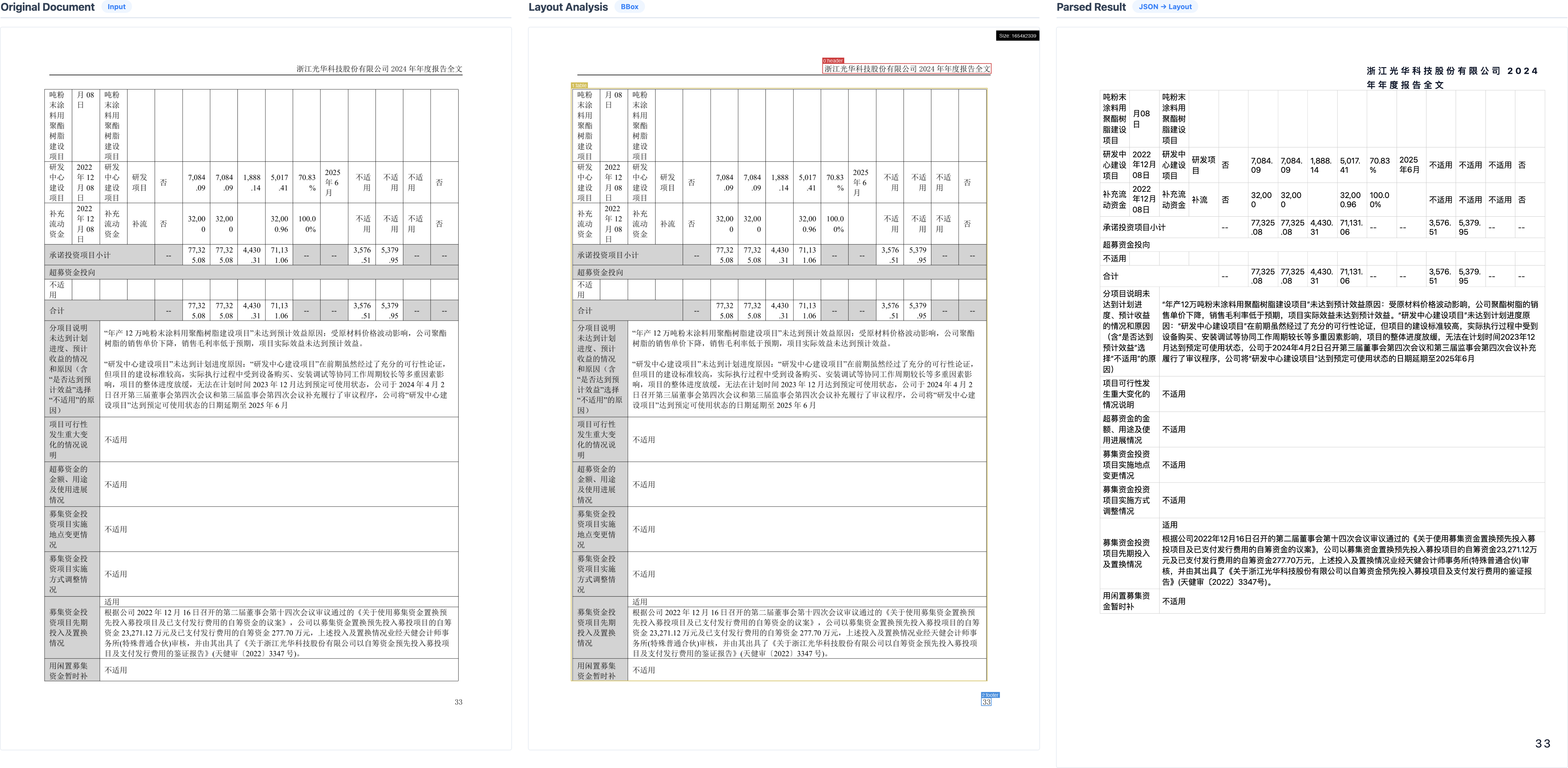
| A-Stock | Easy to miscount colspan in tables |
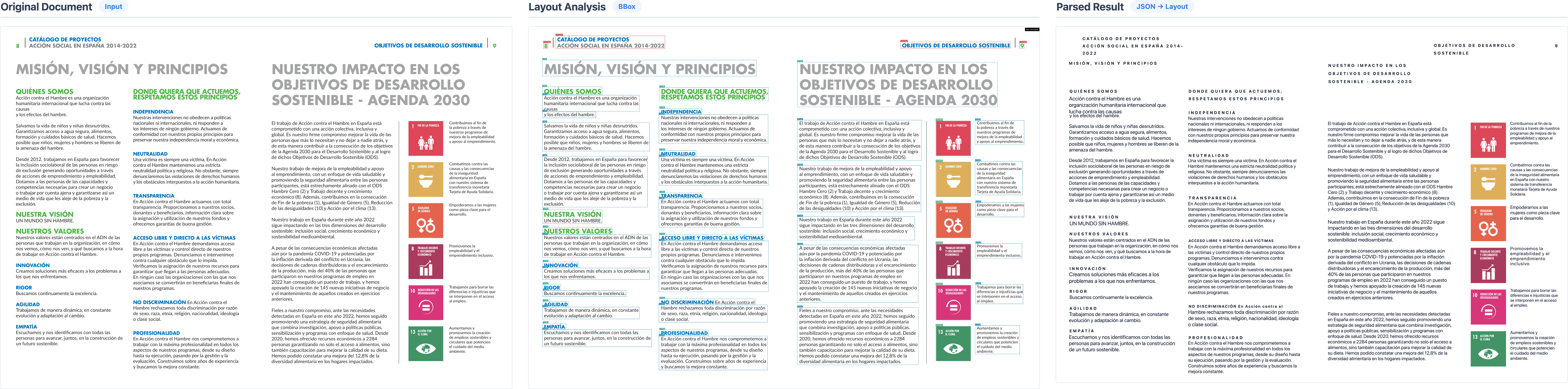
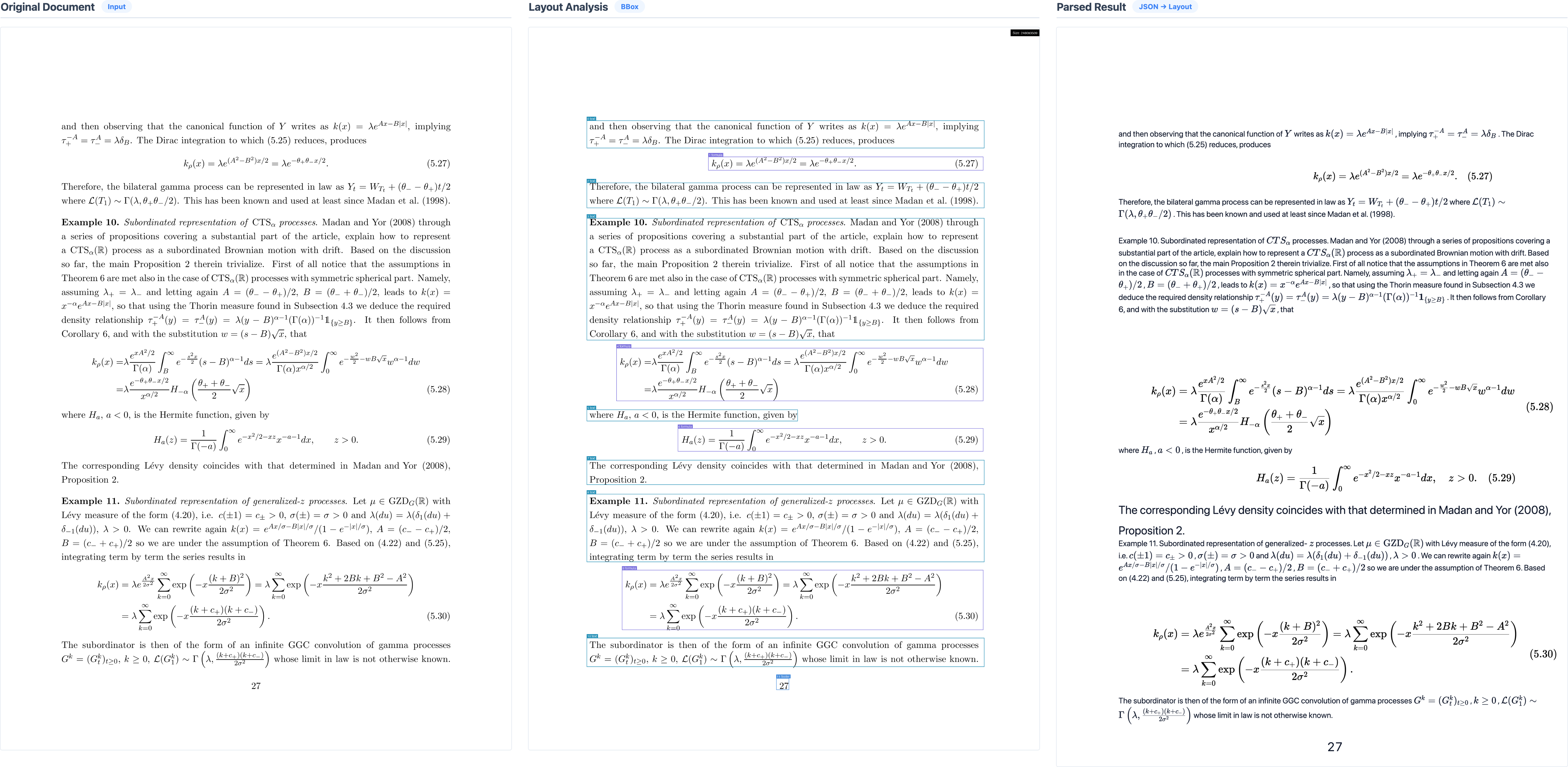
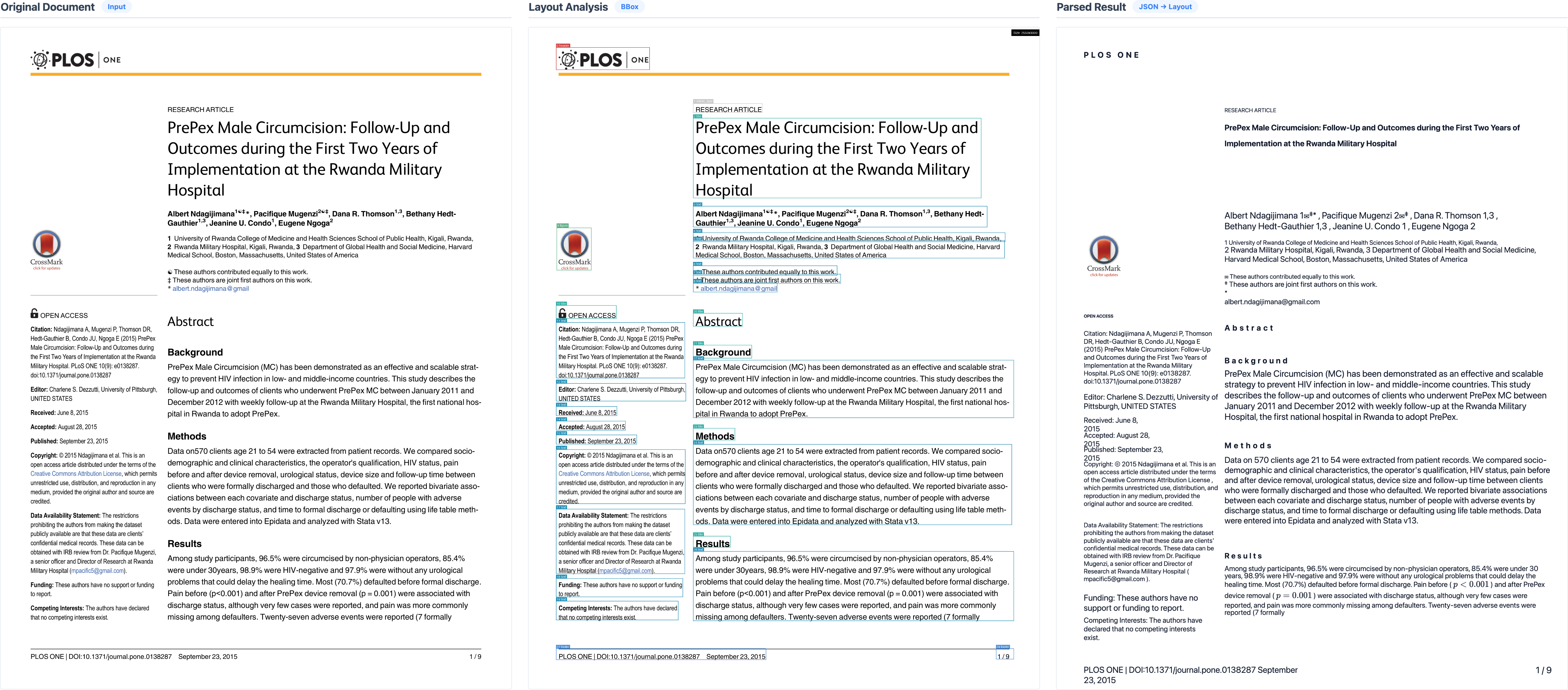
| Multi-Column Layout | Complex layout analysis and reading order recovery. |
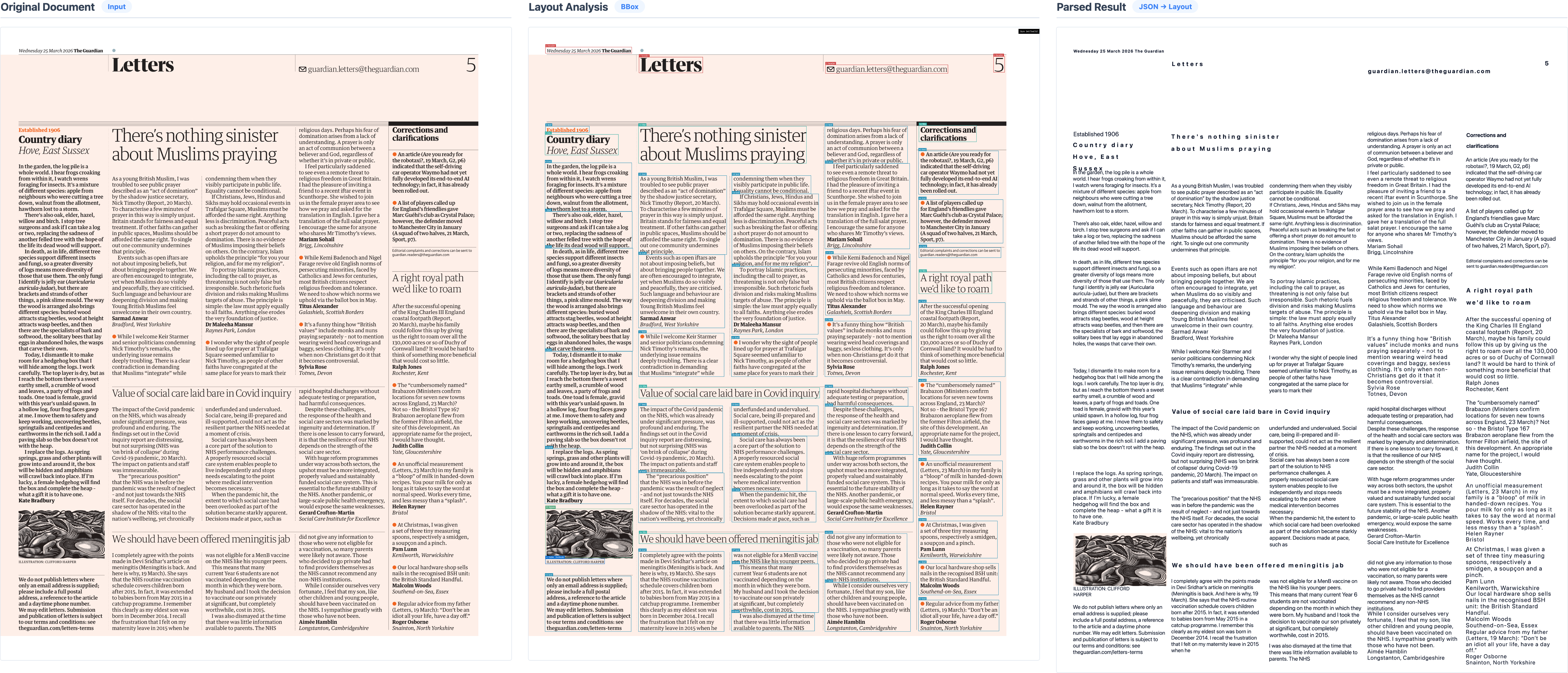
| Historical Newspaper | High probability of bounding box omission caused by ultra-dense text distribution, narrow column margins, and microscopic fonts. |
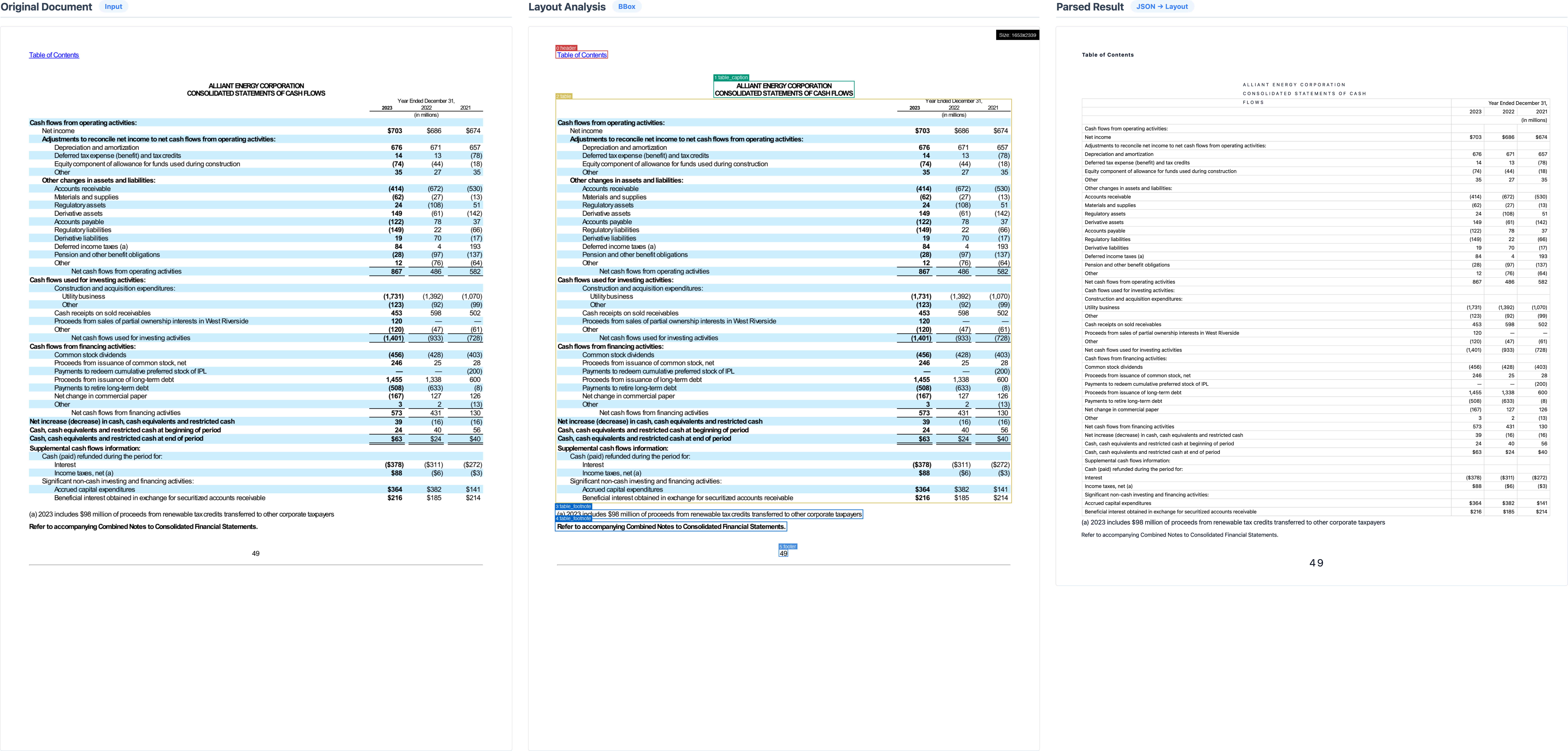
| US-Stock | Precise row alignment across wide frameless spaces and capturing the hierarchical semantics of indented headers. |
| Academic Paper (arXiv) | Accurate structural preservation of complex multi-line mathematical formulas, dense inline notations, and deeply nested subscripts/superscripts. |
| Magazine Page | Complex reading order recovery in an asymmetric multi-column layout. |
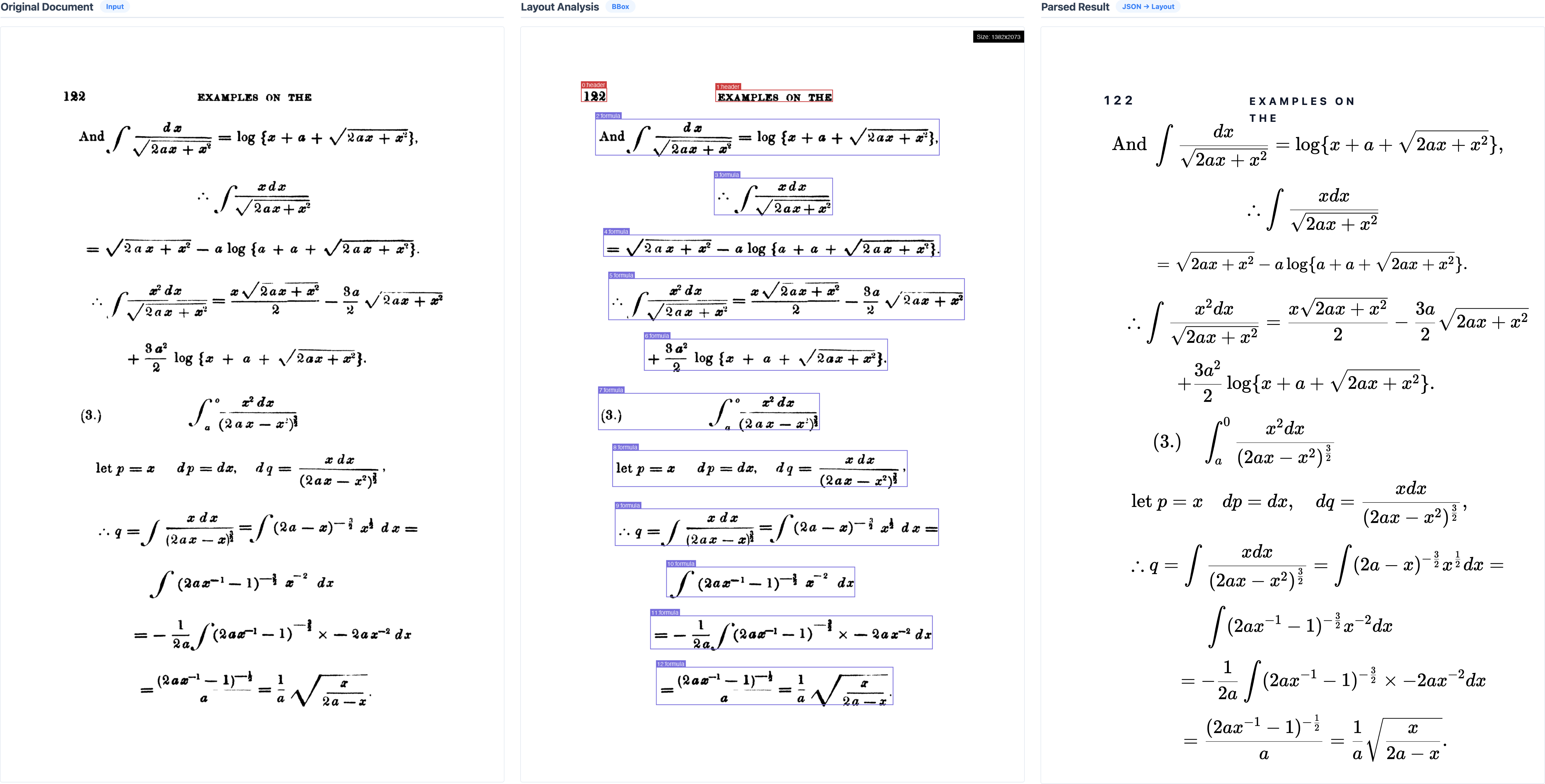
| Scanned Mathematics | Degraded and blurred print |
Limitations
Infinity-Parser2 has several known limitations to consider. It primarily supports English and Chinese documents, and performance degrades when processing multilingual content. Accuracy may also be reduced when parsing charts with complex layouts, as well as documents containing multi-oriented elements such as table rotated at varying angles. Additionally, the model does not capture fine-grained text formatting (e.g., bold, italic, strikethrough) and exhibits suboptimal multimodal instruction-following capability, meaning it may not always reliably follow complex multi-step visual instructions.
Acknowledgments
We would like to thank Qwen3.5, ms-swift, VeRL, lmms-eval, olmocr, PaddleOCR-VL, MinerU, dots.ocr, Chandra-OCR-2 for providing dataset, code and models.
Citation
@misc{huang2026infinityparser2technicalreport,
      title={Infinity-Parser2 Technical Report},
      author={Zuming Huang and Jun Huang and Kexuan Ren and Baode Wang and Weizhen Li and Jianming Feng and Yu Wang and Yichen Yao and Shijun Lin and Yige Tang and Cheng Peng and Weidi Xu and Wei Chu and Yinghui Xu and Yuan Qi},
      year={2026},
      eprint={2607.07836},
      archivePrefix={arXiv},
      primaryClass={cs.AI},
      url={https://arxiv.org/abs/2607.07836},
}
License
This model is licensed under apache-2.0.