Installation
git clone https://github.com/ubc-vision/solv3r.git && cd solv3r
conda create -n solv3r python=3.11 -y && conda activate solv3r
pip install -e .
The pretrained model is on 🤗 HuggingFace.
Solv3R.from_pretrained() downloads it to the Hugging Face cache on first use, or uses checkpoints/solv3r.safetensors if you place it there.
Quick start
from solv3r import Solv3R, cameras_from_pose_enc, list_images, load_images

model = Solv3R.from_pretrained()                       # the released weights
images = load_images(list_images("path/to/images"))   # long side 504, sides multiples of 14, no crop
ctx = model.encode(images)                             # the first image defines the world frame
z = model.solve(ctx, calls=16)                         # 16 calls of the looped block
pred = model.decode(z, ctx)                            # depth, depth_conf, rays, world_points, pose_enc
c2w, K = cameras_from_pose_enc(pred["pose_enc"], (ctx.H, ctx.W))
The state z can be used again at any point:
z = model.solve(ctx, calls=8, z=z)                     # continue solving
new_images = load_images(list_images("path/to/more_images"), size=(ctx.H, ctx.W))
z, ctx = model.add_views(z, ctx, new_images)           # new views join the ongoing solve
z = model.solve(ctx, calls=8, z=z)                     # all views are updated, the old ones too
Examples
Each script takes a folder of images or a video, and writes the cameras and depth maps (.npz), a point cloud (.ply)
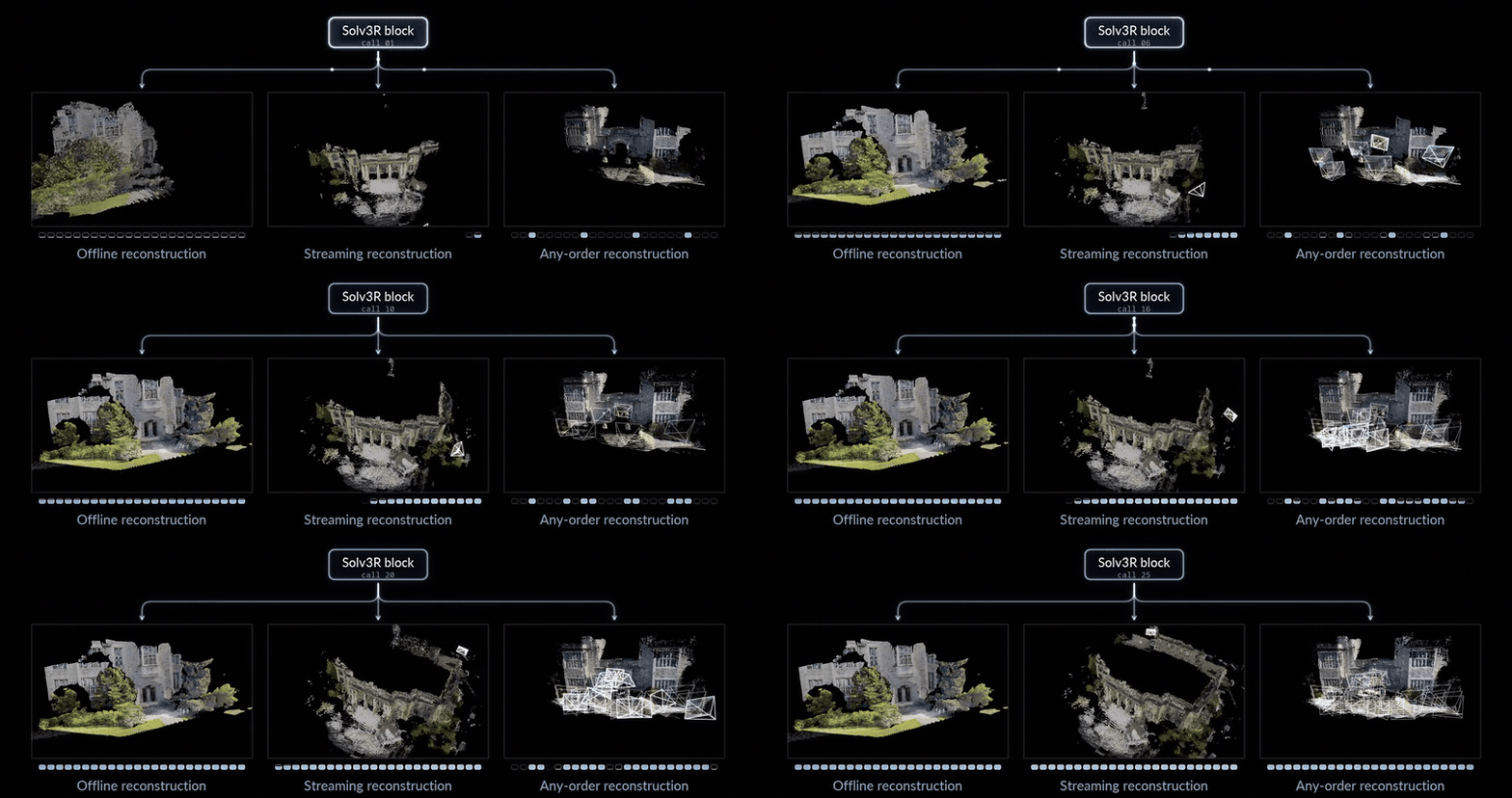
and a viewer that opens in the browser and plays the solve (.html).
python examples/offline.py     --images path/to/images --out outputs/offline      # all images at once
python examples/incremental.py --images path/to/images --out outputs/incremental  # groups of images join the solve
python examples/streaming.py   --frames path/to/video.mp4 --out outputs/streaming # video frames, one at a time
Or try them on the samples in examples/data, the inputs of the animations above:
python examples/offline.py     --images examples/data/park --out outputs/offline --sky-mask
python examples/incremental.py --images examples/data/sofas --out outputs/incremental --initial 8 --group 10 --calls 12
python examples/streaming.py   --frames examples/data/desk --out outputs/streaming
--adaptive 0.02 stops the offline solve once the state settles, --config L4 or S4 selects a lighter streaming
setting from paper Table 8, --memory-stride 16 keeps the paper's streaming memory for short videos (faster; by default
short videos keep more frames in memory), and --sky-mask leaves the sky out of outdoor point clouds.
A result can also be rendered as a short video (--aerial for drone photos):
python examples/render_video.py --input outputs/offline/solve --out outputs/offline/solve.mp4 --aerial
Demo
Solve your own scenes in the interactive demo on 🤗 HuggingFace Space, or run it locally:
pip install -e ".[demo]"
python demo/app.py            # http://127.0.0.1:7860
Solve photos or a video offline, incrementally or as a stream, watch the solve call by call, keep solving from the
result, and export the point cloud (.ply), a COLMAP model or the cameras and depth maps.
Evaluation
The offline and streaming benchmarks follow existing protocols without changes: the offline benchmark of DVLT and the streaming camera-pose evaluation of CUT3R / TTT3R.
Offline benchmark
DTU, ETH3D, 7-Scenes, ScanNet++ and nuScenes, prepared with the scripts of DVLT
as <data-root>/test/<dataset>.
pip install -e ".[eval]"   # the offline benchmark runs inside DVLT's evaluation pipeline
python eval/offline.py --data-root /path/to/benchmark --out results/offline                    # 16 calls
python eval/offline.py --data-root /path/to/benchmark --out results/offline --adaptive 0.02   # adaptive
python eval/offline.py --data-root /path/to/benchmark --out results/offline --datasets eth3d
Expected results (Table 1 of the paper):
AUC@3 and AUC@30 are camera pose accuracy, Rel. L2 and Inlier are point-map error and inlier ratio (%).
Streaming camera poses
Sintel, TUM-dynamics and ScanNet as in CUT3R and
TTT3R, prepared with TTT3R datasets_preprocess/long_prepare_{tum,scannet}.py:
<data-root>/sintel/training/{final,camdata_left}/<seq>
<data-root>/long_tum_s1/<seq>/{rgb_1000, groundtruth_1000.txt}
<data-root>/long_scannet_s3/<scene>/{color_1000, pose_1000.txt}
python eval/streaming.py --data-root /path/to/data --task all --config L8 --out results/streaming
Expected results (Tables 3 and 8 of the paper):
Map-based relocalization
7-Scenes and Cambridge Landmarks as released:
<data-root>/7scenes/<scene>/{TrainSplit.txt, TestSplit.txt, seq-XX/frame-XXXXXX.{color.png, pose.txt}}
<data-root>/cambridge/<Scene>/{dataset_train.txt, dataset_test.txt, seqN/frameXXXXX.png}
python eval/relocalization.py --data-root /path/to/data --out results/relocalization
Expected results (Table 2 of the paper):
Median translation and rotation errors and localization recall (%), averaged over scenes.
Citation
@article{kwak2026solv3r,
  title   = {Solv3R: 3D Looped Transformer as a Multi-view Solver},
  author  = {Kwak, Jeong-gi and Tagliasacchi, Andrea and Kagami, Sho and Ono, Yuki and Yi, Kwang Moo},
  journal = {arXiv preprint arXiv:2611.02857},
  year    = {2026}
}
License
The code is released under the Apache License 2.0. The model weights are built on DVLT and are released under the NVIDIA License (non-commercial, research and evaluation use only).