Kandinsky 2.2
Kandinsky inherits best practices from Dall-E 2 and Latent diffusion while introducing some new ideas.
It uses the CLIP model as a text and image encoder, and diffusion image prior (mapping) between latent spaces of CLIP modalities. This approach increases the visual performance of the model and unveils new horizons in blending images and text-guided image manipulation.
The Kandinsky model is created by Arseniy Shakhmatov, Anton Razzhigaev, Aleksandr Nikolich, Igor Pavlov, Andrey Kuznetsov and Denis Dimitrov
Usage
Kandinsky 2.2 is available in diffusers!
pip install diffusers transformers accelerate
Text to image
from diffusers import AutoPipelineForText2Image
import torch

pipe = AutoPipelineForText2Image.from_pretrained("kandinsky-community/kandinsky-2-2-decoder", torch_dtype=torch.float16)
pipe = pipe.to("cuda")

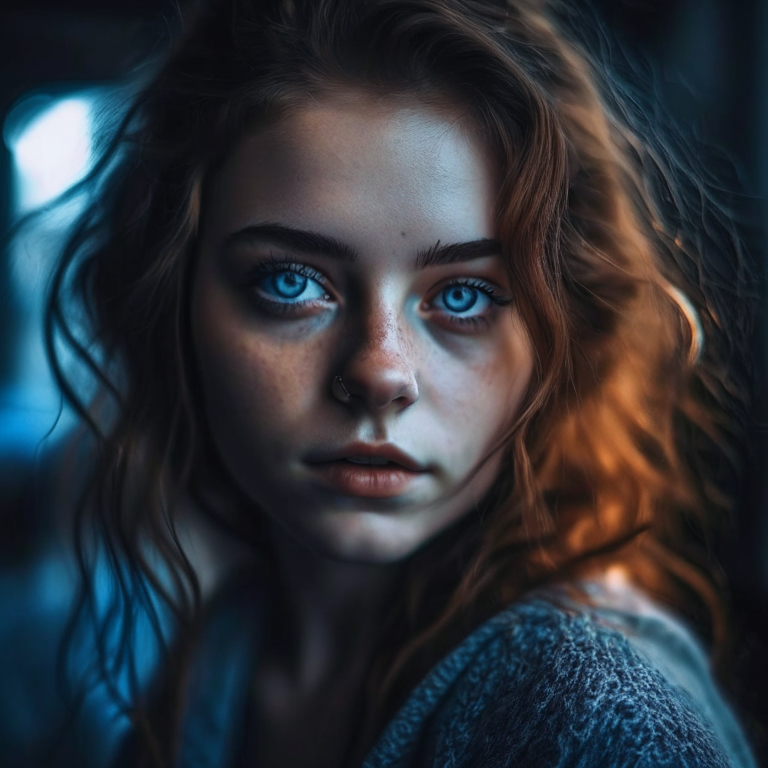
prompt = "portrait of a young women, blue eyes, cinematic"
negative_prompt = "low quality, bad quality"

image = pipe(prompt=prompt, negative_prompt=negative_prompt, prior_guidance_scale =1.0, height=768, width=768).images[0]
image.save("portrait.png")
Text Guided Image-to-Image Generation
from PIL import Image
import requests
from io import BytesIO

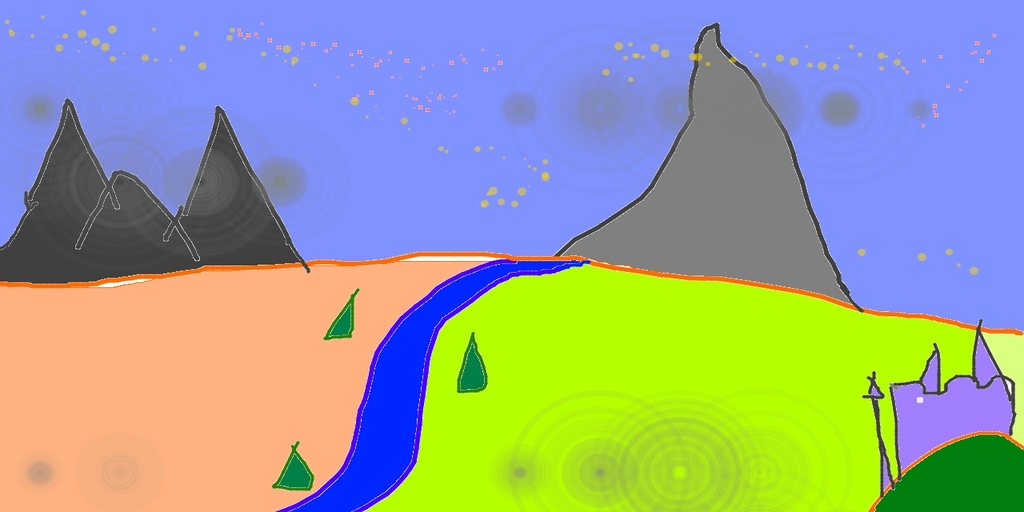
url = "https://raw.githubusercontent.com/CompVis/stable-diffusion/main/assets/stable-samples/img2img/sketch-mountains-input.jpg"
response = requests.get(url)
original_image = Image.open(BytesIO(response.content)).convert("RGB")
original_image = original_image.resize((768, 512))
from diffusers import AutoPipelineForImage2Image
import torch

pipe = AutoPipelineForImage2Image.from_pretrained("kandinsky-community/kandinsky-2-2-decoder", torch_dtype=torch.float16)
pipe.enable_model_cpu_offload()

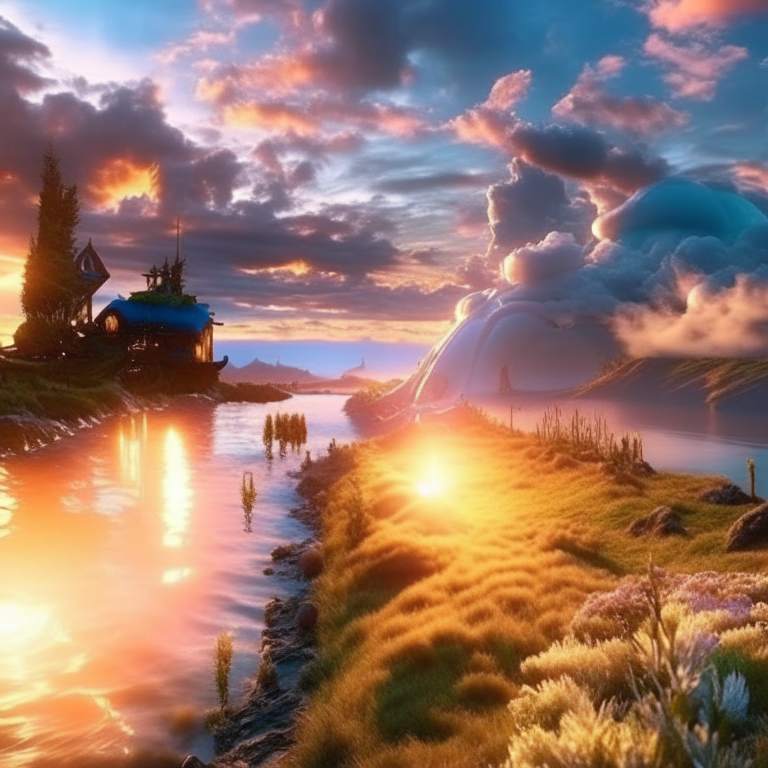
prompt = "A fantasy landscape, Cinematic lighting"
negative_prompt = "low quality, bad quality"

image = pipe(prompt=prompt, image=original_image, strength=0.3, height=768, width=768).images[0]

out.images[0].save("fantasy_land.png")
Interpolate
from diffusers import KandinskyV22PriorPipeline, KandinskyV22Pipeline
from diffusers.utils import load_image
import PIL

import torch

pipe_prior = KandinskyV22PriorPipeline.from_pretrained(
    "kandinsky-community/kandinsky-2-2-prior", torch_dtype=torch.float16
)
pipe_prior.to("cuda")

img1 = load_image(
    "https://huggingface.co/datasets/hf-internal-testing/diffusers-images/resolve/main" "/kandinsky/cat.png"
)

img2 = load_image(
    "https://huggingface.co/datasets/hf-internal-testing/diffusers-images/resolve/main" "/kandinsky/starry_night.jpeg"
)

# add all the conditions we want to interpolate, can be either text or image
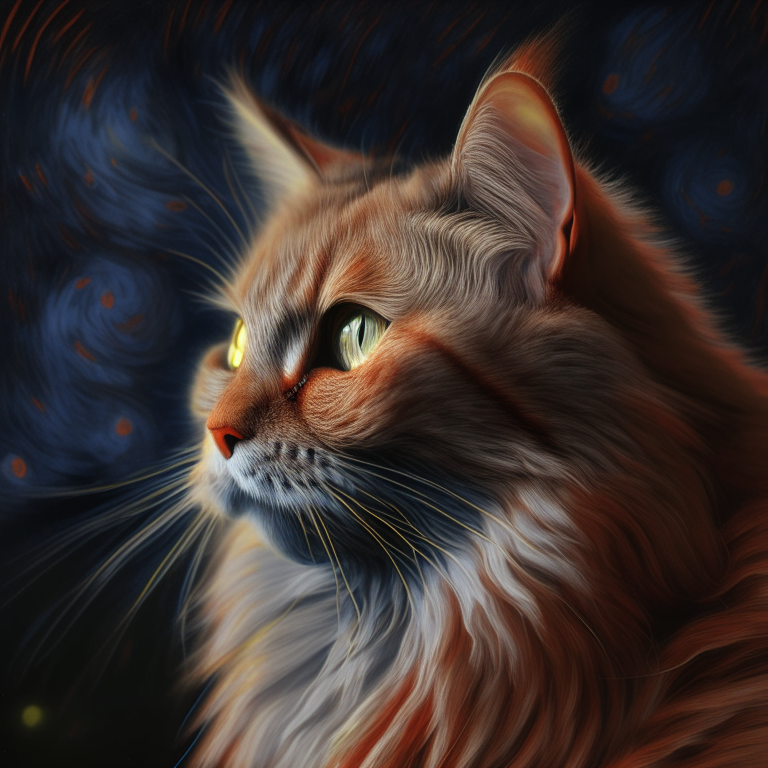
images_texts = ["a cat", img1, img2]

# specify the weights for each condition in images_texts
weights = [0.3, 0.3, 0.4]

# We can leave the prompt empty
prompt = ""
prior_out = pipe_prior.interpolate(images_texts, weights)

pipe = KandinskyV22Pipeline.from_pretrained("kandinsky-community/kandinsky-2-2-decoder", torch_dtype=torch.float16)
pipe.to("cuda")

image = pipe(**prior_out, height=768, width=768).images[0]

image.save("starry_cat.png")
Text Guided Inpainting Generation
from diffusers import AutoPipelineForInpainting
from diffusers.utils import load_image
import torch
import numpy as np

pipe = AutoPipelineForInpainting.from_pretrained("kandinsky-community/kandinsky-2-2-decoder-inpaint", torch_dtype=torch.float16)
pipe.enable_model_cpu_offload()

prompt = "a hat"

init_image = load_image(
    "https://huggingface.co/datasets/hf-internal-testing/diffusers-images/resolve/main" "/kandinsky/cat.png"
)

mask = np.zeros((768, 768), dtype=np.float32)
# Let's mask out an area above the cat's head
mask[:250, 250:-250] = 1


out = pipe(
    prompt=prompt,
    image=init_image,
    mask_image=mask,
    height=768,
    width=768,
    num_inference_steps=150,
)

image = out.images[0]
image.save("cat_with_hat.png")

Breaking change on the mask input:
We introduced a breaking change for Kandinsky inpainting pipeline in the following pull request: https://github.com/huggingface/diffusers/pull/4207. Previously we accepted a mask format where black pixels represent the masked-out area. We have changed to use white pixels to represent masks instead in order to have a unified mask format across all our pipelines. Please upgrade your inpainting code to follow the above. If you are using Kandinsky Inpaint in production. You now need to change the mask to:
# For PIL input
import PIL.ImageOps
mask = PIL.ImageOps.invert(mask)

# For PyTorch and Numpy input
mask = 1 - mask
Text-to-Image Generation with ControlNet Conditioning
import torch
import numpy as np

from transformers import pipeline
from diffusers.utils import load_image

from diffusers import KandinskyV22PriorPipeline, KandinskyV22ControlnetPipeline

# let's take an image and extract its depth map.
def make_hint(image, depth_estimator):
    image = depth_estimator(image)["depth"]
    image = np.array(image)
    image = image[:, :, None]
    image = np.concatenate([image, image, image], axis=2)
    detected_map = torch.from_numpy(image).float() / 255.0
    hint = detected_map.permute(2, 0, 1)
    return hint

img = load_image(
    "https://huggingface.co/datasets/hf-internal-testing/diffusers-images/resolve/main/kandinskyv22/cat.png"
).resize((768, 768))

# We can use the `depth-estimation` pipeline from transformers to process the image and retrieve its depth map.
depth_estimator = pipeline("depth-estimation")
hint = make_hint(img, depth_estimator).unsqueeze(0).half().to("cuda")

# Now, we load the prior pipeline and the text-to-image controlnet pipeline
pipe_prior = KandinskyV22PriorPipeline.from_pretrained(
    "kandinsky-community/kandinsky-2-2-prior", torch_dtype=torch.float16
)
pipe_prior = pipe_prior.to("cuda")

pipe = KandinskyV22ControlnetPipeline.from_pretrained(
    "kandinsky-community/kandinsky-2-2-controlnet-depth", torch_dtype=torch.float16
)
pipe = pipe.to("cuda")

# We pass the prompt and negative prompt through the prior to generate image embeddings
prompt = "A robot, 4k photo"
negative_prior_prompt = "lowres, text, error, cropped, worst quality, low quality, jpeg artifacts, ugly, duplicate, morbid, mutilated, out of frame, extra fingers, mutated hands, poorly drawn hands, poorly drawn face, mutation, deformed, blurry, dehydrated, bad anatomy, bad proportions, extra limbs, cloned face, disfigured, gross proportions, malformed limbs, missing arms, missing legs, extra arms, extra legs, fused fingers, too many fingers, long neck, username, watermark, signature"

generator = torch.Generator(device="cuda").manual_seed(43)
image_emb, zero_image_emb = pipe_prior(
    prompt=prompt, negative_prompt=negative_prior_prompt, generator=generator
).to_tuple()

# Now we can pass the image embeddings and the depth image we extracted to the controlnet pipeline. With Kandinsky 2.2, only prior pipelines accept `prompt` input. You do not need to pass the prompt to the controlnet pipeline.
images = pipe(
    image_embeds=image_emb,
    negative_image_embeds=zero_image_emb,
    hint=hint,
    num_inference_steps=50,
    generator=generator,
    height=768,
    width=768,
).images
images[0].save("robot_cat.png")
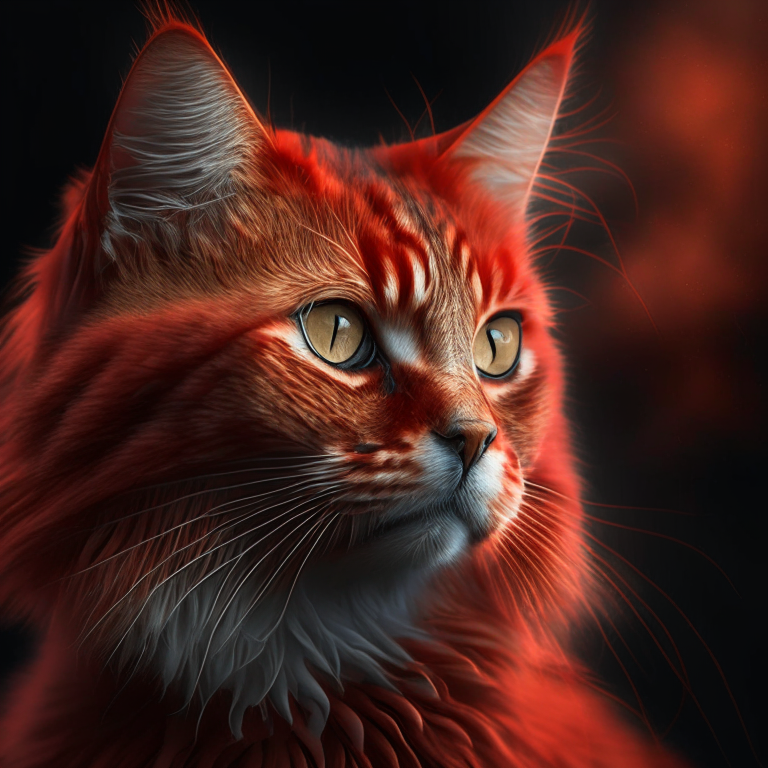
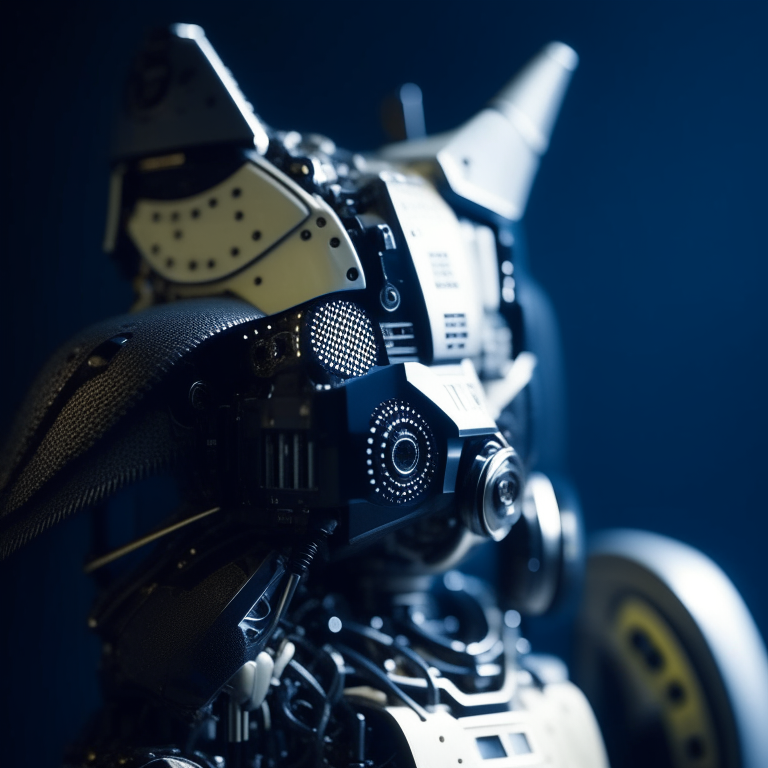
Image-to-Image Generation with ControlNet Conditioning
import torch
import numpy as np

from diffusers import KandinskyV22PriorEmb2EmbPipeline, KandinskyV22ControlnetImg2ImgPipeline
from diffusers.utils import load_image
from transformers import pipeline

img = load_image(
    "https://huggingface.co/datasets/hf-internal-testing/diffusers-images/resolve/main" "/kandinskyv22/cat.png"
).resize((768, 768))

def make_hint(image, depth_estimator):
    image = depth_estimator(image)["depth"]
    image = np.array(image)
    image = image[:, :, None]
    image = np.concatenate([image, image, image], axis=2)
    detected_map = torch.from_numpy(image).float() / 255.0
    hint = detected_map.permute(2, 0, 1)
    return hint

depth_estimator = pipeline("depth-estimation")
hint = make_hint(img, depth_estimator).unsqueeze(0).half().to("cuda")

pipe_prior = KandinskyV22PriorEmb2EmbPipeline.from_pretrained(
    "kandinsky-community/kandinsky-2-2-prior", torch_dtype=torch.float16
)
pipe_prior = pipe_prior.to("cuda")

pipe = KandinskyV22ControlnetImg2ImgPipeline.from_pretrained(
    "kandinsky-community/kandinsky-2-2-controlnet-depth", torch_dtype=torch.float16
)
pipe = pipe.to("cuda")

prompt = "A robot, 4k photo"
negative_prior_prompt = "lowres, text, error, cropped, worst quality, low quality, jpeg artifacts, ugly, duplicate, morbid, mutilated, out of frame, extra fingers, mutated hands, poorly drawn hands, poorly drawn face, mutation, deformed, blurry, dehydrated, bad anatomy, bad proportions, extra limbs, cloned face, disfigured, gross proportions, malformed limbs, missing arms, missing legs, extra arms, extra legs, fused fingers, too many fingers, long neck, username, watermark, signature"

generator = torch.Generator(device="cuda").manual_seed(43)

# run prior pipeline

img_emb = pipe_prior(prompt=prompt, image=img, strength=0.85, generator=generator)
negative_emb = pipe_prior(prompt=negative_prior_prompt, image=img, strength=1, generator=generator)

# run controlnet img2img pipeline
images = pipe(
    image=img,
    strength=0.5,
    image_embeds=img_emb.image_embeds,
    negative_image_embeds=negative_emb.image_embeds,
    hint=hint,
    num_inference_steps=50,
    generator=generator,
    height=768,
    width=768,
).images

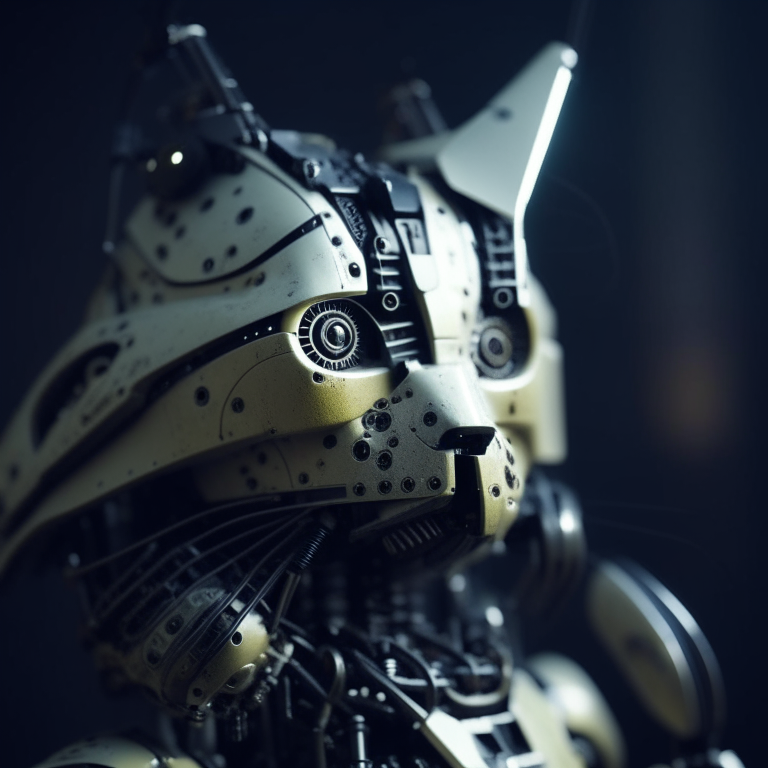
images[0].save("robot_cat.png")
Here is the output. Compared with the output from our text-to-image controlnet example, it kept a lot more cat facial details from the original image and worked into the robot style we asked for.
Model Architecture
Overview
Kandinsky 2.2 is a text-conditional diffusion model based on unCLIP and latent diffusion, composed of a transformer-based image prior model, a unet diffusion model, and a decoder.
The model architectures are illustrated in the figure below - the chart on the left describes the process to train the image prior model, the figure in the center is the text-to-image generation process, and the figure on the right is image interpolation.
Specifically, the image prior model was trained on CLIP text and image embeddings generated with a pre-trained CLIP-ViT-G model. The trained image prior model is then used to generate CLIP image embeddings for input text prompts. Both the input text prompts and its CLIP image embeddings are used in the diffusion process. A MoVQGAN model acts as the final block of the model, which decodes the latent representation into an actual image.
Details
The image prior training of the model was performed on the LAION Improved Aesthetics dataset, and then fine-tuning was performed on the LAION HighRes data.
The main Text2Image diffusion model was trained on LAION HighRes dataset and then fine-tuned with a dataset of 2M very high-quality high-resolution images with descriptions (COYO, anime, landmarks_russia, and a number of others) was used separately collected from open sources.
The main change in Kandinsky 2.2 is the replacement of CLIP-ViT-G. Its image encoder significantly increases the model's capability to generate more aesthetic pictures and better understand text, thus enhancing its overall performance.
Due to the switch CLIP model, the image prior model was retrained, and the Text2Image diffusion model was fine-tuned for 2000 iterations. Kandinsky 2.2 was trained on data of various resolutions, from 512 x 512 to 1536 x 1536, and also as different aspect ratios. As a result, Kandinsky 2.2 can generate 1024 x 1024 outputs with any aspect ratio.
Evaluation
We quantitatively measure the performance of Kandinsky 2.1 on the COCO_30k dataset, in zero-shot mode. The table below presents FID.
FID metric values for generative models on COCO_30k
| FID (30k) | |
|---|---|
| eDiff-I (2022) | 6.95 |
| Image (2022) | 7.27 |
| Kandinsky 2.1 (2023) | 8.21 |
| Stable Diffusion 2.1 (2022) | 8.59 |
| GigaGAN, 512x512 (2023) | 9.09 |
| DALL-E 2 (2022) | 10.39 |
| GLIDE (2022) | 12.24 |
| Kandinsky 1.0 (2022) | 15.40 |
| DALL-E (2021) | 17.89 |
| Kandinsky 2.0 (2022) | 20.00 |
| GLIGEN (2022) | 21.04 |
For more information, please refer to the upcoming technical report.
BibTex
If you find this repository useful in your research, please cite:
@misc{kandinsky 2.2,
  title         = {kandinsky 2.2},
  author        = {Arseniy Shakhmatov, Anton Razzhigaev, Aleksandr Nikolich, Vladimir Arkhipkin, Igor Pavlov, Andrey Kuznetsov, Denis Dimitrov},
  year          = {2023},
  howpublished  = {},
}