Model Summary
Cephalo is a series of multimodal materials science focused vision large language models (V-LLMs) designed to integrate visual and linguistic data for advanced understanding and interaction in human-AI or multi-agent AI frameworks.
A novel aspect of Cephalo's development is the innovative dataset generation method. The extraction process employs advanced algorithms to accurately detect and separate images and their corresponding textual descriptions from complex PDF documents. It involves extracting images and captions from PDFs to create well-reasoned image-text pairs, utilizing large language models (LLMs) for natural language processing. These image-text pairs are then refined and validated through LLM-based NLP processing, ensuring high-quality and contextually relevant data for training.
Cephalo can interpret complex visual scenes and generating contextually accurate language descriptions and answer queries.
The model is developed to process diverse inputs, including images and text, facilitating a broad range of applications such as image captioning, visual question answering, and multimodal content generation. The architecture combines a vision encoder model and an autoregressive transformer to process complex natural language understanding.

Cephalo provides a robust framework for multimodal interaction and understanding, including the development of complex generative pipelines to create 2D and 3D renderings of material microstructures as input for additive manufacturing methods.
This version of Cephalo, lamm-mit/Cephalo-Llama-3.2-11B-Vision-Instruct-128k, is based on the meta-llama/Llama-3.2-11B-Vision-Instruct model. The model was trained on a combination of scientific text-image data extracted from Wikipedia and scientific papers.
For further details on the base model, see: https://huggingface.co/meta-llama/Llama-3.2-11B-Vision-Instruct. More details about technical aspects of the model, training and example applications to materials science problems are provided in the paper (reference at the bottom).

Chat Format
The lamm-mit/Cephalo-Llama-3.2-11B-Vision-Instruct-128k is suiteable for one or more image inputs, wih prompts using the chat format as follows:
messages=[{'role': 'user',
  'content': [{'type': 'image'},
   {'type': 'text',
    'text': 'Consider the stress-strain response under compression. What are the three curves shown. Based on an inspection of the plot, do they show good agreement or are they very different?'}]}]
After application of the chat template:
input_text = processor.apply_chat_template(messages, add_generation_prompt=True)
The raw input text is:
<|begin_of_text|><|start_header_id|>user<|end_header_id|>\n\n<|image|>Consider the stress-strain response under compression. What are the three curves shown. Based on an inspection of the plot, do they show good agreement or are they very different?<|eot_id|><|start_header_id|>assistant<|end_header_id|>\n\n
Sample inference code
Update your transformers installation if necessary:
pip install -U transformers
This code snippets show how to get quickly started on a GPU:
from transformers import MllamaForConditionalGeneration, AutoProcessor

DEVICE='cuda:0'
model_id='lamm-mit/Cephalo-Llama-3.2-11B-Vision-Instruct-128k'

model = MllamaForConditionalGeneration.from_pretrained( model_id, torch_dtype=torch.bfloat16,
                                       #_attn_implementation="flash_attention_2",
                                       trust_remote_code=True,
                                       ).to (DEVICE )

processor = AutoProcessor.from_pretrained( model_id, trust_remote_code=True, )
Simple inference example:
We are asking a question about this image, showing a material microstructure and associated stress-strain responses.

import requests
import torch
from PIL import Image

url = "https://huggingface.co/lamm-mit/Cephalo-Llama-3.2-11B-Vision-Instruct-128k/resolve/main/architected_stress_strain.png"

image = Image.open(requests.get(url, stream=True ).raw)
images = [image]
messages = [
    {"role": "user", "content": [
        {"type": "image"},
        {"type": "text", "text": "Consider the stress-strain response under compression. What are the three curves shown. Based on an inspection of the plot, do they show good agreement or are they very different?"}
    ]}
]
input_text = processor.apply_chat_template(messages, add_generation_prompt=True)
inputs = processor(images, input_text, return_tensors="pt").to(model.device)

output = model.generate(**inputs, max_new_tokens=512)
print(processor.decode(output[0]))
Raw output:
<|begin_of_text|><|start_header_id|>user<|end_header_id|>

<|image|>Consider the stress-strain response under compression. What are the three curves shown. Based on an inspection of the plot, do they show good agreement or are they very different?<|eot_id|><|start_header_id|>assistant<|end_header_id|>

The image shows three curves representing the stress-strain response under compression. The x-axis represents strain, which is the deformation experienced by the material relative to its original length, while the y-axis represents stress, which is the force applied per unit area.

- The blue curve is labeled "Predicted," indicating a predicted model or simulation result.
- The orange curve is labeled "Ground truth," indicating actual experimental data or true values.
- The green curve is labeled "Simulation result," likely representing another simulation result for comparison.

The curves show an increasing trend of stress with strain, indicating that the material becomes more stressed as it deforms. The predicted and simulation results (blue and green curves) closely follow the ground truth (orange curve), suggesting good agreement among the predicted and simulated models and the actual experimental data. This implies that the models used are accurate in predicting the material's response under compression. The curves do not show significant deviations, indicating reliable modeling and simulation techniques.<|eot_id|>
Next we provide a convenience function for inference. This function takes the model, processor, question, and images, along with messages and images objects for repeated chat-like interactions with the model.
from tqdm.notebook import tqdm
from transformers.image_utils import load_image

def ensure_list(obj):
    if not isinstance(obj, list):
        return [obj]
    return obj

def is_url_or_filename(val) -> bool:
    # Check if it's a URL
    if isinstance(val, str):
        return True

def ask_about_image (model, processor, question, images_input=[],  verbatim=False,temperature=0.1,show_image=False,
                     system="You are a materials scientist. ", max_new_tokens=256, messages=[], images=[], ):

    images_input=ensure_list(images_input)
    if len (images)==0:
        if len (images_input)>0:
            for image in tqdm (images_input) :
                if is_url(image):
                    is_url_or_filename= load_image(image)
                images.append (image)

                if show_image:
                    display ( image )
    if len (messages)==0:
        messages = [
            {"role": "user", "content": [
                {"type": "image"},
                {"type": "text", "text": question}
            ]}
        ]
        input_text = processor.apply_chat_template(messages, add_generation_prompt=True)
        inputs = processor(image, input_text, return_tensors="pt").to(model.device)

    else:
        messages.append (
           {"role": "user", "content": [

                    {"type": "text", "text": question}
                ]}  )

    if verbatim:
        print (messages)

    text = processor.tokenizer.apply_chat_template(messages, tokenize=False, add_generation_prompt=True)
    inputs = processor(text=text, images=images, return_tensors="pt", ).to(DEVICE)

    generation_args = {
                "max_new_tokens": max_new_tokens,
                "temperature": temperature,
                "do_sample": True,
                }

    generate_ids = model.generate(**inputs,# eos_token_id=processor.tokenizer.eos_token_id,
                                  **generation_args)

    generate_ids = generate_ids[:, inputs['input_ids'].shape[1]:-1]
    generated_texts = processor.decode(generate_ids[0], clean_up_tokenization_spaces=False)

    messages.append (  {"role": "assistant", "content": [  {"type": "text", "text": generated_texts}]}  )

    return generated_texts, messages, images

question = """What is shown in this image, and what is the relevance for materials design? Include a discussion of multi-agent AI.

First brainstorm, then organize your thoughts, then respond."""

url1 = "https://d2r55xnwy6nx47.cloudfront.net/uploads/2018/02/Ants_Lede1300.jpg"

response, messages,images= ask_about_image ( model, processor, question,
                                             images_input=[url1,],
                                             temperature=0.1,
                                             system= '',
                                             init_instr='You carefully study the image, and respond accurately, but succinctly. Think step-by-step.\n\n',
                                             show_conversation=True,
                                             max_new_tokens=512, messages=[], images=[])

print (response)
Sample output:
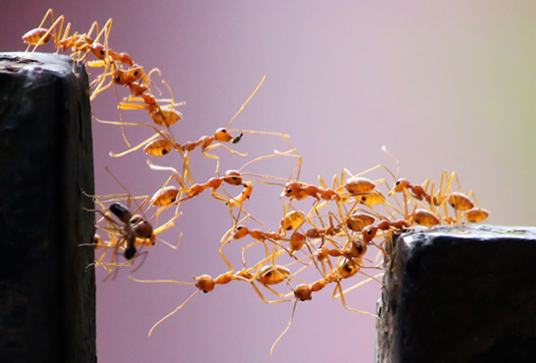 Image by Vaishakh Manohar
Dataset generation
The schematic below shows a visualization of the approach to generate datasets for training the vision model. The extraction process employs advanced algorithms to accurately detect and separate images and their corresponding textual descriptions from complex PDF documents. It involves extracting images and captions from PDFs to create well-reasoned image-text pairs, utilizing large language models (LLMs) for natural language processing. These image-text pairs are then refined and validated through LLM-based NLP processing, ensuring high-quality and contextually relevant data for training.
The image below shows reproductions of two representative pages of the scientific article (here, Spivak, Buehler, et al., 2011), and how they are used to extract visual scientific data for training the Cephalo model.

Citation
Please cite as:
@article{Buehler_Cephalo_2024,
  title={Cephalo: Multi-Modal Vision-Language Models for Bio-Inspired Materials Analysis and Design},
  author={Markus J. Buehler},
  journal={arXiv preprint arXiv:2405.19076},
  year={2024}
}