Model Summary
Cephalo is a series of multimodal materials science focused vision large language models (V-LLMs) designed to integrate visual and linguistic data for advanced understanding and interaction in human-AI or multi-agent AI frameworks.
A novel aspect of Cephalo's development is the innovative dataset generation method. The extraction process employs advanced algorithms to accurately detect and separate images and their corresponding textual descriptions from complex PDF documents. It involves extracting images and captions from PDFs to create well-reasoned image-text pairs, utilizing large language models (LLMs) for natural language processing. These image-text pairs are then refined and validated through LLM-based NLP processing, ensuring high-quality and contextually relevant data for training.
Cephalo can interpret complex visual scenes and generating contextually accurate language descriptions and answer queries.
The model is developed to process diverse inputs, including images and text, facilitating a broad range of applications such as image captioning, visual question answering, and multimodal content generation. The architecture combines a vision encoder model and an autoregressive transformer to process complex natural language understanding.

Cephalo provides a robust framework for multimodal interaction and understanding, including the development of complex generative pipelines to create 2D and 3D renderings of material microstructures as input for additive manufacturing methods.
This version of Cephalo, lamm-mit/Cephalo-Phi-3-vision-128k-4b-alpha, is based on the Phi-3-Vision-128K-Instruct model. The model has a context length of 128,000 tokens. Further details, see: https://huggingface.co/microsoft/Phi-3-vision-128k-instruct.
Chat Format
Given the nature of the training data, the Cephalo-Phi-3-vision-128k-4b-alpha model is best suited for a single image input wih prompts using the chat format as follows.
You can provide the prompt as a single image with a generic template as follow:
<|user|>\n<|image_1|>\n{prompt}<|end|>\n<|assistant|>\n
The model generates the text after <|assistant|> . For multi-turn conversations, the prompt should be formatted as follows:
<|user|>\n<|image_1|>\n{prompt_1}<|end|>\n<|assistant|>\n{response_1}<|end|>\n<|user|>\n{prompt_2}<|end|>\n<|assistant|>\n
Sample inference code
This code snippets show how to get quickly started on a GPU:
from PIL import Image
import requests
from transformers import AutoModelForCausalLM
from transformers import AutoProcessor

model_id = "lamm-mit/Cephalo-Phi-3-vision-128k-4b-alpha"

model = AutoModelForCausalLM.from_pretrained(model_id, device_map="cuda", trust_remote_code=True, torch_dtype="auto")

processor = AutoProcessor.from_pretrained(model_id, trust_remote_code=True)

messages = [
    {"role": "user", "content": "<|image_1|>\nWhat is shown in this image, and what is the relevance for materials design?"},
    ]

url = "https://d2r55xnwy6nx47.cloudfront.net/uploads/2018/02/Ants_Lede1300.jpg"

image = Image.open(requests.get(url, stream=True).raw)

prompt = processor.tokenizer.apply_chat_template(messages, tokenize=False, add_generation_prompt=True)

inputs = processor(prompt, [image], return_tensors="pt").to("cuda:0")

generation_args = {
                    "max_new_tokens": 512,
                    "temperature": 0.1,
                    "do_sample": True,
                    "stop_strings": ['<|end|>',
                                     '<|endoftext|>'],
                    "tokenizer": processor.tokenizer,
                  }

generate_ids = model.generate(**inputs, eos_token_id=processor.tokenizer.eos_token_id, **generation_args)

# remove input tokens
generate_ids = generate_ids[:, inputs['input_ids'].shape[1]:]
response = processor.batch_decode(generate_ids, skip_special_tokens=True, clean_up_tokenization_spaces=False)[0]

print(response)
Sample output:
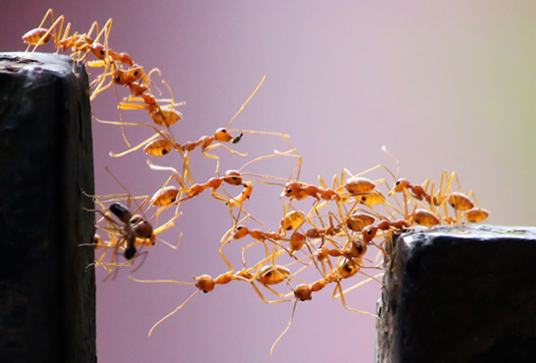 Image by Vaishakh Manohar
Dataset generation
The schematic below shows a visualization of the approach to generate datasets for training the vision model. The extraction process employs advanced algorithms to accurately detect and separate images and their corresponding textual descriptions from complex PDF documents. It involves extracting images and captions from PDFs to create well-reasoned image-text pairs, utilizing large language models (LLMs) for natural language processing. These image-text pairs are then refined and validated through LLM-based NLP processing, ensuring high-quality and contextually relevant data for training.
The image below shows reproductions of two representative pages of the scientific article (here, Spivak, Buehler, et al., 2011), and how they are used to extract visual scientific data for training the Cephalo model.

Fine-tuning
Load base model
model_id = "microsoft/Phi-3-vision-128k-instruct"

model = AutoModelForCausalLM.from_pretrained(model_id, device_map="cuda", trust_remote_code=True, torch_dtype="auto")

processor = AutoProcessor.from_pretrained(model_id, trust_remote_code=True)
Define FT_repo_id to push on HF hub/save model:
FT_repo_id='xxxxx/' #<repo_ID>
from datasets import load_dataset

train_dataset = load_dataset("lamm-mit/Cephalo-Wikipedia-Materials", split="train")
import random

class MyDataCollator:
    def __init__(self, processor):
        self.processor = processor

    def __call__(self, examples):
        texts = []
        images = []
        for example in examples:
            image = example["image"]
            question = example["query"]
            answer = example["answer"]
            messages = [ {
                            "role": "user",  "content": '<|image_1|>\n'+question},
                           {"role": "assistant", "content": f"{answer}"}, ]

            text = processor.tokenizer.apply_chat_template(messages, tokenize=False, add_generation_prompt=False)

            images.append(image)

        batch = processor(text=text, images=[image], return_tensors="pt", padding=True

        labels = batch["input_ids"].clone()
        labels[labels <0] = -100

        batch["labels"] = labels

        return batch

data_collator = MyDataCollator(processor)
Then set up trainer, and train:
from transformers import TrainingArguments, Trainer

optim = "paged_adamw_8bit"

training_args = TrainingArguments(
    num_train_epochs=2,
    per_device_train_batch_size=1,
    #per_device_eval_batch_size=4,
    gradient_accumulation_steps=4,
    warmup_steps=250,
    learning_rate=1e-5,
    weight_decay=0.01,
    logging_steps=25,
    output_dir="output_training",
    optim=optim,
    save_strategy="steps",
    save_steps=1000,
    save_total_limit=16,
    #fp16=True,
    bf16=True,
    push_to_hub_model_id=FT_repo_id,
    remove_unused_columns=False,
    report_to="none",
)

trainer = Trainer(
    model=model,
    args=training_args,
    data_collator=data_collator,
    train_dataset=train_dataset,
)

trainer.train()
Citation
Please cite as:
@article{Buehler_Cephalo_2024,
  title={Cephalo: Multi-Modal Vision-Language Models for Bio-Inspired Materials Analysis and Design},
  author={Markus J. Buehler},
  journal={arXiv preprint arXiv:2405.19076},
  year={2024}
}