Typhoon-OCR-3B: A bilingual document parsing model built specifically for real-world documents in Thai and English inspired by models like olmOCR based on Qwen2.5-VL-Instruction.
By using this model, you agree to the OpenTyphoon Terms and Conditions and acknowledge the Privacy Notice: https://opentyphoon.ai/tac · https://opentyphoon.ai/privacy
Try our demo available on Demo
Code / Examples available on Github
Release Blog available on OpenTyphoon Blog
Technical Report on Arxiv
*Remark: This model is intended to be used with a specific prompt only; it will not work with any other prompts.
*Remark: If you want to run the model locally, we recommend using the Ollama build at https://ollama.com/scb10x. We’ve found that the GGUF files for llama.cpp or LM Studio may suffer from accuracy issues.
Real-World Document Support
1. Structured Documents: Financial reports, Academic papers, Books, Government forms
Output format:
- Markdown for general text
- HTML for tables (including merged cells and complex layouts)
- Figures, charts, and diagrams are represented using figure tags for structured visual understanding
Each figure undergoes multi-layered interpretation:
- Observation: Detects elements like landscapes, buildings, people, logos, and embedded text
- Context Analysis: Infers context such as location, event, or document section
- Text Recognition: Extracts and interprets embedded text (e.g., chart labels, captions) in Thai or English
- Artistic & Structural Analysis: Captures layout style, diagram type, or design choices contributing to document tone
- Final Summary: Combines all insights into a structured figure description for tasks like summarization and retrieval
2. Layout-Heavy & Informal Documents: Receipts, Menus papers, Tickets, Infographics
Output format:
- Markdown with embedded tables and layout-aware structures
Performance
Summary of Findings
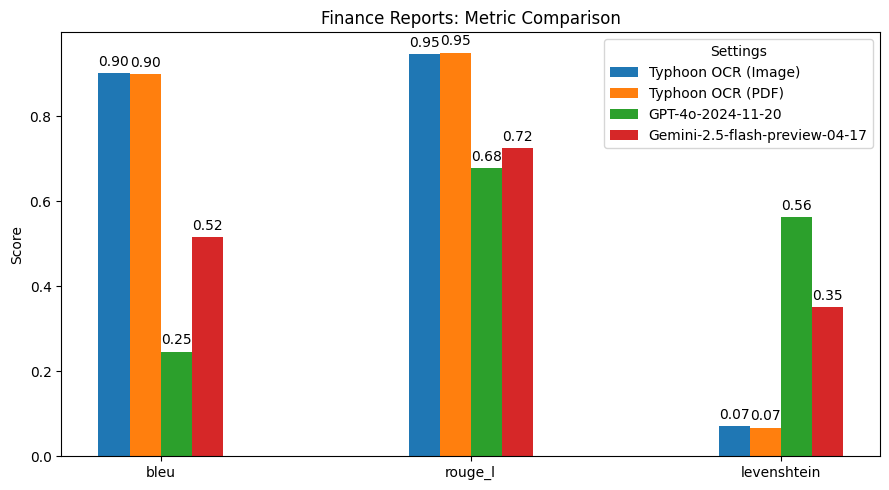
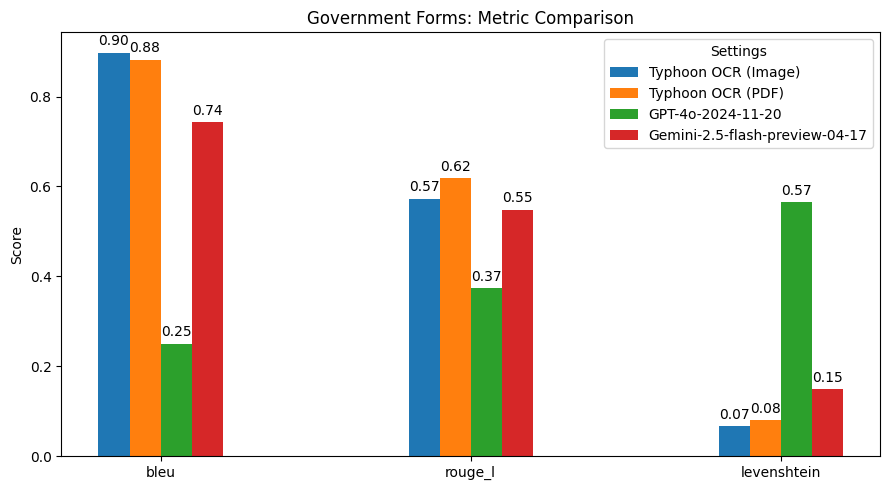
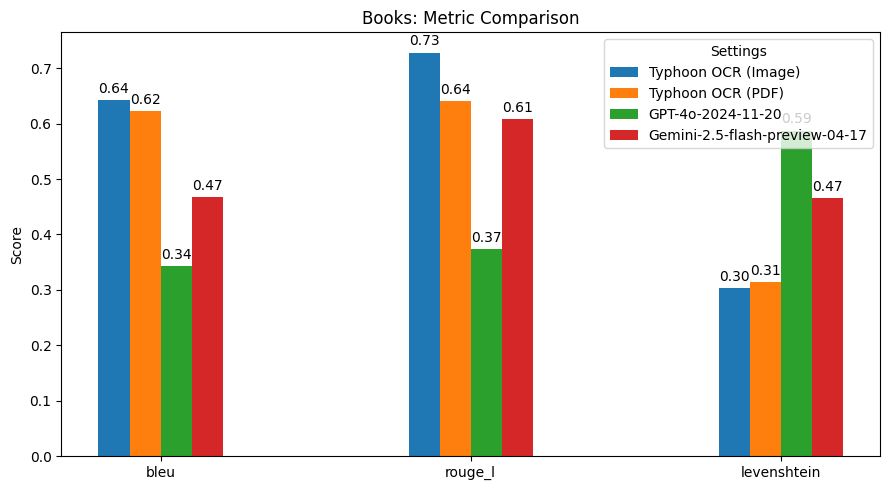
Typhoon OCR outperforms both GPT-4o and Gemini 2.5 Flash in Thai document understanding, particularly on documents with complex layouts and mixed-language content. However, in the Thai books benchmark, performance slightly declined due to the high frequency and diversity of embedded figures. These images vary significantly in type and structure, which poses challenges for our current figure tag parsing. This highlights a potential area for future improvement—specifically, in enhancing the model's image understanding capabilities. For this version, our primary focus has been on achieving high-quality OCR for both English and Thai text. Future releases may extend support to more advanced image analysis and figure interpretation.
Usage Example
(Recommended): Full inference code available on Colab
(Recommended): Using Typhoon-OCR Package
pip install typhoon-ocr
from typhoon_ocr import ocr_document

# please set env TYPHOON_OCR_API_KEY or OPENAI_API_KEY to use this function
markdown = ocr_document("test.png")
print(markdown)
(Recommended): Local Model via vllm (GPU Required):
pip install vllm
vllm serve scb10x/typhoon-ocr-3b --max-model-len 32000 --served-model-name typhoon-ocr-preview # OpenAI Compatible at http://localhost:8000 (or other port)
# then you can supply base_url in to ocr_document
from typhoon_ocr import ocr_document
markdown = ocr_document('image.png', base_url='http://localhost:8000/v1', api_key='no-key')
print(markdown)
To read more about vllm
Run Manually
Below is a partial snippet. You can run inference using either the API or a local model.
API:
from typing import Callable
from openai import OpenAI
from PIL import Image
from typhoon_ocr.ocr_utils import render_pdf_to_base64png, get_anchor_text

PROMPTS = {
    "default": lambda base_text: (f"Below is an image of a document page along with its dimensions. "
        f"Simply return the markdown representation of this document, presenting tables in markdown format as they naturally appear.\n"
        f"If the document contains images, use a placeholder like dummy.png for each image.\n"
        f"Your final output must be in JSON format with a single key `natural_text` containing the response.\n"
        f"RAW_TEXT_START\n{base_text}\nRAW_TEXT_END"),
    "structure": lambda base_text: (
        f"Below is an image of a document page, along with its dimensions and possibly some raw textual content previously extracted from it. "
        f"Note that the text extraction may be incomplete or partially missing. Carefully consider both the layout and any available text to reconstruct the document accurately.\n"
        f"Your task is to return the markdown representation of this document, presenting tables in HTML format as they naturally appear.\n"
        f"If the document contains images or figures, analyze them and include the tag <figure>IMAGE_ANALYSIS</figure> in the appropriate location.\n"
        f"Your final output must be in JSON format with a single key `natural_text` containing the response.\n"
        f"RAW_TEXT_START\n{base_text}\nRAW_TEXT_END"
    ),
}

def get_prompt(prompt_name: str) -> Callable[[str], str]:
    """
    Fetches the system prompt based on the provided PROMPT_NAME.

    :param prompt_name: The identifier for the desired prompt.
    :return: The system prompt as a string.
    """
    return PROMPTS.get(prompt_name, lambda x: "Invalid PROMPT_NAME provided.")


# Render the first page to base64 PNG and then load it into a PIL image.
image_base64 = render_pdf_to_base64png(filename, page_num, target_longest_image_dim=1800)
image_pil = Image.open(BytesIO(base64.b64decode(image_base64)))

# Extract anchor text from the PDF (first page)
anchor_text = get_anchor_text(filename, page_num, pdf_engine="pdfreport", target_length=8000)

# Retrieve and fill in the prompt template with the anchor_text
prompt_template_fn = get_prompt(task_type)
PROMPT = prompt_template_fn(anchor_text)

messages = [{
        "role": "user",
        "content": [
            {"type": "text", "text": PROMPT},
            {"type": "image_url", "image_url": {"url": f"data:image/png;base64,{image_base64}"}},
        ],
    }]
# send messages to openai compatible api
openai = OpenAI(base_url="https://api.opentyphoon.ai/v1", api_key="TYPHOON_API_KEY")
response = openai.chat.completions.create(
          model="typhoon-ocr-preview",
          messages=messages,
          max_tokens=16384,
          temperature=0.1,
          top_p=0.6,
          extra_body={
              "repetition_penalty": 1.2,
          },
      )
text_output = response.choices[0].message.content
print(text_output)
(Not Recommended): Local Model - Transformers (GPU Required):
# Initialize the model
model = Qwen2_5_VLForConditionalGeneration.from_pretrained("scb10x/typhoon-ocr-3b", torch_dtype=torch.bfloat16 ).eval()
processor = AutoProcessor.from_pretrained("scb10x/typhoon-ocr-3b")

device = torch.device("cuda" if torch.cuda.is_available() else "cpu")
model.to(device)
# Apply the chat template and processor
text = processor.apply_chat_template(messages, tokenize=False, add_generation_prompt=True)
main_image = Image.open(BytesIO(base64.b64decode(image_base64)))

inputs = processor(
          text=[text],
          images=[main_image],
          padding=True,
          return_tensors="pt",
      )
inputs = {key: value.to(device) for (key, value) in inputs.items()}

# Generate the output
output = model.generate(
                  **inputs,
                  temperature=0.1,
                  max_new_tokens=12000,
                  num_return_sequences=1,
                  repetition_penalty=1.2,
                  do_sample=True,
              )
# Decode the output
prompt_length = inputs["input_ids"].shape[1]
new_tokens = output[:, prompt_length:]
text_output = processor.tokenizer.batch_decode(
          new_tokens, skip_special_tokens=True
      )
print(text_output[0])
Prompting
This model only works with the specific prompts defined below, where {base_text} refers to information extracted from the PDF metadata using the get_anchor_text function from the typhoon-ocr package. It will not function correctly with any other prompts.
PROMPTS = {
    "default": lambda base_text: (f"Below is an image of a document page along with its dimensions. "
        f"Simply return the markdown representation of this document, presenting tables in markdown format as they naturally appear.\n"
        f"If the document contains images, use a placeholder like dummy.png for each image.\n"
        f"Your final output must be in JSON format with a single key `natural_text` containing the response.\n"
        f"RAW_TEXT_START\n{base_text}\nRAW_TEXT_END"),
    "structure": lambda base_text: (
        f"Below is an image of a document page, along with its dimensions and possibly some raw textual content previously extracted from it. "
        f"Note that the text extraction may be incomplete or partially missing. Carefully consider both the layout and any available text to reconstruct the document accurately.\n"
        f"Your task is to return the markdown representation of this document, presenting tables in HTML format as they naturally appear.\n"
        f"If the document contains images or figures, analyze them and include the tag <figure>IMAGE_ANALYSIS</figure> in the appropriate location.\n"
        f"Your final output must be in JSON format with a single key `natural_text` containing the response.\n"
        f"RAW_TEXT_START\n{base_text}\nRAW_TEXT_END"
    ),
}
Generation Parameters
We suggest using the following generation parameters. Since this is an OCR model, we do not recommend using a high temperature. Make sure the temperature is set to 0 or 0.1, not higher.
temperature=0.1,
top_p=0.6,
repetition_penalty: 1.2
Hosting
We recommend to inference typhoon-ocr using vllm instead of huggingface transformers, and using typhoon-ocr library to ocr documents. To read more about vllm
pip install vllm
vllm serve scb10x/typhoon-ocr-3b --max-model-len 32000 --served-model-name typhoon-ocr-preview  # OpenAI Compatible at http://localhost:8000
# then you can supply base_url in to ocr_document
from typhoon_ocr import ocr_document
markdown = ocr_document('image.png', base_url='http://localhost:8000/v1', api_key='no-key')
print(markdown)
Intended Uses & Limitations
This is a task-specific model intended to be used only with the provided prompts. It does not include any guardrails or VQA capability. Due to the nature of large language models (LLMs), a certain level of hallucination may occur. We recommend that developers carefully assess these risks in the context of their specific use case.
Follow us
https://twitter.com/opentyphoon
Support
Citation
- If you find Typhoon OCR useful for your work, please cite it using:
@misc{nonesung2026typhoonocropenvisionlanguage,
      title={Typhoon OCR: Open Vision-Language Model For Thai Document Extraction},
      author={Surapon Nonesung and Natapong Nitarach and Teetouch Jaknamon and Pittawat Taveekitworachai and Kunat Pipatanakul},
      year={2026},
      eprint={2601.14722},
      archivePrefix={arXiv},
      primaryClass={cs.CL},
      url={https://arxiv.org/abs/2601.14722},
}