🌟 Gemma 4 - 26B A4B x Claude Opus 4.6
Build Environment & Features:
- Fine-tuning Framework: Unsloth
- Reasoning Effort: High
- This model bridges the gap between Google's exceptional open-weights architecture and Claude 4.6's profound reasoning capabilities, leveraging cutting-edge fine-tuning environments.
🚀 Important Update: Version 2 Now Available
- Upgrade Alert: A significantly enhanced version of this distillation has been released. We highly recommend switching to v2 for a superior reasoning experience and improved stability.
- Model Link: gemma-4-26B-A4B-it-Claude-Opus-Distill-v2
🔄 Key Enhancements in v2
We have implemented critical upgrades to further refine the model's performance:
- ✨ Dataset Quality: Re-curated high-density reasoning paths, resulting in significantly higher quality responses and more nuanced logical depth.
- 🛠️ Chat Template Fixes: Comprehensive structural fixes to the chat template to improve formatting.
- ⚖️ Generalization vs. Style: v2 was trained with a large batch size, high rank/alpha, and a low learning rate (LR). This configuration prioritizes broad generalization over specific stylistic imitation. We are currently evaluating which approach offers the best real-world utility; while we await final benchmark results, we are looking for community feedback, as numbers alone don't always capture the full nuances of model behavior.
💡 Model Introduction
Gemma 4 - 26B A4B x Claude Opus 4.6 is a highly capable model fine-tuned on top of the powerful Gemma 4 architecture. The model's core directive is to absorb state-of-the-art reasoning distillation, primarily sourced from Claude-4.6 Opus interactions.
By utilizing datasets where the reasoning effort was explicitly set to High, this model excels in breaking down complex problems and delivering precise, nuanced solutions across a variety of demanding domains.
🗺️ Training Pipeline Overview
Base Model (unsloth/gemma-4-26B-A4B-it)
 │
 ▼
Supervised Fine-Tuning (SFT) + High-Effort Reasoning Datasets
 │
 ▼
Final Model (Gemma 4 - 26B A4B x Claude Opus 4.6)
📋 Stage Details & Benchmarks
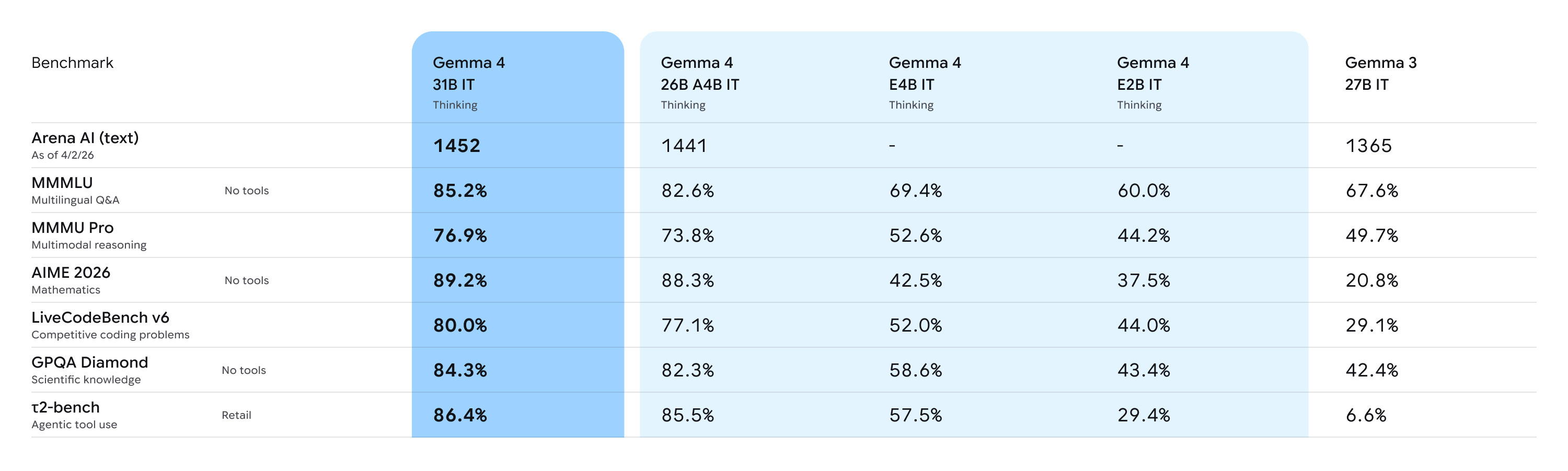
Performance vs Size:
Deep Dive Analysis: For more comprehensive insights regarding the base capabilities of the Gemma 4 architecture, please refer to this Analysis Document.
🔹 Supervised Fine-Tuning (Meeting Claude)
- Objective: To inject high-density reasoning logic and establish a strict format for complex problem-solving.
- Methodology: We utilized Unsloth for highly efficient memory and compute optimization during the fine-tuning process. The model was trained extensively on various reasoning trajectories from Claude Opus 4.6 to adopt a structured and efficient thinking pattern.
📚 All Datasets Used
The dataset consists of high-quality, high-effort reasoning distillation data:
| Dataset Name | Description / Purpose |
|---|---|
TeichAI/Claude-Opus-4.6-Reasoning-887x | Core Claude 4.6 Opus reasoning trajectories. |
TeichAI/Claude-Sonnet-4.6-Reasoning-1100x | Additional high-density reasoning instances from Claude 4.6 Sonnet. |
TeichAI/claude-4.5-opus-high-reasoning-250x | Legacy high-intensity reasoning distillation. |
Crownelius/Opus-4.6-Reasoning-2100x-formatted | Crownelius's extensively formatted Opus reasoning dataset for structural reinforcement. |
🌟 Core Skills & Capabilities
Thanks to its robust base model and high-effort reasoning distillation, this model is highly optimized for the following use cases:
- 💻 Coding: Advanced code generation, debugging, and software architecture planning.
- 🔬 Science: Deep scientific reasoning, hypothesis evaluation, and analytical problem-solving.
- 🔎 Deep Research: Navigating complex, multi-step research queries and synthesizing vast amounts of information.
- 🧠 General Purpose: Highly capable instruction-following for everyday tasks requiring high logical coherence.
Getting Started
You can use all Gemma 4 models with the latest version of Transformers. To get started, install the necessary dependencies in your environment:
pip install -U transformers torch accelerate
Once you have everything installed, you can proceed to load the model with the code below:
from transformers import AutoProcessor, AutoModelForCausalLM

MODEL_ID = "google/gemma-4-31B-it"

# Load model
processor = AutoProcessor.from_pretrained(MODEL_ID)
model = AutoModelForCausalLM.from_pretrained(
    MODEL_ID,
    dtype="auto",
    device_map="auto"
)
Once the model is loaded, you can start generating output:
# Prompt
messages = [
    {"role": "system", "content": "You are a helpful assistant."},
    {"role": "user", "content": "Write a short joke about saving RAM."},
]

# Process input
text = processor.apply_chat_template(
    messages,
    tokenize=False,
    add_generation_prompt=True,
    enable_thinking=False
)
inputs = processor(text=text, return_tensors="pt").to(model.device)
input_len = inputs["input_ids"].shape[-1]

# Generate output
outputs = model.generate(**inputs, max_new_tokens=1024)
response = processor.decode(outputs[0][input_len:], skip_special_tokens=False)

# Parse output
processor.parse_response(response)
To enable reasoning, set enable_thinking=True and the parse_response function will take care of parsing the thinking output.
Below, you will also find snippets for processing audio (E2B and E4B only), images, and video alongside text:
Instead of using AutoModelForCausalLM, you can use AutoModelForMultimodalLM to process audio. To use it, make sure to install the following packages:
pip install -U transformers torch librosa accelerate
You can then load the model with the code below:
from transformers import AutoProcessor, AutoModelForMultimodalLM

MODEL_ID = "google/gemma-4-E2B-it"

# Load model
processor = AutoProcessor.from_pretrained(MODEL_ID)
model = AutoModelForMultimodalLM.from_pretrained(
    MODEL_ID,
    dtype="auto",
    device_map="auto"
)
Once the model is loaded, you can start generating output by directly referencing the audio URL in the prompt:
# Prompt - add audio before text
messages = [
    {
        "role": "user",
        "content": [
            {"type": "audio", "audio": "https://raw.githubusercontent.com/google-gemma/cookbook/refs/heads/main/Demos/sample-data/journal1.wav"},
            {"type": "text", "text": "Transcribe the following speech segment in its original language. Follow these specific instructions for formatting the answer:\n* Only output the transcription, with no newlines.\n* When transcribing numbers, write the digits, i.e. write 1.7 and not one point seven, and write 3 instead of three."},
        ]
    }
]

# Process input
inputs = processor.apply_chat_template(
    messages,
    tokenize=True,
    return_dict=True,
    return_tensors="pt",
    add_generation_prompt=True,
).to(model.device)
input_len = inputs["input_ids"].shape[-1]

# Generate output
outputs = model.generate(**inputs, max_new_tokens=512)
response = processor.decode(outputs[0][input_len:], skip_special_tokens=False)

# Parse output
processor.parse_response(response)
Instead of using AutoModelForCausalLM, you can use AutoModelForMultimodalLM to process images. To use it, make sure to install the following packages:
pip install -U transformers torch torchvision accelerate
You can then load the model with the code below:
from transformers import AutoProcessor, AutoModelForMultimodalLM

MODEL_ID = "google/gemma-4-31B-it"

# Load model
processor = AutoProcessor.from_pretrained(MODEL_ID)
model = AutoModelForMultimodalLM.from_pretrained(
    MODEL_ID,
    dtype="auto",
    device_map="auto"
)
Once the model is loaded, you can start generating output by directly referencing the image URL in the prompt:
# Prompt - add image before text
messages = [
    {
        "role": "user", "content": [
            {"type": "image", "url": "https://raw.githubusercontent.com/google-gemma/cookbook/refs/heads/main/Demos/sample-data/GoldenGate.png"},
            {"type": "text", "text": "What is shown in this image?"}
        ]
    }
]

# Process input
inputs = processor.apply_chat_template(
    messages,
    tokenize=True,
    return_dict=True,
    return_tensors="pt",
    add_generation_prompt=True,
).to(model.device)
input_len = inputs["input_ids"].shape[-1]

# Generate output
outputs = model.generate(**inputs, max_new_tokens=512)
response = processor.decode(outputs[0][input_len:], skip_special_tokens=False)

# Parse output
processor.parse_response(response)
Instead of using AutoModelForCausalLM, you can use AutoModelForMultimodalLM to process videos. To use it, make sure to install the following packages:
pip install -U transformers torch torchvision torchcodec librosa accelerate
You can then load the model with the code below:
from transformers import AutoProcessor, AutoModelForMultimodalLM

MODEL_ID = "google/gemma-4-31B-it"

# Load model
processor = AutoProcessor.from_pretrained(MODEL_ID)
model = AutoModelForMultimodalLM.from_pretrained(
    MODEL_ID,
    dtype="auto",
    device_map="auto"
)
Once the model is loaded, you can start generating output by directly referencing the video URL in the prompt:
# Prompt - add video before text
messages = [
    {
        'role': 'user',
        'content': [
            {"type": "video", "video": "https://github.com/bebechien/gemma/raw/refs/heads/main/videos/ForBiggerBlazes.mp4"},
            {'type': 'text', 'text': 'Describe this video.'}
        ]
    }
]

# Process input
inputs = processor.apply_chat_template(
    messages,
    tokenize=True,
    return_dict=True,
    return_tensors="pt",
    add_generation_prompt=True,
).to(model.device)
input_len = inputs["input_ids"].shape[-1]

# Generate output
outputs = model.generate(**inputs, max_new_tokens=512)
response = processor.decode(outputs[0][input_len:], skip_special_tokens=False)

# Parse output
processor.parse_response(response)
Best Practices
For the best performance, use these configurations and best practices:
1. Sampling Parameters
Use the following standardized sampling configuration across all use cases:
temperature=1.0top_p=0.95top_k=64
2. Thinking Mode Configuration
Compared to Gemma 3, the models use standard system, assistant, and user roles. To properly manage the thinking process, use the following control tokens:
- Trigger Thinking: Thinking is enabled by including the
<|think|>token at the start of the system prompt. To disable thinking, remove the token. - Standard Generation: When thinking is enabled, the model will output its internal reasoning followed by the final answer using this structure:
<|channel>thought\n[Internal reasoning]<channel|> - Disabled Thinking Behavior: For all models except for the E2B and E4B variants, if thinking is disabled, the model will still generate the tags but with an empty thought block:
<|channel>thought\n<channel|>[Final answer]
[!Note] Note that many libraries like Transformers and llama.cpp handle the complexities of the chat template for you.
3. Multi-Turn Conversations
- No Thinking Content in History: In multi-turn conversations, the historical model output should only include the final response. Thoughts from previous model turns must not be added before the next user turn begins.
4. Modality order
- For optimal performance with multimodal inputs, place image and/or audio content before the text in your prompt.
5. Variable Image Resolution
Aside from variable aspect ratios, Gemma 4 supports variable image resolution through a configurable visual token budget, which controls how many tokens are used to represent an image. A higher token budget preserves more visual detail at the cost of additional compute, while a lower budget enables faster inference for tasks that don't require fine-grained understanding.
- The supported token budgets are: 70, 140, 280, 560, and 1120.
- Use lower budgets for classification, captioning, or video understanding, where faster inference and processing many frames outweigh fine-grained detail.
- Use higher budgets for tasks like OCR, document parsing, or reading small text.
6. Audio
Use the following prompt structures for audio processing:
- Audio Speech Recognition (ASR)
Transcribe the following speech segment in {LANGUAGE} into {LANGUAGE} text.

Follow these specific instructions for formatting the answer:
* Only output the transcription, with no newlines.
* When transcribing numbers, write the digits, i.e. write 1.7 and not one point seven, and write 3 instead of three.
- Automatic Speech Translation (AST)
Transcribe the following speech segment in {SOURCE_LANGUAGE}, then translate it into {TARGET_LANGUAGE}.
When formatting the answer, first output the transcription in {SOURCE_LANGUAGE}, then one newline, then output the string '{TARGET_LANGUAGE}: ', then the translation in {TARGET_LANGUAGE}.
7. Audio and Video Length
All models support image inputs and can process videos as frames whereas the E2B and E4B models also support audio inputs. Audio supports a maximum length of 30 seconds. Video supports a maximum of 60 seconds assuming the images are processed at one frame per second.
🙏 Acknowledgements
- Google: For providing an exceptional open weights model. Read more about Gemma 4 on the Google Innovation Blog.
- Unsloth: For assembling ready-to-use, cutting-edge fine-tuning environments that make this work possible.
- Crownelius: For creating and sharing his awesome Opus reasoning dataset with the community.
📖 Citation
If you use this model in your research or projects, please cite:
@misc{teichai_gemma4_26b_a4b_opus_distilled,
  title        = {Gemma-4-26B-A4B-it-Claude-Opus-Distill},
  author       = {TeichAI},
  year         = {2026},
  publisher    = {Hugging Face},
  howpublished = {\url{https://huggingface.co/TeichAI/gemma-4-26B-A4B-it-Claude-Opus-Distill}}
}